If you’ve ever dealt with Romania’s eFactura system, you know it can be quite cumbersome. The interface isn’t exactly intuitive, you need to fill out multiple fields, verify XML formats, and ensure everything complies with legislative requirements. For many entrepreneurs and accountants, electronic invoicing through the ANAF portal represents a constant source of frustration - a process that should be simple becomes time-consuming and energy-draining.
But what if this process could be radically simplified?
With Enlivy, issuing and receiving invoices through eFactura becomes a matter of a few clicks, without technical complications. Everything happens from a single platform: one click sends an invoice to ANAF, supplier invoices sync every hour, and nothing gets retyped.
What Is eFactura and Why Integration with Enlivy Matters
Romania’s eFactura system was introduced to digitalize and simplify fiscal communication between companies and authorities. In theory, it’s an excellent idea - all invoices circulate electronically, transparently, and under tax authority supervision. In practice, however, many companies face serious difficulties:
- Complex ANAF portal interface that requires time to learn
- Manual data entry in multiple systems (your own software and eFactura)
- Increased risk of errors when manually transcribing information
- Lack of overview of issued and received invoices
- Time wasted on repetitive verifications and validations
- Difficult navigation through SPV (Private Virtual Space) ANAF
For companies that issue or receive dozens or hundreds of invoices monthly, these challenges amplify dramatically. What should be an automated process becomes a daily chore that consumes precious resources.
This is where Enlivy comes in, transforming complexity into simplicity through direct eFactura integration.
How to Send Invoices to eFactura with Enlivy
Forget the complicated ANAF portal interface. In Enlivy, the entire process of issuing and sending invoices through eFactura becomes intuitive and fast.
Creating the Invoice in the Platform - Everything One Click Away
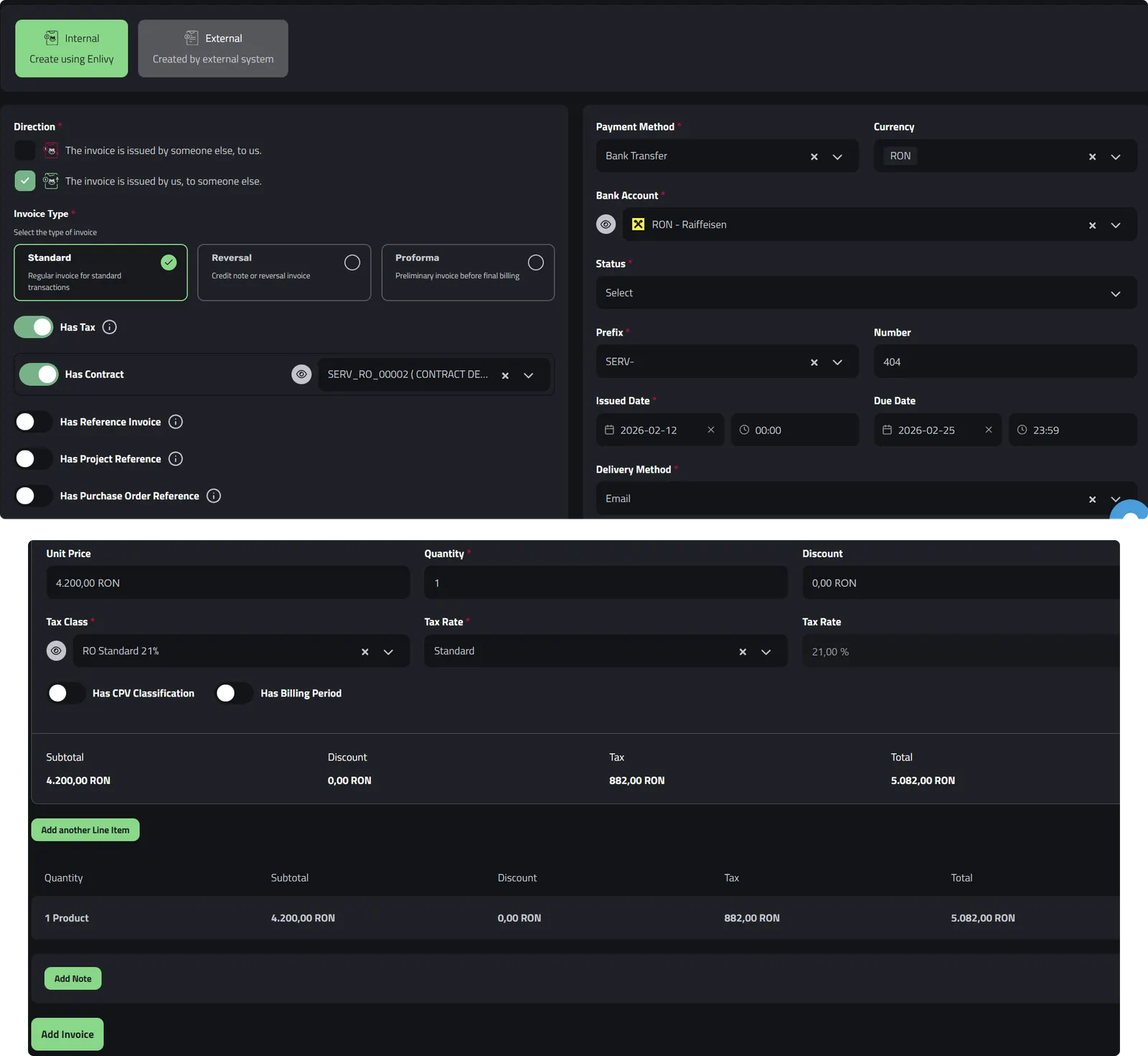
You enter the Invoices section in Enlivy and click Add Invoice. Select Internal to use the platform’s integrated system. The first step is to choose the Outbound direction (invoice issued to a client) and specify whether the invoice includes VAT.
Then you quickly fill in the essential details:
Payment and identification information:
- Payment method from dropdown (bank transfer, cash, card)
- Bank account where the money will be received
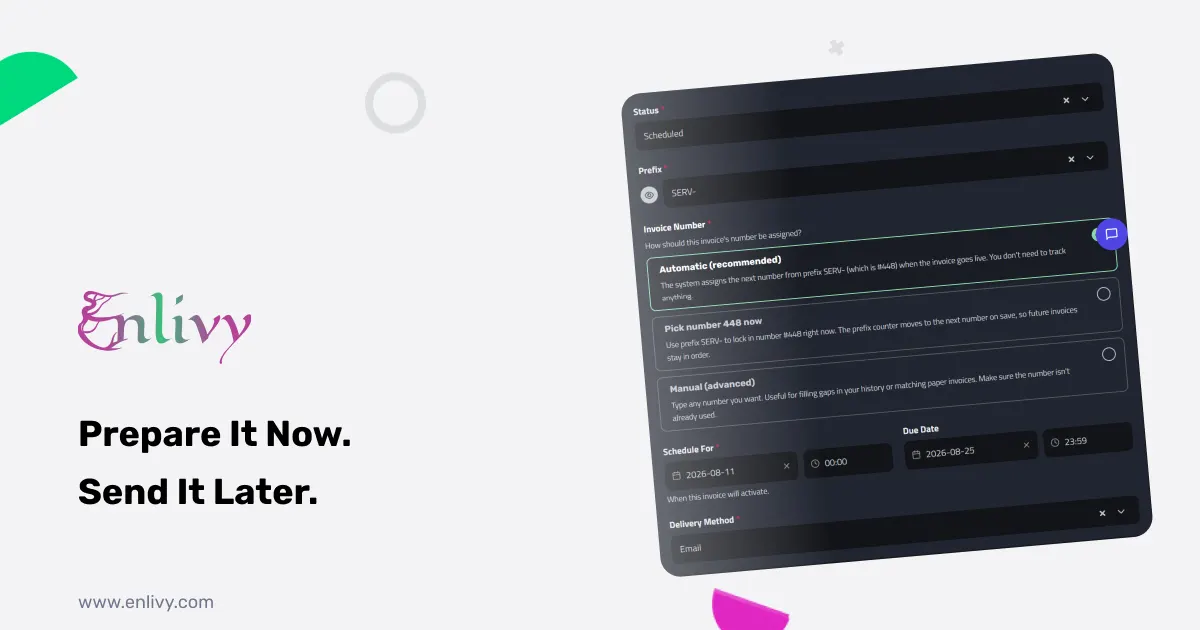
- Invoice prefix and number (you can use automatic or customized numbering)
- Issue date
- Due date
Parties involved:
- Sending user: Your company (invoice issuer)
- Receiving user: The client’s company receiving the invoice
Products or services invoiced: In the Line items section, you simply and quickly add products or services. Here it’s essential to verify:
- Correct description of each product/service
- Quantity and unit price
- Correct VAT percentage (21%, 11%, or other applicable special rates in Romania)
After verifying all information, you click Add Invoice and your invoice is created in the system.
Sending to ANAF in One Click
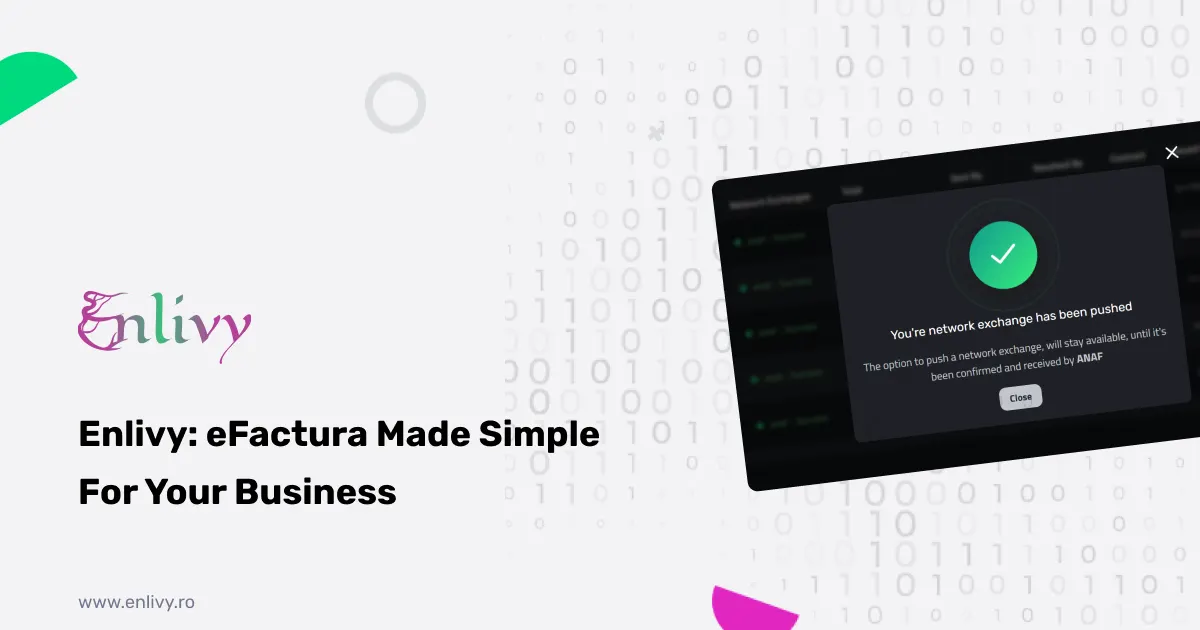
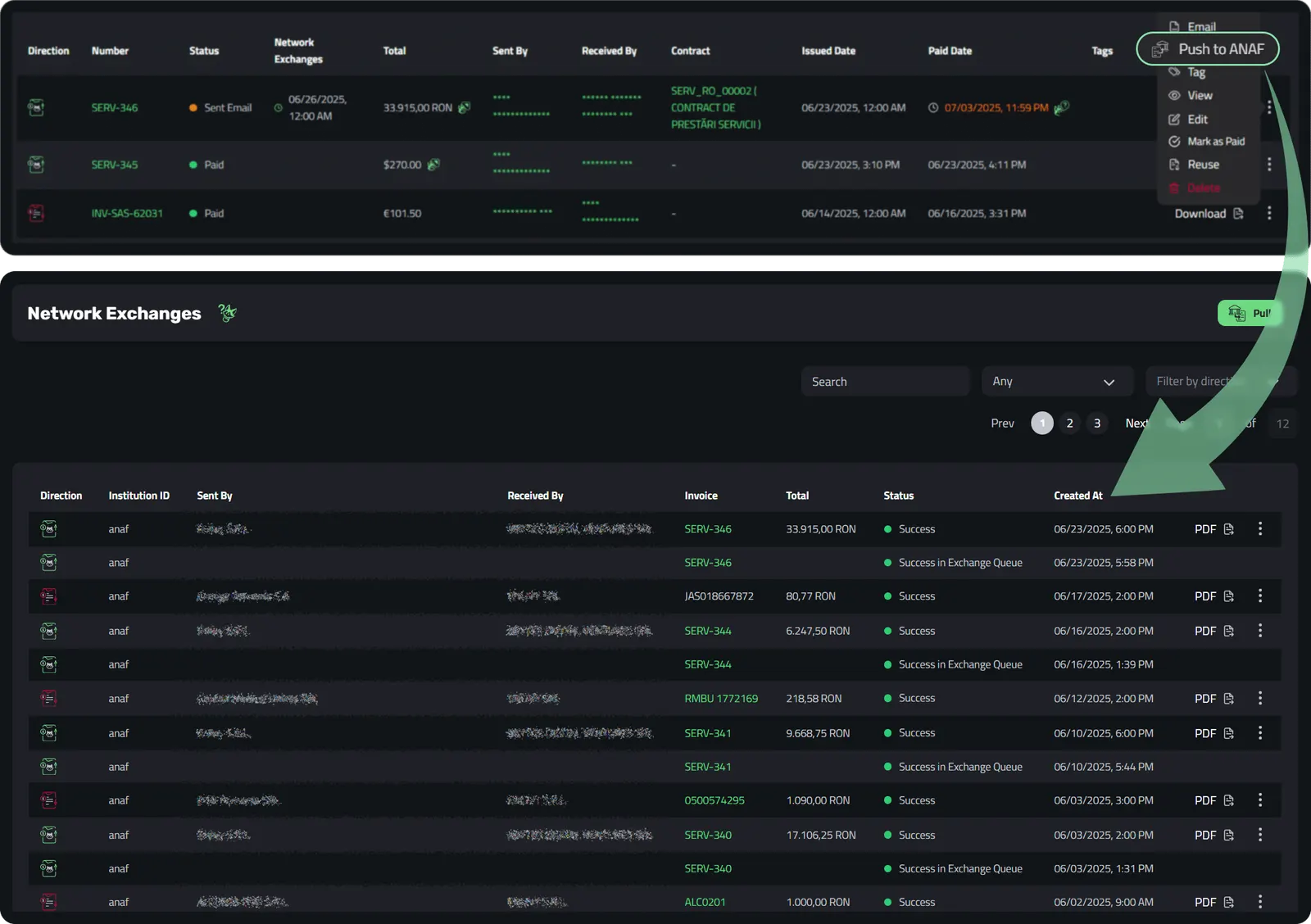
Now comes the part that will amaze you with its simplicity. The newly created invoice appears in the Enlivy dashboard, and once your ANAF account is connected and the client is Romanian, the Push to ANAF button is available.
One single click and the system does all the magic behind the scenes:
- Generates the XML in the CIUS-RO format ANAF expects
- Uploads the invoice to the eFactura system, where ANAF validates it
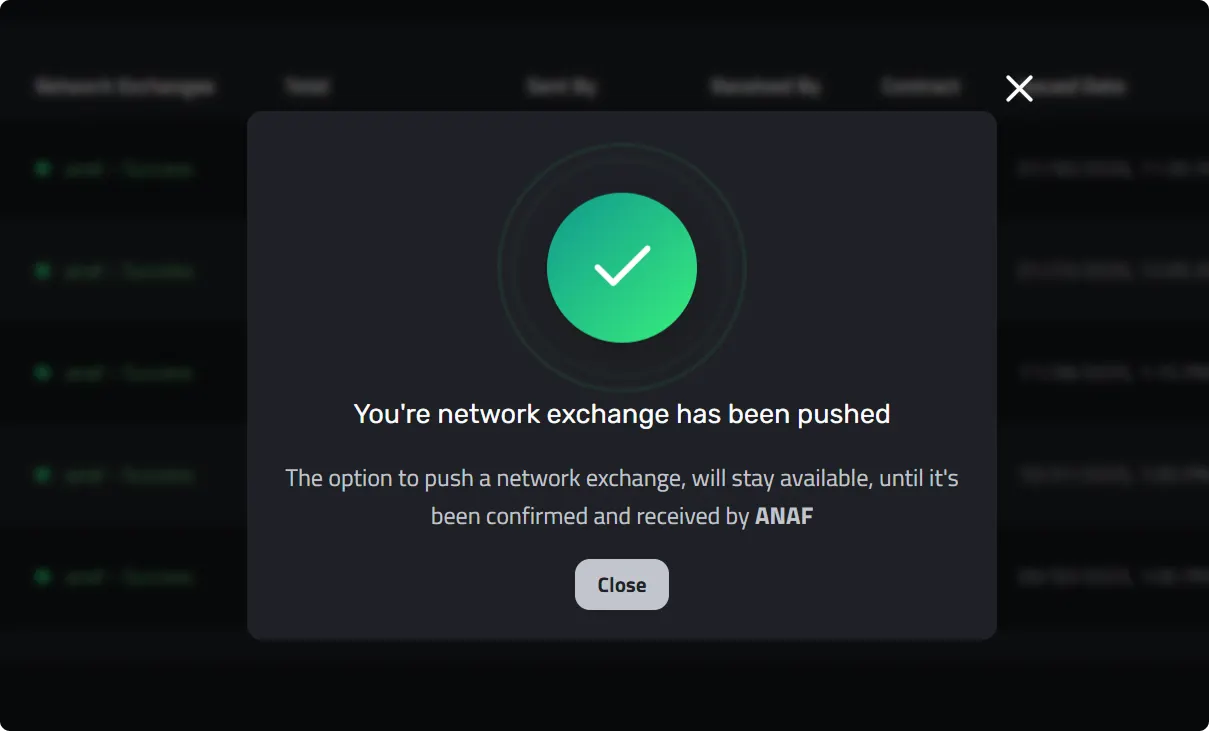
- Shows ANAF’s answer, accepted or rejected, after the next hourly sync
Once ANAF accepts it, your client finds the invoice in their SPV (Private Virtual Space) in eFactura. There is no need for emails with attached PDFs, phone calls for confirmation, or questions about invoice receipt. Everything is transparent.
Learn more about how this works in Enlivy’s Network Exchanges feature.
Auto-Push for Maximum Efficiency
For companies that issue many invoices (perhaps dozens or even hundreds per month), Enlivy goes a step further: auto-push to ANAF.
Auto-push is off by default. You turn it on once in settings and choose a delay of 1 to 4 days, and from then on Enlivy sends each invoice for a Romanian client to eFactura that many days after its issue date, without any additional steps on your part.
Imagine this: instead of spending hours every month logging into the ANAF portal, verifying and sending each invoice individually through eFactura, you just create them in Enlivy and, with auto-push on, they reach ANAF on schedule. Huge time savings and zero technological stress.
This Network Exchanges functionality completely transforms how you interact with eFactura, entirely eliminating the complicated intermediary of the government portal.
How to Receive Invoices from eFactura with Enlivy
Enlivy’s integration with eFactura doesn’t work in just one direction. Receiving invoices from suppliers becomes just as simple as issuing them.
Initial Connection with eFactura - One Simple Step
To receive invoices from eFactura in Enlivy, you need to connect your Enlivy account with the eFactura system once. This process is quick and done directly from the platform settings. Once ANAF is connected, Enlivy checks for new supplier invoices every hour, and you can also check on demand.
The Reception Process from eFactura
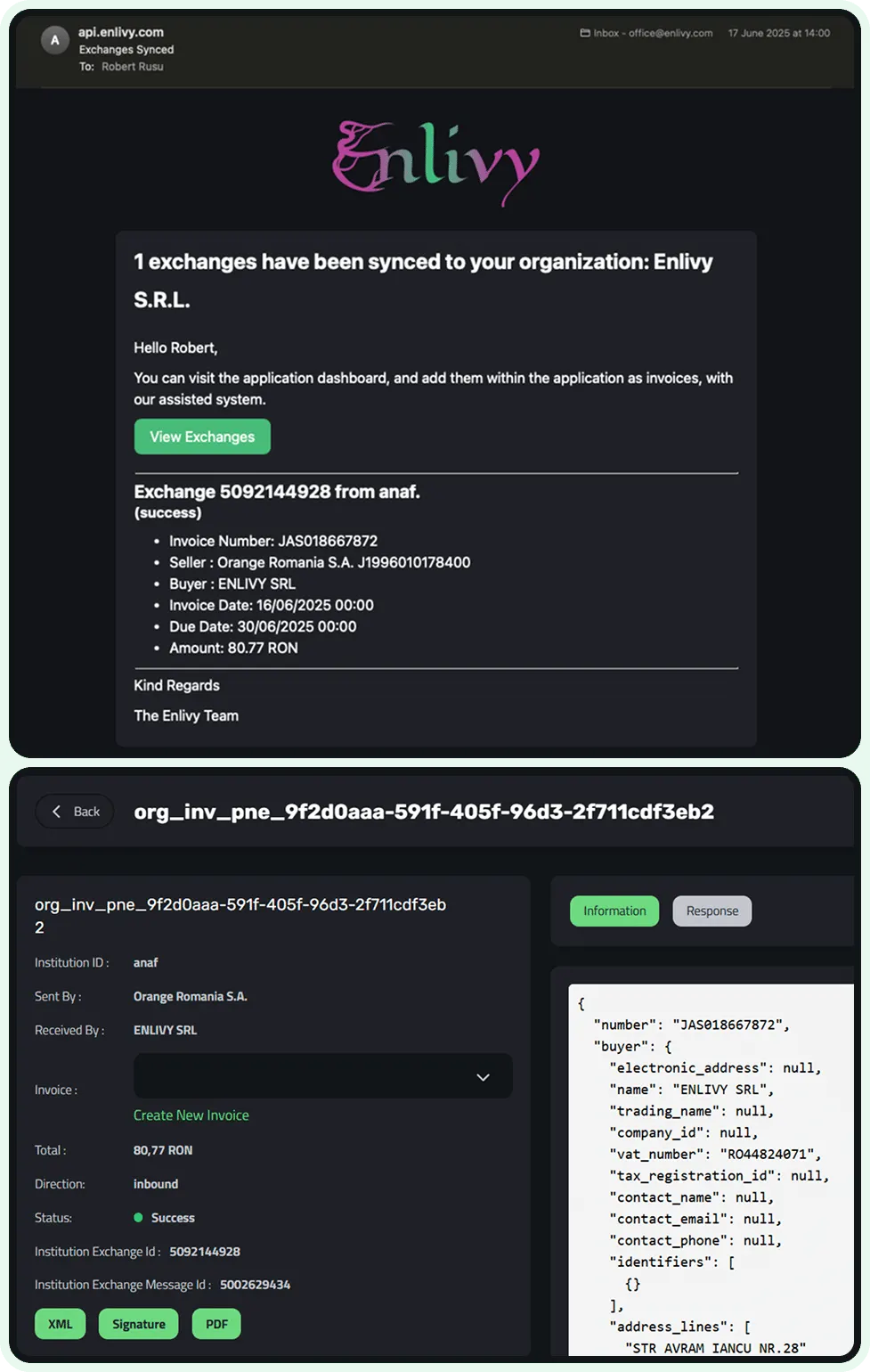
Imagine this scenario: a supplier sends you an invoice through eFactura. Instead of logging into the ANAF portal, searching for the invoice in SPV, downloading it in XML format, opening it, verifying the data, and then manually entering it into your accounting system, the following happens in Enlivy:
- New exchange notification: After the hourly check (or one you start yourself), the Enlivy dashboard shows the notification “We have a new network exchange”. The system has found a new invoice from eFactura. An email alert is also available, off until you turn it on in settings.
- Data pre-population from eFactura: You click on the notification and enter directly into the registration process. The wonder is that most data is already pre-filled from information received from ANAF:
- Invoice issuer (your supplier)
- Recipient (your company)
- Invoiced amounts
- Applied VAT percentage
- Issue date from eFactura
- Verification and confirmation: You just quickly verify that everything is correct, optionally fill in the date you paid the invoice (or you’ll complete it later when you make the payment), and confirm.
- Complete integration in Enlivy: The invoice becomes part of your records in Enlivy, alongside all other documents. You can find it in your invoice list, link it to the payment that settled it, and export it for your accountant, all from one place.
For detailed step-by-step instructions on this process, check out the guide on adding an invoice from the eFactura system.
You stop downloading complicated XMLs from eFactura, manually entering data that can be wrong, and switching between different platforms. Everything flows naturally and quickly through Network Exchanges.
Benefits of Enlivy’s eFactura Integration
Let’s do a simple calculation about how much time you save by giving up the classic ANAF portal.
If you issue 50 invoices per month and each invoice takes you an average of 5 minutes to send manually through the eFactura portal (login, form completion, verification, sending), that means 250 minutes (over 4 hours) just for sending invoices. With Enlivy, sending takes one click per invoice, or none with auto-push on.
The same applies to invoices received from eFactura: if you receive 30 invoices monthly and each takes 7-8 minutes to process (download from eFactura, verification, entry into your own system), you’re at another 3-4 hours lost. Enlivy transforms them into a few clicks.
Eliminating Human Errors from eFactura
When you manually enter the same data in two different systems - once in Enlivy and once in the eFactura portal - there’s always the risk of errors: a wrong digit, an incorrect VAT percentage, an incorrectly entered date. These mistakes can lead to discrepancies in accounting, reconciliation problems, and even fiscal complications with ANAF.
Enlivy sends the data you entered to ANAF as XML, so nothing is retyped. You enter information once, in Enlivy, and the same figures reach eFactura. Zero manual transcriptions means zero transcription errors.
Complete Visibility Through Network Exchanges
Network Exchanges in Enlivy offers you something the eFactura portal cannot: a clear and complete overview of all your invoice exchanges.
In the centralized Enlivy dashboard, you see:
- All invoices sent to eFactura and their exchange status (processing, success or rejected), plus whether each one is paid
- All invoices received from eFactura from suppliers and their state (received, awaiting payment, paid)
- Complete history of financial communication with each partner
- Your invoice totals, plus a data export for your accountant
You don’t have to search the complicated ANAF SPV menus or switch between multiple windows. Everything is transparent and at hand in Enlivy.
Explore all the capabilities of this feature at Enlivy’s Network Exchanges page.
Built for ANAF’s eFactura Format
Another major advantage of Enlivy is that you don’t have to build the eFactura XML yourself. Enlivy builds the CIUS-RO XML that ANAF expects and shows ANAF’s answer for every upload, so a rejected file never goes unnoticed.
Who Should Use Enlivy’s eFactura ANAF Integration
Companies with High Invoice Volume in eFactura
If you issue or receive dozens or hundreds of invoices monthly through eFactura, the benefit of Enlivy is obvious and immediate. One-click sending, or auto-push once you turn it on, saves hours of repetitive work, allowing you to focus on activities that truly matter for your business, not fighting with the ANAF portal.
Freelancers and Individual Entrepreneurs Using eFactura
Even if you don’t have a huge volume of invoices in eFactura, simplicity matters enormously. Instead of wasting time learning the ANAF interface and stressing about the technical aspects of eFactura, you focus on what you do best - your services or products. Enlivy completely eliminates the technical barrier.
Growing Companies
If your business is expanding and invoice volume is constantly growing, you need a scalable solution. Enlivy grows with you: past 5 invoices a month, the Invoicing pack lifts the cap, and whether you have 10 or 1,000 invoices monthly in eFactura, the process remains equally simple.
International Teams at Romanian Companies
If your company is registered in Romania but your team works in English, navigating the Romanian eFactura system can be particularly challenging. Enlivy provides an English interface for the whole eFactura flow, making it easier for international teams to manage Romanian invoicing.
Getting Started with Enlivy’s eFactura Integration
eFactura doesn’t have to be complicated, time-consuming, or stressful. The system was created to digitalize and simplify fiscal communication, but to truly achieve this goal, you need the right tools. If you are only starting out and the volume is low, it is worth seeing what a free e-invoicing tool already covers before paying for anything.
With Enlivy’s integration, you send invoices to eFactura in one click, get supplier invoices every hour, and keep everything organized in a single dashboard. No technological stress, no time waste, no retyping errors, no switching between multiple platforms.