

Payslips
Record every payslip line by line, and Enlivy checks its totals
Your accountant works out the figures, and you record each amount in Enlivy on its own line, under your country's payroll code. Enlivy checks that the lines match the payslip's totals.
Record your first payslipFree account, no card needed. The Payroll pack is €19.99/month, excluding VAT, and you add it in the app.
TOTALS AND LINES
A payslip that carries its own numbers
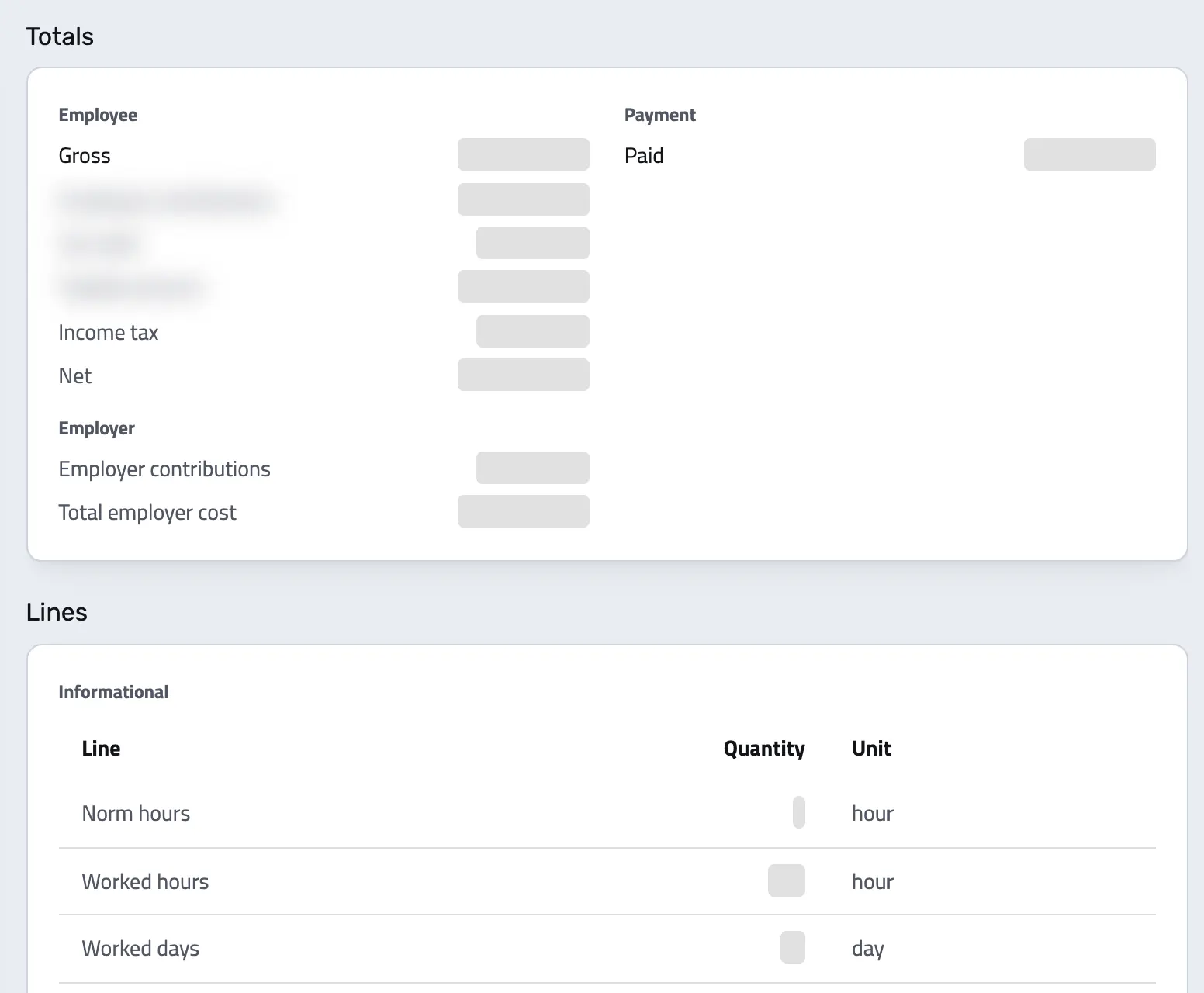
Every total on the payslip is a figure in its own named field, not text inside a document.
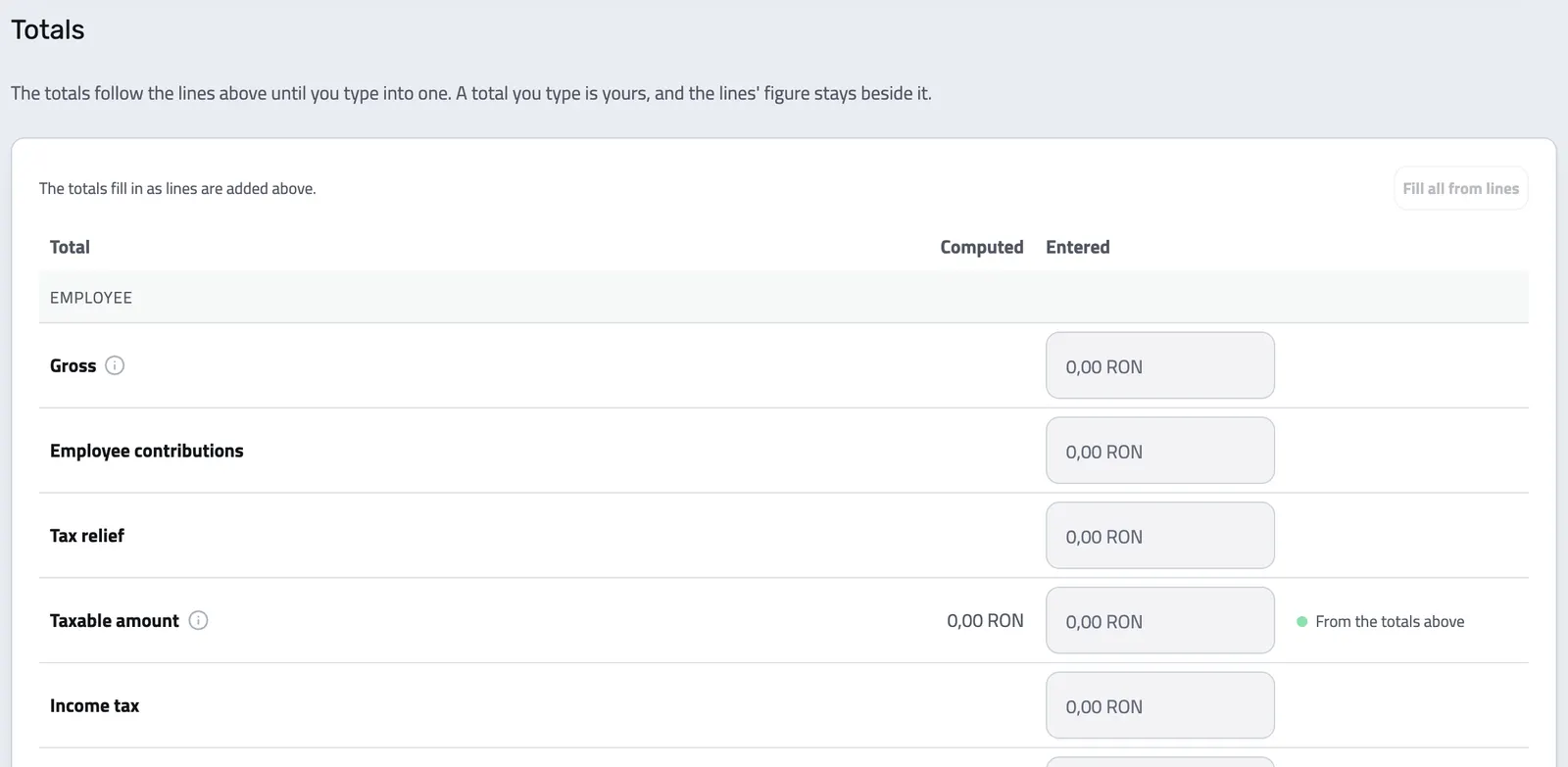
The payslip keeps gross, employee contributions, tax relief, the taxable amount, tax, post-tax deductions, what was actually paid, and what the employment cost the employer.
Underneath, every one of those totals is built from lines you can read one at a time.
-
Nothing is hidden in a template:
the figures are stored as figures, so a payslip from three years ago still reads the same way as one from this month.
-
Positive amounts, typed direction:
a line's class says which way the money flows, so a deduction can never be entered as an earning by accident.
-
Gross and net, side by side
Both totals are held on the payslip itself, alongside the taxable amount they were worked out from.
-
Employee and employer split
What the person contributed and what the employer contributed are separate totals, never merged into one number.
-
Tax relief in its own column
Personal allowances and other relief sit apart from the tax itself, so the calculation stays readable.
-
Paid, and what is left
The amount that actually reached the bank is its own field, after post-tax deductions such as advances or garnishments.
-
Its own period
Every payslip states the start and end of the period it covers, separately from the day it was issued.
-
Encrypted identity
The national identification number is held encrypted on the payslip and its employment, never in plain text.
Payroll records should not live in a spreadsheet
The accountant does the math. The problem is everything that happens to the result afterwards.
-
The figures arrive as a PDF and stop there
Without Enlivy: Your accountant sends a statement every month. It gets filed in a folder, or retyped into a spreadsheet, and nothing else in the business can read it.
With Enlivy: The same figures land as structured lines, so they can be totalled, searched, reported on and connected to the payment that settled them.
-
Every country calls things something different
Without Enlivy: A generic payroll form makes you map CAS onto "social contribution 1" and hope everyone remembers what that meant next year.
With Enlivy: Each jurisdiction's own wage types are built in, under the names payroll actually uses there, resolved from the employment rather than your company address.
-
One transposed digit and nothing balances
Without Enlivy: A payslip that does not reconcile can sit unnoticed for months, until someone reconciles the year and has to work backwards through twelve of them.
With Enlivy: The chain is checked on every save and a mismatch is reported immediately, with the expected figure beside the entered one.
-
Records scattered across systems
Without Enlivy: Payslips in one tool, contracts in another, bank transactions in a third. Answering a simple question means opening three systems.
With Enlivy: Link a payslip to its employment and you find it next to the contract, the month's working-time record and the payment.
SEVEN CLASSES, ONE VOCABULARY
Earnings, contributions, tax and deductions on separate lines
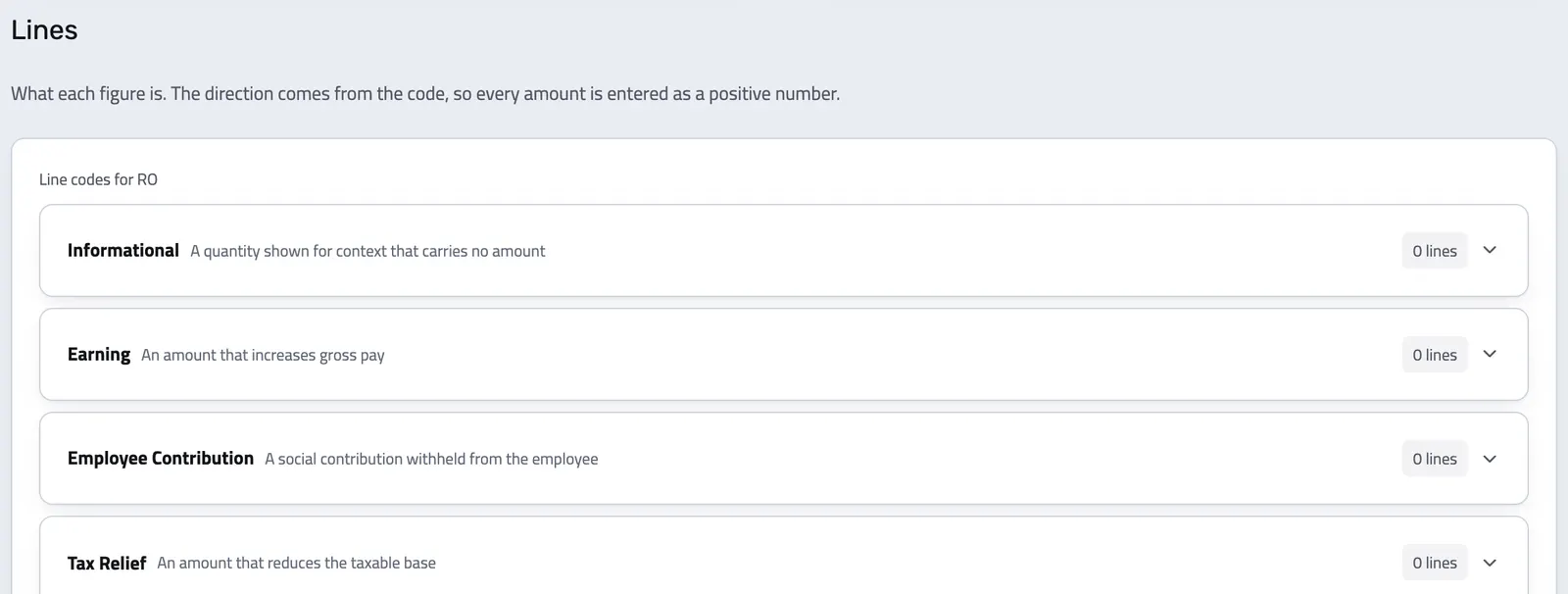
Payroll everywhere is built from the same seven kinds of line. Enlivy names them, so a figure can be totalled, printed and reported without anyone guessing what it was.
- Informational Counted, not paid. The hours and days behind the money.
- Norm hours and hours actually worked
- Two bands of overtime, night hours, weekend hours
- Leave, sick, unpaid and unexcused days
- Earnings Everything that adds to the gross.
- Base salary and earned salary
- Bonuses, commission, overtime and shift premiums
- Leave pay, sick pay, meal vouchers, expense reimbursement
- Employee contributions What the person pays into the state systems.
- Social security, health insurance, pension
- Unemployment insurance
- Tax relief What reduces the taxable amount before tax is applied.
- Personal allowance
- Any other relief your jurisdiction grants
- Tax Income tax, at every level that levies it.
- Income tax
- State and local income tax where they apply
- Post-tax deductions Taken from net pay, after everything else.
- Advances and loan repayments
- Garnishments and union dues
- Employer contributions What the employment costs on top of the gross.
- Employer social security, health and pension
- Employer unemployment insurance
YOUR COUNTRY'S OWN WORDS
CAS and CASS in Romania, National Insurance in the UK
The line list is not a generic form. It is your jurisdiction's own payroll vocabulary.
Alongside the universal classes, each country pack carries the wage types that country actually uses, named the way payroll names them there.
For a payslip linked to an employment, Enlivy takes the allowed codes from that employment's jurisdiction, not from where your company is registered, so a Romanian company with a remote employee abroad gets the right codes for that person.
-
A wrong code is refused, not stored:
a code outside the universal set and your jurisdiction's own catalogue is rejected, so a Romanian contribution can never land on a British payslip.
-
The document speaks the record's language:
a payslip prints in the language its jurisdiction keeps records in, not the language whoever opened it happens to read.
-
Romania
CAS, CASS, CAM and deducerea personală, under their own names.
-
United Kingdom
National Insurance, student loan repayments, statutory sick pay.
-
United States
Federal income tax, Medicare, 401(k) contributions.
-
Germany
Solidaritätszuschlag, Kirchensteuer, Pflegeversicherung.
-
Measured in real units
Hours and days are counted in the same UN/ECE units your invoices bill in, not in free text.
-
See the allowed codes first
When you add a line, the app lists exactly the codes that employment is allowed to carry.
Payslips and payroll records
Keep every payslip as figures, not files
Each amount goes on its own line, under your country's payroll code. Enlivy checks that the lines match the payslip's totals, and you can link each payslip to the bank transaction that paid it.
- Free account, no card
- Payroll pack €19.99/month
- Prices exclude VAT
CHECKED, NOT BLOCKED
The arithmetic is checked every time you save
Gross, minus employee contributions, minus tax, minus post-tax deductions, should equal what was paid.
Enlivy runs that chain on every save. When it does not close, the app says so straight away, because a real payslip reconciles exactly and a mismatch is almost always a typo.
A difference in the totals never blocks the save: your accountant's document is the authority.
-
You see the difference and decide:
the app shows what the figures imply beside what was entered. Nothing is corrected for you.
-
Five statuses:
pending, approval required, approved, rejected and paid, so you can see which payslips still wait for approval or payment.
-
Approve, then pay
Move a payslip through approval before it is marked paid, with the payment method on record.
-
Tied to the payment
Connect the payslip to the bank transaction that settled it, so you can see who was paid and when.
-
Readable on screen
Open a payslip to see its totals and every line, grouped by kind, without opening a file.
-
A second language on request
Through the API, download a second copy in another language when someone needs one, without changing the record.
-
Survives a deleted contract
Removing a contract releases the link instead of taking the payslip with it. The record stays.
-
Kept, never filed
Enlivy prints the payslip from your figures and keeps the record. It submits nothing to an authority: filing stays with you or your accountant.
How a payslip gets made
From the employment record to a payslip your accountant would recognize.
You are not doing the payroll here. You are recording its result in a shape that still makes sense years later, and the app checks your typing on the way in.
-
Start from the employment record
First add the Payroll pack in the app. Then create an employment record for each person, with their contract, jurisdiction and pay period. You create it once, then link each payslip to it.
-
Enter the lines
Take your accountant’s figures and enter them as lines. Enlivy offers the codes that employment is allowed to carry, in your country’s own vocabulary.
-
Save, and Enlivy checks the totals
When you save, Enlivy recomputes the totals and checks the chain. If something does not add up, the app shows exactly which figure disagrees.
-
Approve it and link the payment
Move it through approval and connect the bank transaction that settled it.
Everything a payslip record should do
Your accountant works out the figures. What happens to them afterwards is the part that usually goes wrong, and the part Enlivy is built for.
- Enter a payslip in your country's own codes
The app offers exactly the lines that employment is allowed to carry, so a wrong code is refused rather than quietly stored.
- Catch a typo when you save
Enlivy recomputes the totals on every save and shows which figure disagrees. It warns you and never blocks the save.
- Connect the slip to the payment
Link a payslip to the bank transaction that settled it, so you can see who was paid and when.
- Approve a payslip before it is paid
Move it through approval before it is marked paid, with the payment method on record.
API reference
Payslip management from the API
Push the payslips your accountant produces straight into the record: typed totals, coded lines, and the employment each one belongs to, without anybody retyping a figure.
A line sends its code and its amount. The class it belongs to is derived from that code, never supplied, and a code your jurisdiction does not know is refused with a 422 rather than stored under the wrong heading.
Query payslips with pagination and navigation metadata, and expand their lines. Each slip carries its own typed totals: gross, employee contributions, tax relief, the taxable amount, tax, post-tax deductions, net pay, and the employer cost.
/organizations/<organization_id>/payslips curl -G 'https://api.enlivy.com/organizations/<organization_id>/payslips' \
--data-urlencode 'page=1' \
--data-urlencode 'limit=20' \
--data-urlencode 'include=lines' \
--data-urlencode 'include_meta=navigation' \
-H "Authorization: Bearer $ENLIVY_API_TOKEN" \
-H 'Accept: application/json' const baseUrl = "https://api.enlivy.com" ;
const token = process.env.ENLIVY_API_TOKEN;
const organizationId = "<organization_id>";
const query = new URLSearchParams({
page: "1",
limit: "20",
include: "lines",
include_meta: "navigation",
});
const result = await fetch(`${baseUrl}/organizations/${organizationId}/payslips?${query}` , {
method: "GET",
headers: {
Authorization: `Bearer ${token}`,
Accept: "application/json" ,
},
}).then((response) => response.json());Retrieve one payslip with every line it is built from. Each line states its code, its class, its amount, and where the figure came from: entered by a person, computed, or imported from another system.
/organizations/<organization_id>/payslips/<payslip_id> curl -G 'https://api.enlivy.com/organizations/<organization_id>/payslips/<payslip_id>' \
--data-urlencode 'include=lines' \
-H "Authorization: Bearer $ENLIVY_API_TOKEN" \
-H 'Accept: application/json' const baseUrl = "https://api.enlivy.com" ;
const token = process.env.ENLIVY_API_TOKEN;
const organizationId = "<organization_id>";
const payslipId = "<payslip_id>";
const query = new URLSearchParams({
include: "lines",
});
const result = await fetch(`${baseUrl}/organizations/${organizationId}/payslips/${payslipId}?${query}` , {
method: "GET",
headers: {
Authorization: `Bearer ${token}`,
Accept: "application/json" ,
},
}).then((response) => response.json());Record a payslip as coded lines. Forty-eight universal codes cover the seven classes everywhere, and each country pack adds the wage types that jurisdiction actually uses on top. The totals chain is checked against the lines on save and reported, never blocked.
/organizations/<organization_id>/payslips curl -X POST 'https://api.enlivy.com/organizations/<organization_id>/payslips' \
-H "Authorization: Bearer $ENLIVY_API_TOKEN" \
-H 'Accept: application/json' \
-H 'Content-Type: application/json' \
-d '{
"organization_employment_id": "<employment_id>",
"organization_sender_user_id": "<user_id>",
"organization_receiver_user_id": "<user_id>",
"period_start": "2026-09-01",
"period_end": "2026-09-30",
"status": "pending",
"payment_method": "bank_transfer",
"currency": "RON",
"lines": [
{
"code": "base_salary",
"amount": 8000,
"source": "entered"
},
{
"code": "worked_days",
"quantity": 21,
"unit_code": "DAY",
"amount": 0
},
{
"code": "social_security_employee",
"amount": 2000,
"source": "entered"
},
{
"code": "health_insurance_employee",
"amount": 800,
"source": "entered"
},
{
"code": "income_tax",
"amount": 650,
"source": "entered"
}
]
}'const baseUrl = "https://api.enlivy.com" ;
const token = process.env.ENLIVY_API_TOKEN;
const organizationId = "<organization_id>";
const result = await fetch(`${baseUrl}/organizations/${organizationId}/payslips` , {
method: "POST",
headers: {
Authorization: `Bearer ${token}`,
Accept: "application/json" ,
"Content-Type": "application/json" ,
},
body: JSON.stringify({
organization_employment_id: "<employment_id>",
organization_sender_user_id: "<user_id>",
organization_receiver_user_id: "<user_id>",
period_start: "2026-09-01",
period_end: "2026-09-30",
status: "pending",
payment_method: "bank_transfer",
currency: "RON",
lines: [
{ code: "base_salary", amount: 8000, source: "entered" },
{ code: "worked_days", quantity: 21, unit_code: "DAY", amount: 0 },
{ code: "social_security_employee", amount: 2000, source: "entered" },
{ code: "health_insurance_employee", amount: 800, source: "entered" },
{ code: "income_tax", amount: 650, source: "entered" },
],
}),
}).then((response) => response.json());Update a payslip in place, most often to move it through its five statuses: pending, approval required, approved, rejected and paid. Send only the fields you are changing.
/organizations/<organization_id>/payslips/<payslip_id> curl -X PUT 'https://api.enlivy.com/organizations/<organization_id>/payslips/<payslip_id>' \
-H "Authorization: Bearer $ENLIVY_API_TOKEN" \
-H 'Accept: application/json' \
-H 'Content-Type: application/json' \
-d '{
"status": "paid",
"payment_method": "bank_transfer"
}'const baseUrl = "https://api.enlivy.com" ;
const token = process.env.ENLIVY_API_TOKEN;
const organizationId = "<organization_id>";
const payslipId = "<payslip_id>";
const result = await fetch(`${baseUrl}/organizations/${organizationId}/payslips/${payslipId}` , {
method: "PUT",
headers: {
Authorization: `Bearer ${token}`,
Accept: "application/json" ,
"Content-Type": "application/json" ,
},
body: JSON.stringify({
status: "paid",
payment_method: "bank_transfer",
}),
}).then((response) => response.json());Fetch the payslip document itself. It prints in the language its jurisdiction keeps records in, so the file matches the record rather than whoever happened to request it.
/organizations/<organization_id>/payslips/<payslip_id>/download curl 'https://api.enlivy.com/organizations/<organization_id>/payslips/<payslip_id>/download' \
-H "Authorization: Bearer $ENLIVY_API_TOKEN" \
--remote-name --remote-header-nameconst baseUrl = "https://api.enlivy.com" ;
const token = process.env.ENLIVY_API_TOKEN;
const organizationId = "<organization_id>";
const payslipId = "<payslip_id>";
const result = await fetch(`${baseUrl}/organizations/${organizationId}/payslips/${payslipId}/download` , {
method: "GET",
headers: {
Authorization: `Bearer ${token}`,
},
}).then((response) => response.blob());Works together with
- Employment Records Record each employment, what the person did each day and how long to keep each record. The rules come from the person's jurisdiction, not your company address.
- Contracts Write a contract, or let Enlivy draft it from your package's template when a client accepts your proposal. You send it, and your client signs online with an optional email or SMS code.
- Bank Transactions Bring every transaction into Enlivy, synced from your bank, imported from a file or entered by hand, and link each one to the invoice, receipt or payslip it belongs to.
- Customer Portal Your clients accept the proposal and sign the contract from the links in your emails, and pay an invoice from the payment link you send. In a portal with your logo, they find their invoices, contracts and subscriptions, and sign in with an email code instead of a password.
- Data Export Choose the period and the record types, and download one archive for your accountant, with a summary spreadsheet for each type if you want one. Free on every plan.
- MCP Connect Claude, ChatGPT, Cursor, or another MCP-compatible assistant to work with your invoices, contracts, and pipeline, within your own permissions.