

Data Export
Export Financial Records Fast: Custom Dates, Folders, and Formats
Export your invoices, receipts, payslips, contracts, and transactions in the format and folder structure your accountant expects, for any date range. Built in, at no extra cost, on every plan.
Create a free accountFree account, no card needed.
THE EXPORT ADVANTAGE
Export Financial Data, Quickly and Reliably
Export documents the smart way
Each month, you need to send financial documents to accountants, government systems, or internal teams, but doing it manually takes time and risks errors.
With Enlivy, you can export invoices, receipts, payslips, contracts, and bank transactions in the right format, timezone, and folder structure.
For taxes, ANAF, or backups, Enlivy's Export tool makes it fast and accurate.
-
Built-In, No Setup Required
The Export feature is built into your Enlivy account, no extra cost and no third-party tools. Just log in and export.
-
Designed for Accountants and Compliance
Made for accountants and auditors, with filters, date formats, folders, and cheat sheets.
-
Secure and Consistent Every Time
Exports follow the same structure each month, saving time and reducing errors. Your files stay complete and reliable, solo or in a team.
Export Exactly What You Need, When You Need It
Customize your exports with flexible filters, date ranges, and data types.
- Choose What to Export
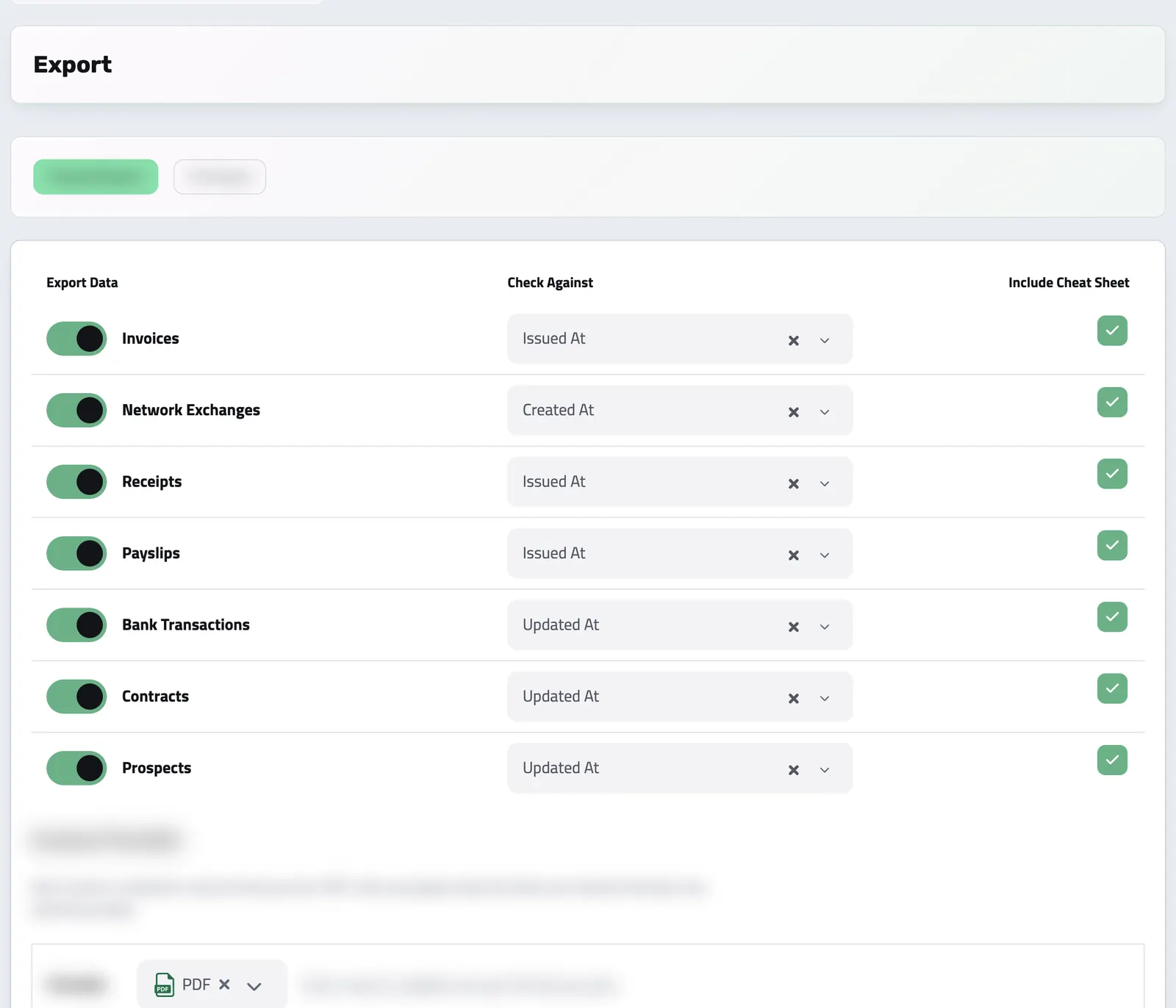
Select from invoices, receipts, payslips, contracts, bank transactions, and even network exchanges. Pick one or multiple data types based on what your accountant or team needs.
- Filter by Date Field
Use "Issued At", "Created At", "Paid At", or "Updated At" to control which documents are included, depending on your reporting or tax filing workflow.
- Set Time Period and Timezone
Specify the export range with a simple From–To selector, and make sure timestamps match your organization’s timezone or reporting jurisdiction.
- Clean Structure, With a Summary
Sort your exports into inbound and outbound folders, or keep everything in one place: your choice. Optionally include a summary CSV for each document type that gives accountants and auditors a fast overview of the contents, without opening every file.
How to Export Your Data
From Filters to Files: Export in Just a Few Clicks
A guided process that puts you in control, from what you export to how it’s organized.
-
Select What to Export
Choose the data types you want: invoices, receipts, payslips, bank transactions, contracts, or network exchanges.
-
Filter by Date
Use the “Check Against” dropdown to filter by issued, created, paid, or updated dates. Set your export interval and preferred timezone to match your reports.
-
Add Cheat Sheet & Folder Options
Want a summary CSV for each document type? Need files split by inbound/outbound? Just toggle the options, it’s all built-in.
-
Choose Your Format
Set the date format, then pick the invoice formats and their language. Make sure your accountant gets the structure they expect.
-
Download the Archive
Click Download. When the export finishes, Enlivy shows what the archive holds, and you save it as one file.
Use It Every Month, for What Matters Most
Enlivy’s Export feature isn’t just flexible. It’s essential for your month-end routines.
- Send files to your accountant in one go
Export invoices, receipts, and payslips in a clean package, with a cheat sheet and structured folders they’ll appreciate.
- Back up critical records
Export to your local drive or cloud storage monthly. Keep a secure archive that’s easy to browse and ready for audits.
- Share reports with internal teams
Need to inform finance or leadership? Export financial docs from multiple categories in a consistent layout, with zero guesswork.
- Take your data with you, anytime
You can export all your records (invoices, receipts, transactions, contracts, payslips), structured and complete, across months or years. One click, full control, no vendor lock-in.
What types of data can I export?
You can export invoices, receipts, bank transactions, payslips, contracts, and network exchange documents, all filtered by date, status, or other attributes.
Is there a cost to use the Export feature?
No, the Export feature is fully included in your Enlivy subscription. There are no additional charges.
Can I filter the export by date or status?
Yes. You can filter by various date fields (issued, paid, created, updated) and other document-specific filters before exporting.
Can I export documents from previous years?
Yes. You can export records from any time period, including multiple years of historical data.
Can I export everything at once?
Yes. You can do a full export across all document types and all time ranges if needed.
Can I re-export the same period multiple times?
Yes. There’s no limit. You can export the same range as many times as you need, with different settings.
Can I include attachments in the export?
Yes. Any files attached to the documents (e.g., scanned receipts or signed contracts) will be included.
How long does it take to generate an export?
Usually just a few seconds, even for months of data. Larger exports (e.g., 2+ years) may take a minute or two.
Works together with
- API Driven Solution Connect Enlivy to your other tools and platforms through its API, and build integrations that keep up as your business grows.
- Bank Account Data See every connected account, balance, and transaction in one dashboard. Synced securely, kept current, and linked to the rest of your records.
- Bank Transactions Bring every transaction into Enlivy: synced from your bank, imported from a file, or entered by hand. Then tie each one to the invoice, receipt, or payslip it belongs to, so every payment sits next to the document it settles.
- Billing Packages Build a plan once and offer it weekly, monthly, yearly, or anything in between. Customers subscribe and manage their card from a branded portal, and switch cycle, change tier, pause, or cancel when you allow it. With the Billing Schedules pack, each cycle is invoiced for you and card payments are collected through your own Stripe account.
- Billing Schedules Set up a subscription, retainer, or payment plan, link its invoices and receipts, and see exactly how much has been paid, what is pending, and where each relationship stands.
- Contracts Draft contracts from templates, send them for signature with SMS or email identity verification, and track every signature and renewal.
- Customer Portal A branded, self-service portal, on your own domain if you add one, where clients accept proposals, pay invoices, manage subscriptions and sign contracts themselves. Every action lands on the client's record in Enlivy.
- Dashboard See the work and numbers that matter to you, then customize the dashboard by adding and arranging available widgets.
- Document Intake Start with a document, choose where it belongs and review the form; an AI reading you request can suggest its details.
- Guidelines Document your best practices and policies, and keep your team aligned with clear, accessible guidelines.
- Helpdesk Work through questions from your website widget and an IMAP-connected mailbox, assign a teammate, reply with context and hold mail from unknown senders for review.
- Invoices Create an invoice, send it to your client, and connect the contract, receipt or bank transaction that belongs with it. For Romanian e-Factura, use the configured ANAF connection.
- MCP Connect Enlivy to Claude, ChatGPT, Cursor, or any AI assistant through MCP. Ask about your invoices, contracts, and pipeline, and get real work done, safely scoped to exactly what your own account can already do.
- Network Exchanges For Romanian organizations, connect ANAF eFactura to receive invoices and submit the ones you issue to Romanian clients, manually or on a configured schedule. See the exchange status in Enlivy. For other markets, download a supported electronic invoice file for review and separate submission.
- Payslips Your accountant works out the figures. Enlivy is where they land: every amount on its own coded line, in the vocabulary your country actually uses, checked against the payslip's own totals and tied to the employment, the contract and the payment it belongs to.
- Playbooks Design, execute, and refine step-by-step procedures for any workflow. Ensure consistency, reduce errors, and guide your team through repeatable tasks with built-in structure and clarity.
- Products Build a reusable catalog of everything you sell, services or goods, with pricing, units, tax settings, and descriptions set once. Every product is ready to drop into a quote or invoice in seconds.
- Sales Pipeline See which opportunities are moving forward, review the conversation before you follow up and keep proposals close to the deal.
- Receipts Record money in and money out, keep supporting files together, and connect a receipt to its related invoice or contract when needed.
- Reports Replace updates spread across chat and email with structured reports your team fills in. You define the questions and the expected rhythm once with a reusable schema, share it with the people who answer it, and every submission lands in Enlivy, ready to compare.
- Taxes Stop picking VAT rates by hand. Assign a tax class to a product or invoice line and Enlivy resolves the correct rate automatically, based on who the customer is and where they are, with the right EU codes for e-invoicing built in.
- Tasks Keep team work beside the invoices, prospects and projects it concerns. Tasks are included for every organization at no extra charge, with no separate Tasks subscription or task-count quota.
- Users Easily customize roles and permissions in Enlivy for clients, partners, accountants, and administrators, ensuring secure and efficient access.
- Webhooks Moments after something happens in Enlivy (an invoice is paid, a transaction lands, a user changes), a webhook fires to your system. React to events instead of polling for changes or waiting on reports.