

Webhooks
Get event alerts and automate actions across your tools
Moments after something happens in Enlivy (an invoice is paid, a transaction lands, a user changes), a webhook fires to your system. React to events instead of polling for changes or waiting on reports.
Add your first webhookFree account, no card needed. Sending events needs any paid pack, from €2.99/month, excluding VAT.
WHAT IT IS
The change happens. Your systems act.
Keep your systems in sync with event updates from Enlivy.
Webhooks let your applications react moments after something happens inside Enlivy.
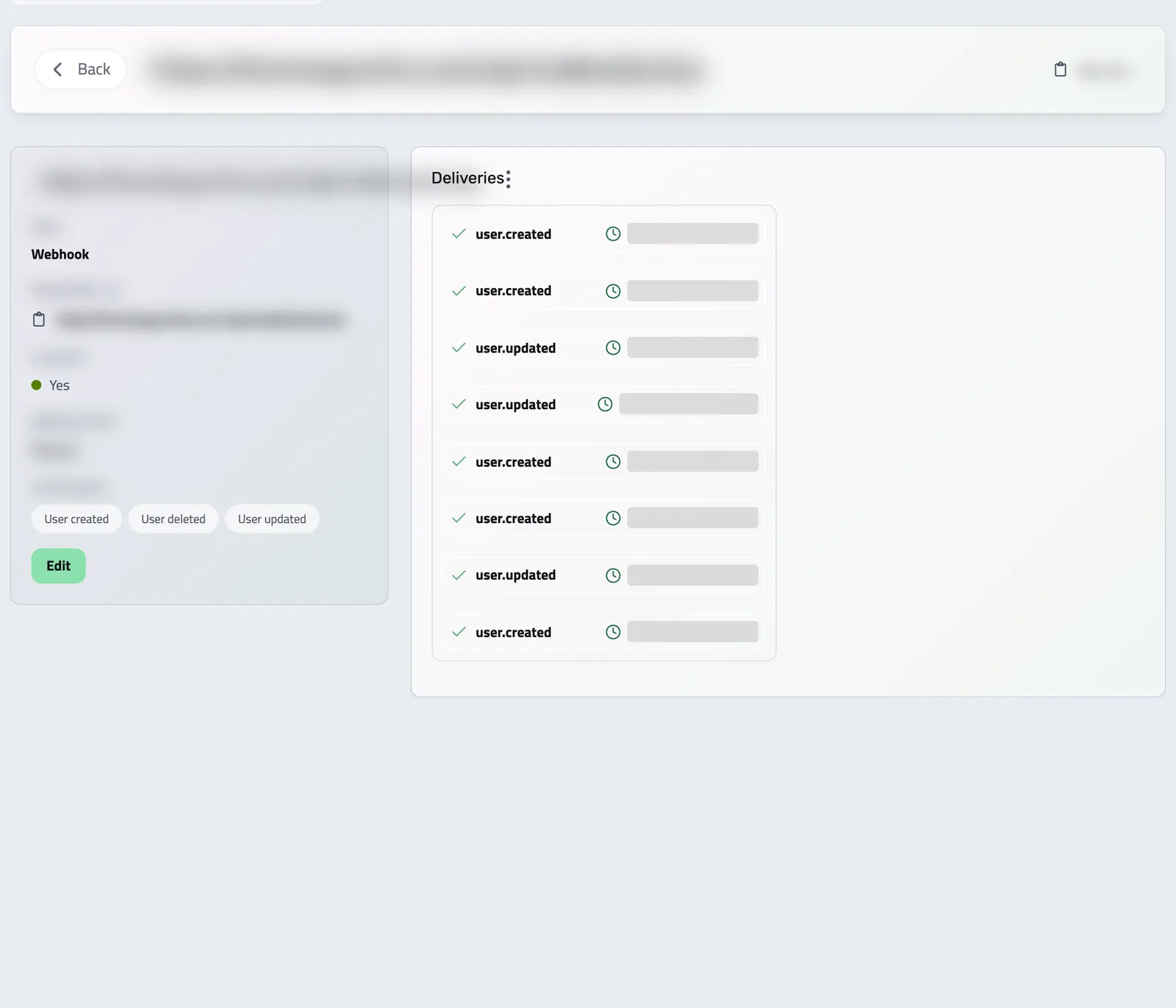
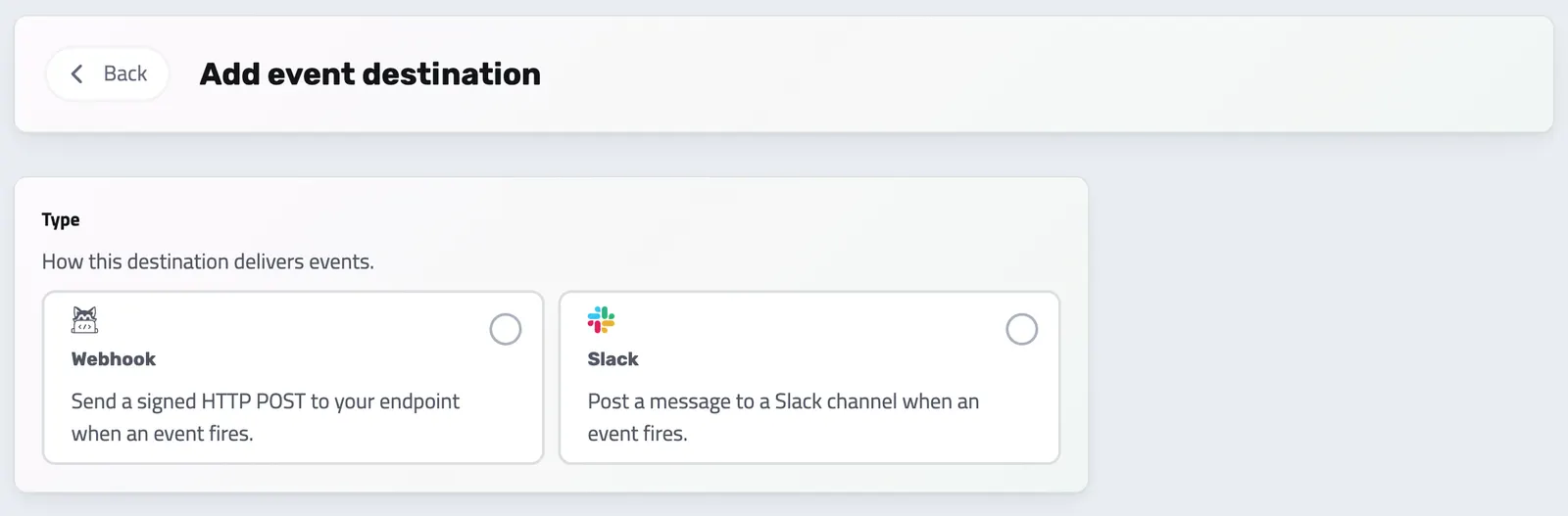
Send each event to your own endpoint as a signed HTTP POST, or as a message to a Slack channel. You add a destination in the Enlivy app under Settings, then Event destinations.
-
Event notifications
Get notified moments after an invoice, transaction, user, or other key record is created or updated, with retries when your endpoint is down.
-
Direct automation
Connect Enlivy directly to your apps and workflows. Trigger custom actions, sync with external tools, or keep your reporting current without polling.
WHY IT HELPS
Keep your other systems up to date
Enlivy webhooks tell your systems what changed.
By receiving notifications whenever invoices, transactions, users, or other key events occur, you no longer have to rely on manual checks or delayed reporting.
-
Save time automatically
Event notifications mean less manual work and faster response times.
-
Reduce errors
Your systems receive each change from Enlivy, instead of someone copying it by hand.
-
Simplify your integrations
You choose a destination and its events, and Enlivy does the sending.
EVENT DELIVERY
Helpdesk conversations too
Beyond invoices and transactions, you can subscribe to Helpdesk events, such as a new, assigned or unanswered conversation, and send them to a webhook destination. Choose the events and destination for each subscription.
WHY WEBHOOKS
Fast, reliable, and yours to shape
Webhooks turn Enlivy into the source of truth your whole stack listens to.
- Signed event notifications
Moments after an invoice, transaction, or user changes, a signed payload lands on your endpoint. No polling, no waiting on reports.
You know what changed without checking by hand.
- Fully customizable
Subscribe to only the events that matter and choose the related data each one carries. Get exactly what your workflow needs, nothing more.
Subscriptions cover only the records your role can view.
- Smarter automation
Trigger workflows, notifications, and integrations automatically instead of moving data by hand.
Your systems work for you, not the other way around.
- Centralized data flow
Keep every tool, platform, and application synchronized from one stream of events.
Your team focuses on decisions, not data management.
- Retries and a delivery log
Every send is logged, so you can inspect exactly what happened and when.
A delivery to your endpoint is tried up to five times over about ten minutes, and the account owner gets an hourly digest of anything that still failed.
- Scalable integration
Each active paid pack includes 25 event destinations, shared between webhooks, Slack channels and Zapier triggers.
Automation stays simple at every scale.
API reference
Webhooks & event delivery from the API
Get notified the moment something happens in your account. An event destination is an endpoint, an HTTPS webhook or a Slack channel, that subscribes to the events you care about (an invoice paid, a contract updated, a bank transaction created) and receives a signed payload each time one fires.
Every send is recorded as a delivery, so you can inspect exactly what was sent and how your endpoint responded. This reference covers the full loop: create and adjust destinations, subscribe them to events, fire a test, delete them, and read the delivery logs and their data.
List your configured destinations. Retrieve a single one with its subscribed events and recent deliveries by expanding the includes.
/organizations/<organization_id>/event-destinations +1# list all destinations
curl 'https://api.enlivy.com/organizations/<organization_id>/event-destinations' \
-H "Authorization: Bearer $ENLIVY_API_TOKEN" \
-H 'Accept: application/json'
# one destination, with its subscriptions and deliveries inline
curl -G 'https://api.enlivy.com/organizations/<organization_id>/event-destinations/<event_destination_id>' \
--data-urlencode 'include=event_subscriptions,event_deliveries' \
-H "Authorization: Bearer $ENLIVY_API_TOKEN" \
-H 'Accept: application/json' const baseUrl = "https://api.enlivy.com" ;
const token = process.env.ENLIVY_API_TOKEN;
const organizationId = "<organization_id>";
const eventDestinationId = "<event_destination_id>";
const headers = {
Authorization: `Bearer ${token}`,
Accept: "application/json" ,
};
// list all destinations
const result1 = await fetch(`${baseUrl}/organizations/${organizationId}/event-destinations` , {
method: "GET",
headers,
}).then((response) => response.json());
// one destination, with its subscriptions and deliveries inline
const query = new URLSearchParams({
include: "event_subscriptions,event_deliveries",
});
const result2 = await fetch(`${baseUrl}/organizations/${organizationId}/event-destinations/${eventDestinationId}?${query}` , {
method: "GET",
headers,
}).then((response) => response.json());Register a webhook (or Slack) endpoint and subscribe it to events. Each subscribed event can specify which related data to embed and an optional message template. The response includes a signing_secret, use it to verify the signature on incoming webhook payloads.
/organizations/<organization_id>/event-destinations curl -X POST 'https://api.enlivy.com/organizations/<organization_id>/event-destinations' \
-H "Authorization: Bearer $ENLIVY_API_TOKEN" \
-H 'Accept: application/json' \
-H 'Content-Type: application/json' \
-d '{
"type": "webhook",
"name": "My integration",
"destination_url": "https://example.com/enlivy/webhooks",
"is_active": true,
"events": [
{
"event": "invoice.paid",
"includes": [
"line_items",
"taxes"
],
"config": {
"message": "Invoice {{ invoice.number }} was paid"
}
},
{
"event": "contract.updated"
}
]
}'
# Response includes: id, type, destination_url, signing_secret, is_active, name, config.const baseUrl = "https://api.enlivy.com" ;
const token = process.env.ENLIVY_API_TOKEN;
const organizationId = "<organization_id>";
const result = await fetch(`${baseUrl}/organizations/${organizationId}/event-destinations` , {
method: "POST",
headers: {
Authorization: `Bearer ${token}`,
Accept: "application/json" ,
"Content-Type": "application/json" ,
},
body: JSON.stringify({
// webhook | slack
type: "webhook",
name: "My integration",
// required when type = webhook
destination_url: "https://example.com/enlivy/webhooks" ,
is_active: true,
// For Slack instead, drop destination_url and send:
// type: "slack",
// organization_api_credential_id: "slack_credential_id",
// config: { channel: "#billing" },
// subscribe to one or more trigger events (pattern: subject.action)
events: [
{
// e.g. invoice.created | invoice.paid | contract.updated
event: "invoice.paid",
includes: ["line_items", "taxes"],
config: { message: "Invoice {{ invoice.number }} was paid" },
},
{ event: "contract.updated" },
],
}),
}).then((response) => response.json());
// Response includes: id, type, destination_url, signing_secret, is_active, name, config. Update a destination: change its URL, pause or resume it, or re-set the events it is subscribed to. Provide the full events set you want the destination subscribed to.
/organizations/<organization_id>/event-destinations/<event_destination_id> curl -X PUT 'https://api.enlivy.com/organizations/<organization_id>/event-destinations/<event_destination_id>' \
-H "Authorization: Bearer $ENLIVY_API_TOKEN" \
-H 'Accept: application/json' \
-H 'Content-Type: application/json' \
-d '{
"is_active": false,
"destination_url": "https://example.com/enlivy/webhooks/v2",
"events": [
{
"event": "invoice.created"
},
{
"event": "invoice.paid"
}
]
}' const baseUrl = "https://api.enlivy.com" ;
const token = process.env.ENLIVY_API_TOKEN;
const organizationId = "<organization_id>";
const eventDestinationId = "<event_destination_id>";
const result = await fetch(`${baseUrl}/organizations/${organizationId}/event-destinations/${eventDestinationId}` , {
method: "PUT",
headers: {
Authorization: `Bearer ${token}`,
Accept: "application/json" ,
"Content-Type": "application/json" ,
},
body: JSON.stringify({
// pause delivery without deleting
is_active: false,
destination_url: "https://example.com/enlivy/webhooks/v2" ,
events: [{ event: "invoice.created" }, { event: "invoice.paid" }],
}),
}).then((response) => response.json());Fire a synthetic event at a destination to verify the wiring end to end. It produces a real delivery record you can inspect in the logs.
/organizations/<organization_id>/event-destinations/<event_destination_id>/test curl -X POST 'https://api.enlivy.com/organizations/<organization_id>/event-destinations/<event_destination_id>/test' \
-H "Authorization: Bearer $ENLIVY_API_TOKEN" \
-H 'Accept: application/json' \
-H 'Content-Type: application/json' \
-d '{
"event": "invoice.paid"
}'const baseUrl = "https://api.enlivy.com" ;
const token = process.env.ENLIVY_API_TOKEN;
const organizationId = "<organization_id>";
const eventDestinationId = "<event_destination_id>";
const result = await fetch(`${baseUrl}/organizations/${organizationId}/event-destinations/${eventDestinationId}/test` , {
method: "POST",
headers: {
Authorization: `Bearer ${token}`,
Accept: "application/json" ,
"Content-Type": "application/json" ,
},
body: JSON.stringify({
// optional, omit to send a generic test event
event: "invoice.paid",
}),
}).then((response) => response.json());Read the log of every event sent. Filter by destination, by one or more events, by delivery status, and by date, the fastest way to spot failures and retries.
/organizations/<organization_id>/event-destinations/deliveries # event + status accept arrays, pass each value with a [] suffix
# status: pending | success | failed | dropped | anomaly
curl -G 'https://api.enlivy.com/organizations/<organization_id>/event-destinations/deliveries' \
--data-urlencode 'organization_event_destination_id=<destination_id>' \
--data-urlencode 'event[]=invoice.paid' \
--data-urlencode 'event[]=invoice.created' \
--data-urlencode 'status[]=failed' \
--data-urlencode 'created_at_from=2026-07-01' \
--data-urlencode 'created_at_to=2026-07-31' \
-H "Authorization: Bearer $ENLIVY_API_TOKEN" \
-H 'Accept: application/json' const baseUrl = "https://api.enlivy.com" ;
const token = process.env.ENLIVY_API_TOKEN;
const organizationId = "<organization_id>";
// event + status accept arrays, pass each value with a [] suffix
// status: pending | success | failed | dropped | anomaly
const query = new URLSearchParams([
["organization_event_destination_id", "<destination_id>"],
["event[]", "invoice.paid"],
["event[]", "invoice.created"],
["status[]", "failed"],
["created_at_from", "2026-07-01"],
["created_at_to", "2026-07-31"],
]);
const result = await fetch(`${baseUrl}/organizations/${organizationId}/event-destinations/deliveries?${query}` , {
method: "GET",
headers: {
Authorization: `Bearer ${token}`,
Accept: "application/json" ,
},
}).then((response) => response.json());Retrieve a single delivery with its full data: the exact payload Enlivy sent, the HTTP status and body your endpoint returned, and whether it was a retry. Use this to debug a failed delivery.
/organizations/<organization_id>/event-destinations/deliveries/<event_delivery_id> curl 'https://api.enlivy.com/organizations/<organization_id>/event-destinations/deliveries/<event_delivery_id>' \
-H "Authorization: Bearer $ENLIVY_API_TOKEN" \
-H 'Accept: application/json'
# Returns: event, status, request_payload (what we sent),
# response_status + response_type + response (what your endpoint replied), is_retry.const baseUrl = "https://api.enlivy.com" ;
const token = process.env.ENLIVY_API_TOKEN;
const organizationId = "<organization_id>";
const eventDeliveryId = "<event_delivery_id>";
const result = await fetch(`${baseUrl}/organizations/${organizationId}/event-destinations/deliveries/${eventDeliveryId}` , {
method: "GET",
headers: {
Authorization: `Bearer ${token}`,
Accept: "application/json" ,
},
}).then((response) => response.json());
// Returns: event, status, request_payload (what we sent),
// response_status + response_type + response (what your endpoint replied), is_retry. Delete a destination to stop all delivery to it. To pause temporarily instead, set is_active false with a PUT.
/organizations/<organization_id>/event-destinations/<event_destination_id> curl -X DELETE 'https://api.enlivy.com/organizations/<organization_id>/event-destinations/<event_destination_id>' \
-H "Authorization: Bearer $ENLIVY_API_TOKEN" \
-H 'Accept: application/json' const baseUrl = "https://api.enlivy.com" ;
const token = process.env.ENLIVY_API_TOKEN;
const organizationId = "<organization_id>";
const eventDestinationId = "<event_destination_id>";
const result = await fetch(`${baseUrl}/organizations/${organizationId}/event-destinations/${eventDestinationId}` , {
method: "DELETE",
headers: {
Authorization: `Bearer ${token}`,
Accept: "application/json" ,
},
}).then((response) => response.json());Works together with
- API Driven Solution Connect Enlivy to your other tools and platforms through its API, and build integrations that keep up as your business grows.
- Bank Account Data Connect your business bank accounts with the Banking pack and see each account's balance and transactions in Enlivy. New transactions come in several times a day, ready to link to the invoices and receipts they settle.
- Bank Transactions Bring every transaction into Enlivy, synced from your bank, imported from a file or entered by hand, and link each one to the invoice, receipt or payslip it belongs to.
- Billing Packages Sell one package on six billing cycles and let customers manage their subscription. With the Billing Schedules pack, Enlivy invoices each cycle and charges cards through your Stripe account.
- Billing Schedules Set up a subscription or payment plan and see what is paid and what is pending. For your clients, Enlivy issues each cycle's invoice on the billing date and charges a saved card, if there is one.
- Contracts Draft contracts from templates, send them for signature with an optional email or SMS code, and track every signature and renewal.
- Customer Portal A branded, self-service portal, on your own domain if you add one, where clients accept proposals, pay invoices, manage subscriptions and sign contracts themselves. Every action lands on the client's record in Enlivy.
- Data Export Choose the period and the record types, and download one archive for your accountant, with a summary spreadsheet for each type if you want one. Free on every plan.
- Guidelines Document your best practices and policies, and keep your team aligned with clear, accessible guidelines.
- Invoices Create an invoice, send it to your client, and connect the contract, receipt or bank transaction that belongs with it. For Romanian eFactura, use the configured ANAF connection.
- MCP Connect Claude, ChatGPT, Cursor, or another MCP-compatible assistant to work with your invoices, contracts, and pipeline, within your own permissions.
- Network Exchanges If your company is Romanian, connect ANAF eFactura to receive invoices and submit those for Romanian clients, by hand or on a schedule. Elsewhere, download the e-invoice file and submit it yourself.
- Payslips Your accountant works out the figures, and you record each amount in Enlivy on its own line, under your country's payroll code. Enlivy checks that the lines match the payslip's totals.
- Playbooks Write step-by-step procedures for the work your team repeats, with checklists, files and video, and keep them up to date as the work changes.
- Products Build a reusable catalog of everything you sell, services or goods, with pricing, units, tax settings, and descriptions set once. Every product is ready to add to a proposal or invoice.
- Proposals Quote the work in detail, share it with the customer and follow its progress through acceptance, signature and payment when those steps apply.
- Sales Pipeline See which opportunities are moving forward, review the conversation before you follow up and keep proposals close to the deal.
- Receipts Record money in and money out, keep the payment file with each receipt, and let Enlivy issue the receipt when you mark an invoice paid with one of the payment methods you set for automatic receipts.
- Reports Replace chat and email updates with structured reports your team fills in. Define the questions and rhythm once in a schema, share it, and compare every submission in Enlivy.
- Slack Integration Stop checking dashboards to find out what changed. Enlivy brings important moments directly into Slack, from payments and proposals to Helpdesk conversations. Connect once, choose your events and route them to the right channels.
- Taxes Give a product or invoice line a tax class, and Enlivy applies the rate that fits the customer's status and location. For companies based in 32 European countries, Enlivy keeps ready-made classes up to date.
- User Roles Give every user the right access with role-based permissions. Decide who can invoice, manage payroll records, or reach the back office, and adapt roles as your team grows.
- Users Clients, suppliers, and colleagues share one list in Enlivy. Open anyone's record to see what they owe you or you owe them, their documents, reports, and proposals, as far as your role allows.