

Contracts
Manage, send and sign contracts in one place
Draft contracts from templates, send them for signature with an optional email or SMS code, and track every signature and renewal.
Send your first contractFree account, no card needed.
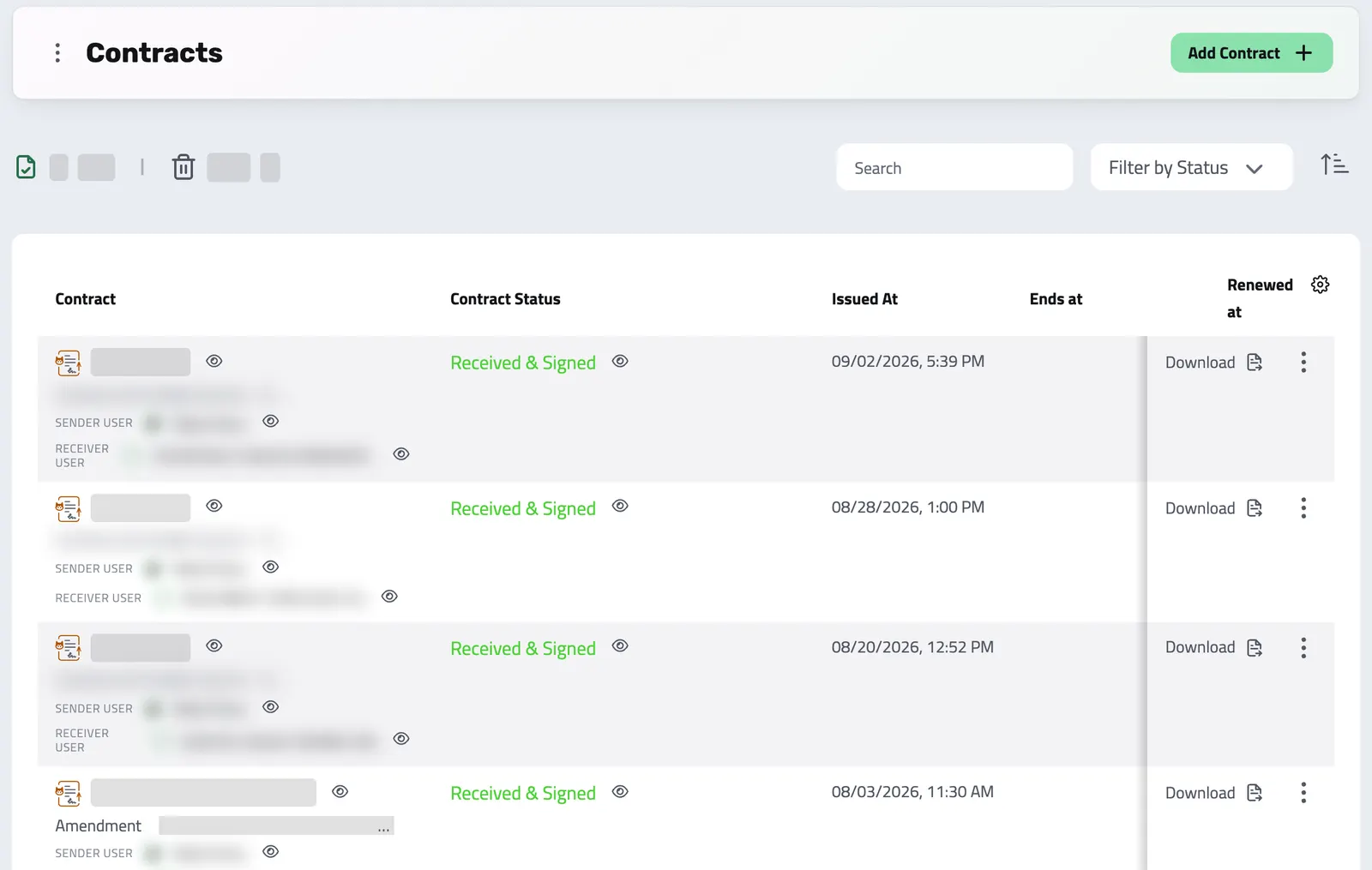
CONTRACT OVERVIEW
Everything you need to stay organized
Track every contract, signature and renewal date from one list.
Every contract lives in one table you can filter and search, so nothing gets lost in email threads or shared drives.
Party details, categories, and related documents stay connected automatically, giving you the full context behind every agreement.
- Party details auto-populated from user profiles
- Categorize as core, amendment, supplement, or addendum
- Filter by direction, status, category, date, or party
- Download, edit or delete in a click
-
One contract list
Contracts with your clients and with your suppliers sit in the same table.
-
Signature tracking
Mark which parties need to sign, follow signature status, and see at a glance which contracts are still waiting.
-
Contract relationships
Link amendments, supplements, and addenda to their parent contract, keeping a clear chain of related documents.
-
Important dates
Keep issue, end, renewal, and signing dates on every contract, and filter for what is coming up.
Which version did they sign?
The email, print, scan, and rescan loop is still how most businesses handle contracts: delays, version confusion, and no reliable way to verify who actually signed.
-
Lost in email chains
Without Enlivy: Searching through endless emails to find that one contract version, never sure which is the final signed copy.
With Enlivy: Every contract sits in one searchable list, with the signed copy always a click away.
-
Signature bottlenecks
Without Enlivy: Waiting days or weeks to track down who needs to sign what, while critical deals sit and wait.
With Enlivy: Send for signature with clear per-party rules and live status for each signer.
-
Missing renewal dates
Without Enlivy: Contracts expire without warning because renewal dates live in a spreadsheet somewhere, or nowhere at all.
With Enlivy: Issue, end, and renewal dates sit on every contract, so you can filter for what is coming up.
-
No clear audit trail
Without Enlivy: When a question comes up, there is no reliable way to trace a contract's history, parties, or amendments.
With Enlivy: Amendments stay linked to their parent contract. For each signature, Enlivy keeps a fingerprint of the exact text that party signed, any code check they passed and how far they read.
BUILD OR IMPORT
Two ways to manage contracts
Build contracts from scratch or bring in documents from anywhere, with the same control over both.
Write contracts in Enlivy, or add a contract template to a billing package: when a client accepts a proposal from it, Enlivy generates the contract with the parties, items and payment terms. For a lead, this waits until they become a client.
Or bring in contracts created outside Enlivy, PDFs or documents from any source, for centralized tracking, signing, and storage.
- Assign senders and receivers from your team or a third party
- Link amendments and supplements to a parent contract
- Generate professional PDFs automatically
- Set direction: sent by you or received from others
-
Build from scratch
Write contracts in Enlivy in chapters, with an editor for headings, lists and bold text, and your own note above the signature lines on every document.
-
Import from anywhere
Upload contracts made elsewhere, as a PDF or a document, then track them, send them for signing and keep them with the rest.
-
Automatic numbering
Every contract gets a unique number from your own series, with custom prefixes you control.
-
Signature rules per party
Set who has to sign and the identity verification each party needs before a contract goes out.
-
Draft to fully signed
Track every contract from draft through to fully signed, with clear signature status at each stage. Once the first party signs, the text is locked, so every signer signs the same document.
-
Search and filters
Filter and search contract details to find any document.
THE ENLIVY ADVANTAGE
Stop switching between tools. Use one system.
| Requirement | Enlivy Contracts | Traditional methods |
|---|---|---|
| Contract creation | Built-in editor with templates | Separate word processor needed |
| Document storage | One contract list with search | Scattered across email and drives |
| Signature tracking | Automatic status updates per party | Manual follow-ups via email |
| Version control | Clear parent-child relationships | File names like "final_v3_FINAL" |
| Renewal dates | Stored on each contract, filterable | Calendar entries or nothing |
| Party information | Auto-populated from user profiles | Manually typed each time |
| Search & filter | Filter by status, date, party, category | Search file names and hope |
| Audit trail | Signing evidence kept for each signature | Pieced together from emails |
CONFIGURE SIGNING RULES
You decide how each party verifies
Before sending, choose who needs to sign and whether each signer confirms with a code sent by email, by SMS, or both. Match the verification to the contract's sensitivity. Enlivy's signature is a simple electronic signature, the basic level under eIDAS, the EU rules on electronic signatures. Where the law requires a qualified signature, use a qualified provider.
- Email verification The code is checked before the signature is accepted, not after: nobody signs until they prove they can open that mailbox.
A unique 6-digit code is sent to the signer's registered email and expires after 10 minutes. Good for standard and internal agreements.
- Phone verification
A 6-digit code is sent by SMS to the signer's registered phone number and expires after 5 minutes, adding a device factor for higher-security requirements.
- Combined verification Both channels must pass. Used where the signature has to stand up later, such as a guarantor or a witness.
The signer verifies via email first, then via phone. Both must pass before the contract can be signed. Use it for high-value or legally sensitive agreements.
How signing works
-
Signers receive their link
You send each signer a personalized email with an individual signing link. No Enlivy account needed. No software to install. Signers click, enter the code if you asked for one, and continue.
-
Read, then sign
The signer can sign only after scrolling through at least 80% of the contract, and Enlivy keeps how long they read and how far they scrolled. Then they draw their signature and tick the box confirming it is legally binding.
-
A link to the signed contract
Signers get an email with a link to the signed contract in your client portal, and everyone gets the final version once all parties have signed. For a contract from a proposal, the client can then make the first payment.
Proposals, contracts, invoices and payments
Ready to get your contracts in order?
Join teams who've simplified their contract management with Enlivy.
Free to start · No credit card required · ANAF eFactura for Romanian companies invoicing Romanian clients
The signing experience
Walk through what your signer actually sees
The real signing journey, start to finish: consent, email and SMS verification, reading the document, then signing it. Try it yourself, nothing is sent and nothing is stored.
How to add a contract
From the contract list to a tracked contract, in four steps.
-
Open Contracts
Navigate to Contracts from your left menu. You’ll see all existing contracts in a clean, organized table view.
-
Choose your method
Click “Add Contract +” and select either Create Using Enlivy for new contracts, or Uploaded for documents created outside the platform.

-
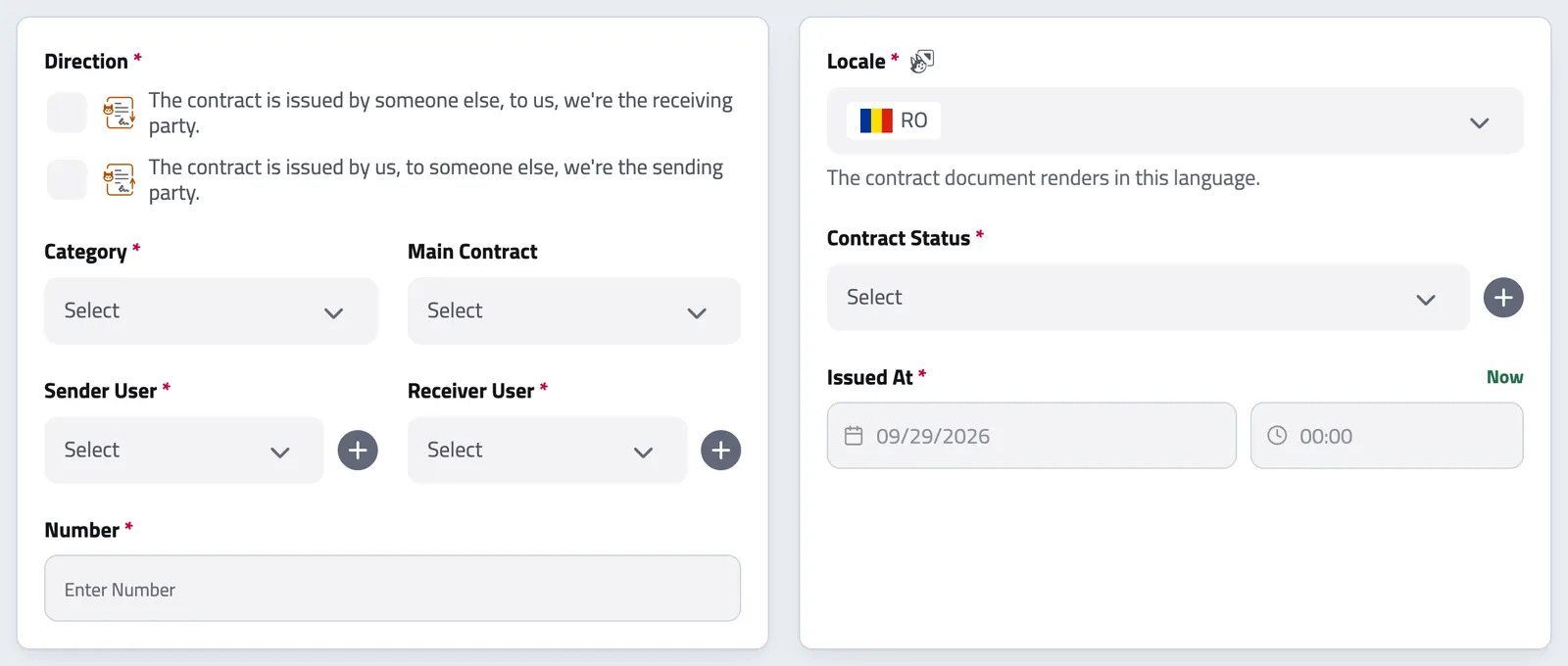
Fill in details
Enter contract information, select parties, set dates, and add content using our intuitive tabs: Information, Parties, General, Content Introduction, and Chapter Details.
-
Track and manage
Once added, your contract appears in the contract list. From there, follow its signature status, track deadlines and edit its details.
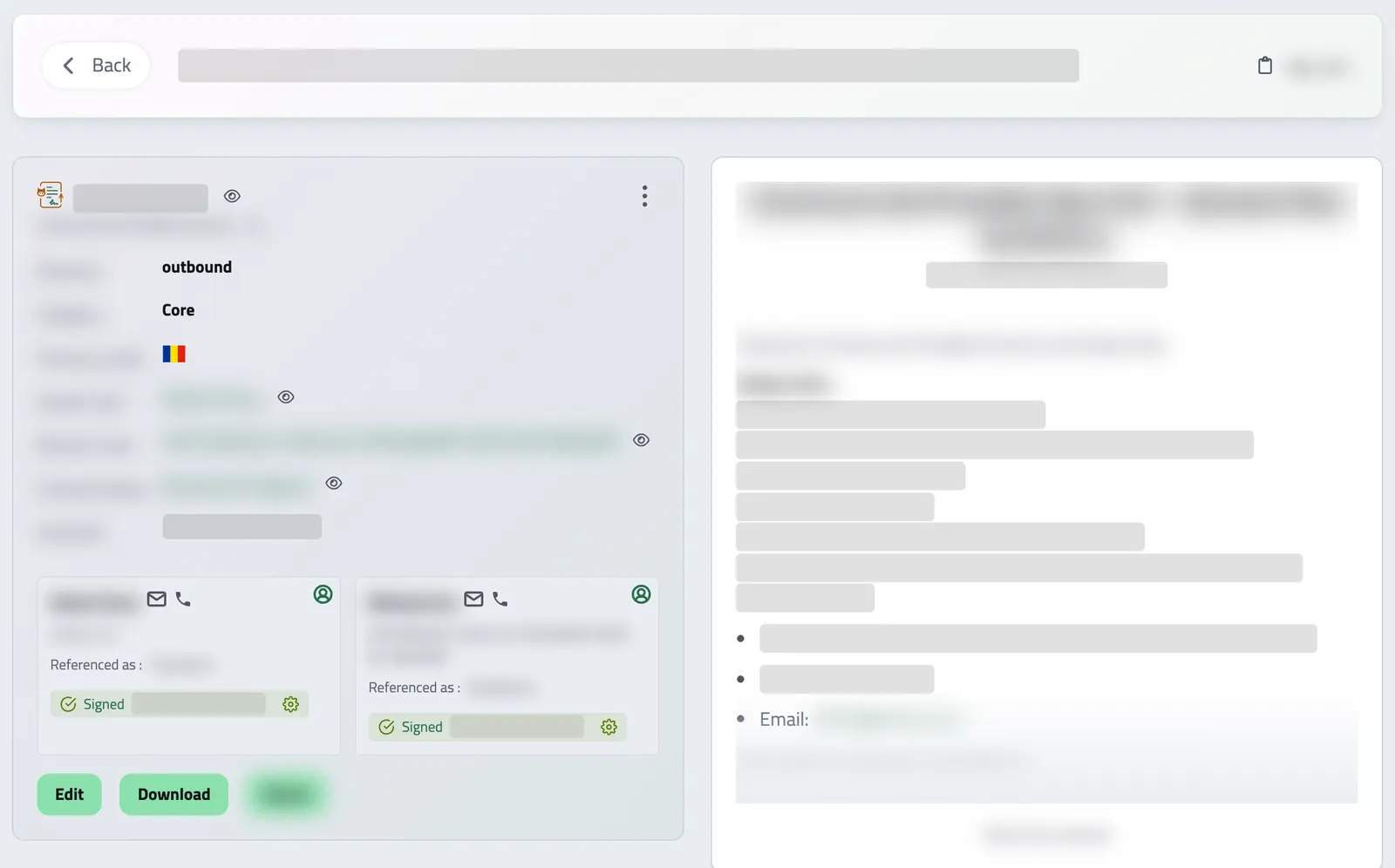
CONNECTED DOCUMENTS
See what refers to a contract
A contract's Connections tab lists the proposals, invoices, receipts, billing schedules, payslips and related contracts that refer to it, as far as your permissions allow. Open the proposal a contract came from, or the invoices that followed, without searching through separate lists.
API reference
Contract management from the API
Draft, send, sign, and track contracts end-to-end, without your users ever leaving your product. The Contracts API covers the whole lifecycle: assemble a contract from chapters and parties, move it through your own status pipeline, open a legally-binding signing session per signer, and pull the signed document plus its tamper-evident audit evidence back out.
Everything is organized around four resources: contracts (the document, its chapters and its parties), contract statuses (your configurable pipeline stages), signing sessions (one per party, with email / SMS verification), and the audit trail (delivery logs and signing evidence). The examples below walk the entire flow.
Query your contracts with pagination, rich filtering, and full-text search. Filter by status, sender, receiver, direction (inbound / outbound), category (core, amendment, addenda, supplement), source (internal / uploaded), locale, parent contract, or any of the date ranges (issued_at, ends_at, created_at, updated_at). Expand related records inline.
/organizations/<organization_id>/contracts # filters are optional and combinable
# pass a q=... param instead of ids to run a full-text search
curl -G 'https://api.enlivy.com/organizations/<organization_id>/contracts' \
--data-urlencode 'page=1' \
--data-urlencode 'limit=20' \
--data-urlencode 'direction=outbound' \
--data-urlencode 'category=core' \
--data-urlencode 'include=contract_status,sender_user,receiver_user,contract_parties' \
--data-urlencode 'include_meta=navigation' \
-H "Authorization: Bearer $ENLIVY_API_TOKEN" \
-H 'Accept: application/json' const baseUrl = "https://api.enlivy.com" ;
const token = process.env.ENLIVY_API_TOKEN;
const organizationId = "<organization_id>";
// filters are optional and combinable
// pass a q=... param instead of ids to run a full-text search
const query = new URLSearchParams({
page: "1",
limit: "20",
direction: "outbound",
category: "core",
include: "contract_status,sender_user,receiver_user,contract_parties",
include_meta: "navigation",
});
const result = await fetch(`${baseUrl}/organizations/${organizationId}/contracts?${query}` , {
method: "GET",
headers: {
Authorization: `Bearer ${token}`,
Accept: "application/json" ,
},
}).then((response) => response.json());Retrieve a single contract with everything attached: its chapters, its parties, the current pipeline status, the linked file, and the sender / receiver.
/organizations/<organization_id>/contracts/<contract_id> # available includes: organization, parent_contract, sender_user, receiver_user,
# file, contract_status, contract_chapters, contract_parties, contract_prefix
curl -G 'https://api.enlivy.com/organizations/<organization_id>/contracts/<contract_id>' \
--data-urlencode 'include=contract_chapters,contract_parties,contract_status' \
-H "Authorization: Bearer $ENLIVY_API_TOKEN" \
-H 'Accept: application/json' const baseUrl = "https://api.enlivy.com" ;
const token = process.env.ENLIVY_API_TOKEN;
const organizationId = "<organization_id>";
const contractId = "<contract_id>";
// available includes: organization, parent_contract, sender_user, receiver_user,
// file, contract_status, contract_chapters, contract_parties, contract_prefix
const query = new URLSearchParams({
include: "contract_chapters,contract_parties,contract_status",
});
const result = await fetch(`${baseUrl}/organizations/${organizationId}/contracts/${contractId}?${query}` , {
method: "GET",
headers: {
Authorization: `Bearer ${token}`,
Accept: "application/json" ,
},
}).then((response) => response.json());Build a contract in one call: its metadata, its body as ordered chapters, and its parties. A party can be an individual or an organization, and each carries how it should be referenced in the document and whether its signature is required.
/organizations/<organization_id>/contracts curl -X POST 'https://api.enlivy.com/organizations/<organization_id>/contracts' \
-H "Authorization: Bearer $ENLIVY_API_TOKEN" \
-H 'Accept: application/json' \
-H 'Content-Type: application/json' \
-d '{
"category": "core",
"source": "internal",
"direction": "outbound",
"organization_sender_user_id": "<org_user_sender_id>",
"organization_receiver_user_id": "<org_user_receiver_id>",
"organization_contract_status_id": "<contract_status_id>",
"organization_contract_prefix_id": "<contract_prefix_id>",
"title": "Master Services Agreement",
"sub_title": "2026 Engagement",
"locale": "en",
"issued_at": "2026-07-03 09:00:00",
"ends_at": "2027-07-03 09:00:00",
"content_introduction": "This agreement is entered into between the parties below.",
"content_signature_disclaimer": "By signing, each party agrees to the terms above.",
"chapters": [
{
"title": "Scope of Work",
"content": "<p>The Provider will deliver…</p>",
"order": 1
},
{
"title": "Payment Terms",
"content": "<p>Fees are due within 14 days…</p>",
"order": 2
}
],
"parties": [
{
"party_type": "organization",
"party_country_code": "RO",
"organization_name": "Acme Studio SRL",
"organization_type": "srl",
"first_name": "Jane",
"last_name": "Doe",
"role_in_organization": "Administrator",
"referenced_as_within_document": "the Provider",
"appears_as_party": true,
"is_signature_required": true,
"contact_email_address": "jane@acme.example",
"order": 0
},
{
"party_type": "individual",
"party_country_code": "RO",
"first_name": "John",
"last_name": "Smith",
"referenced_as_within_document": "the Client",
"appears_as_party": true,
"is_signature_required": true,
"contact_email_address": "john@example.com",
"order": 1
}
]
}' const baseUrl = "https://api.enlivy.com" ;
const token = process.env.ENLIVY_API_TOKEN;
const organizationId = "<organization_id>";
const result = await fetch(`${baseUrl}/organizations/${organizationId}/contracts` , {
method: "POST",
headers: {
Authorization: `Bearer ${token}`,
Accept: "application/json" ,
"Content-Type": "application/json" ,
},
body: JSON.stringify({
// core | amendment | addenda | supplement.
// amendment/addenda/supplement REQUIRE organization_contract_id -> a "core" parent contract.
category: "core",
// internal -> auto-numbered from a prefix (organization_contract_prefix_id required below)
// uploaded -> you supply `number`, and may set `signed_by_all_parties_at`
source: "internal",
// outbound | inbound
direction: "outbound",
organization_sender_user_id: "<org_user_sender_id>",
organization_receiver_user_id: "<org_user_receiver_id>",
organization_contract_status_id: "<contract_status_id>",
// required only for internal + core; omit it for any other source/category
organization_contract_prefix_id: "<contract_prefix_id>",
title: "Master Services Agreement",
sub_title: "2026 Engagement",
locale: "en",
issued_at: "2026-07-03 09:00:00",
ends_at: "2027-07-03 09:00:00",
content_introduction: "This agreement is entered into between the parties below.",
content_signature_disclaimer: "By signing, each party agrees to the terms above.",
chapters: [
{
title: "Scope of Work",
content: "<p>The Provider will deliver…</p>" ,
order: 1,
},
{
title: "Payment Terms",
content: "<p>Fees are due within 14 days…</p>" ,
order: 2,
},
],
parties: [
// country-specific `information` (person) and `organization_information` (company)
// JSON blocks are also accepted; their shape is validated against the country schema.
{
// party_type, party_country_code, first_name, last_name are required on every party
// organization | individual
party_type: "organization",
party_country_code: "RO",
// organization parties additionally REQUIRE organization_name + organization_type
organization_name: "Acme Studio SRL",
// value comes from reference data
organization_type: "srl",
first_name: "Jane",
last_name: "Doe",
role_in_organization: "Administrator",
referenced_as_within_document: "the Provider",
appears_as_party: true,
is_signature_required: true,
contact_email_address: "jane@acme.example",
order: 0,
},
{
party_type: "individual",
party_country_code: "RO",
first_name: "John",
last_name: "Smith",
referenced_as_within_document: "the Client",
appears_as_party: true,
is_signature_required: true,
contact_email_address: "john@example.com",
order: 1,
},
],
}),
}).then((response) => response.json());Update a contract’s metadata, move it to another status, adjust its chapters, or refine its parties. Send only what you want to change.
/organizations/<organization_id>/contracts/<contract_id> curl -X PUT 'https://api.enlivy.com/organizations/<organization_id>/contracts/<contract_id>' \
-H "Authorization: Bearer $ENLIVY_API_TOKEN" \
-H 'Accept: application/json' \
-H 'Content-Type: application/json' \
-d '{
"organization_contract_status_id": "<next_status_id>",
"sub_title": "2026 Engagement (revised)",
"ends_at": "2027-12-31 23:59:59"
}'const baseUrl = "https://api.enlivy.com" ;
const token = process.env.ENLIVY_API_TOKEN;
const organizationId = "<organization_id>";
const contractId = "<contract_id>";
const result = await fetch(`${baseUrl}/organizations/${organizationId}/contracts/${contractId}` , {
method: "PUT",
headers: {
Authorization: `Bearer ${token}`,
Accept: "application/json" ,
"Content-Type": "application/json" ,
},
body: JSON.stringify({
// partial update, only the fields you send are touched
organization_contract_status_id: "<next_status_id>",
sub_title: "2026 Engagement (revised)",
ends_at: "2027-12-31 23:59:59",
}),
}).then((response) => response.json());Render and download the contract as a PDF, the same document your counterparties see.
/organizations/<organization_id>/contracts/<contract_id>/download # returns a file stream, read it as a blob, not JSON
curl 'https://api.enlivy.com/organizations/<organization_id>/contracts/<contract_id>/download' \
-H "Authorization: Bearer $ENLIVY_API_TOKEN" \
--remote-name --remote-header-nameconst baseUrl = "https://api.enlivy.com" ;
const token = process.env.ENLIVY_API_TOKEN;
const organizationId = "<organization_id>";
const contractId = "<contract_id>";
// returns a file stream, read it as a blob, not JSON
const pdf = await fetch(`${baseUrl}/organizations/${organizationId}/contracts/${contractId}/download` , {
method: "GET",
headers: {
Authorization: `Bearer ${token}`,
},
}).then((response) => response.blob());Soft-delete a contract. It can be restored later.
/organizations/<organization_id>/contracts/<contract_id> # soft delete, restore via POST /contracts/restore/{contractId}
curl -X DELETE 'https://api.enlivy.com/organizations/<organization_id>/contracts/<contract_id>' \
-H "Authorization: Bearer $ENLIVY_API_TOKEN" \
-H 'Accept: application/json' const baseUrl = "https://api.enlivy.com" ;
const token = process.env.ENLIVY_API_TOKEN;
const organizationId = "<organization_id>";
const contractId = "<contract_id>";
// soft delete, restore via POST /contracts/restore/{contractId}
const result = await fetch(`${baseUrl}/organizations/${organizationId}/contracts/${contractId}` , {
method: "DELETE",
headers: {
Authorization: `Bearer ${token}`,
Accept: "application/json" ,
},
}).then((response) => response.json());Contracts move through your pipeline, not a fixed one. Each status maps to a lifecycle state (draft, action_required, accepted, breach, or terminated), carries localized labels, a color, and an order, and applies to inbound, outbound, or any direction. List them to build a board or drive automation.
/organizations/<organization_id>/contract-statuses curl -G 'https://api.enlivy.com/organizations/<organization_id>/contract-statuses' \
--data-urlencode 'page=1' \
--data-urlencode 'limit=50' \
-H "Authorization: Bearer $ENLIVY_API_TOKEN" \
-H 'Accept: application/json' const baseUrl = "https://api.enlivy.com" ;
const token = process.env.ENLIVY_API_TOKEN;
const organizationId = "<organization_id>";
const query = new URLSearchParams({
page: "1",
limit: "50",
});
const result = await fetch(`${baseUrl}/organizations/${organizationId}/contract-statuses?${query}` , {
method: "GET",
headers: {
Authorization: `Bearer ${token}`,
Accept: "application/json" ,
},
}).then((response) => response.json());Define a new pipeline stage. Labels and descriptions are per-locale language maps, contract_state ties the stage to a lifecycle state, and you can auto-advance to another status once an action succeeds.
/organizations/<organization_id>/contract-statuses curl -X POST 'https://api.enlivy.com/organizations/<organization_id>/contract-statuses' \
-H "Authorization: Bearer $ENLIVY_API_TOKEN" \
-H 'Accept: application/json' \
-H 'Content-Type: application/json' \
-d '{
"title_lang_map": {
"en": "Awaiting Signature",
"ro": "În așteptarea semnării"
},
"description_lang_map": {
"en": "Sent to all parties for signing.",
"ro": "Trimis către toate părțile pentru semnare."
},
"contract_state": "action_required",
"direction": "any",
"order": 3,
"rgba_color_code": "rgba(59, 130, 246, 1)"
}'const baseUrl = "https://api.enlivy.com" ;
const token = process.env.ENLIVY_API_TOKEN;
const organizationId = "<organization_id>";
const result = await fetch(`${baseUrl}/organizations/${organizationId}/contract-statuses` , {
method: "POST",
headers: {
Authorization: `Bearer ${token}`,
Accept: "application/json" ,
"Content-Type": "application/json" ,
},
body: JSON.stringify({
// per-locale maps, not plain strings
title_lang_map: {
en: "Awaiting Signature",
ro: "În așteptarea semnării",
},
description_lang_map: {
en: "Sent to all parties for signing.",
ro: "Trimis către toate părțile pentru semnare.",
},
// draft | action_required | accepted | breach | terminated
contract_state: "action_required",
// inbound | outbound | any
direction: "any",
// order is unique per organization, pick a free slot,
// or reorder existing stages via PUT /contract-statuses/reorder
order: 3,
rgba_color_code: "rgba(59, 130, 246, 1)",
}),
}).then((response) => response.json());A signing session is created per party that needs to sign. Choose the accepted signature types (draw, checkbox, classic file, electronic file), which confirmations are required (email, phone, legally-binding acknowledgement), and an expiry. With signature_source user_flow, Enlivy hosts the guided signer experience and returns a tokenized signing URL.
/organizations/<organization_id>/contract-signatures curl -X POST 'https://api.enlivy.com/organizations/<organization_id>/contract-signatures' \
-H "Authorization: Bearer $ENLIVY_API_TOKEN" \
-H 'Accept: application/json' \
-H 'Content-Type: application/json' \
-d '{
"organization_contract_id": "<contract_id>",
"organization_contract_party_id": "<party_id>",
"signature_source": "user_flow",
"sign_session_signature_types": [
"draw",
"checkbox"
],
"sign_session_required_confirmations": [
"email",
"legally_binding"
],
"expires_at": "2026-07-17 23:59:59"
}'const baseUrl = "https://api.enlivy.com" ;
const token = process.env.ENLIVY_API_TOKEN;
const organizationId = "<organization_id>";
const result = await fetch(`${baseUrl}/organizations/${organizationId}/contract-signatures` , {
method: "POST",
headers: {
Authorization: `Bearer ${token}`,
Accept: "application/json" ,
"Content-Type": "application/json" ,
},
body: JSON.stringify({
organization_contract_id: "<contract_id>",
// one active session per party, organization_contract_party_id is unique
organization_contract_party_id: "<party_id>",
// user_flow -> Enlivy hosts the signer experience (get the link via sign_session_url)
// admin_panel -> you record the signature yourself and may send is_signed / signature_drawing / signed_contract
signature_source: "user_flow",
sign_session_signature_types: [
"draw",
// draw | checkbox | file_classic | file_electronic
"checkbox",
],
sign_session_required_confirmations: [
"email",
// email | phone | legally_binding
"legally_binding",
],
expires_at: "2026-07-17 23:59:59",
}),
}).then((response) => response.json());Deliver the signing session to the party by email or SMS, with an optional custom message. Every send is recorded in the notification log for audit.
/organizations/<organization_id>/contract-signatures/<contract_signature_id>/send curl -X POST 'https://api.enlivy.com/organizations/<organization_id>/contract-signatures/<contract_signature_id>/send' \
-H "Authorization: Bearer $ENLIVY_API_TOKEN" \
-H 'Accept: application/json' \
-H 'Content-Type: application/json' \
-d '{
"method": "email",
"message": "Please review and sign the agreement by Friday."
}'const baseUrl = "https://api.enlivy.com" ;
const token = process.env.ENLIVY_API_TOKEN;
const organizationId = "<organization_id>";
const contractSignatureId = "<contract_signature_id>";
const result = await fetch(`${baseUrl}/organizations/${organizationId}/contract-signatures/${contractSignatureId}/send` , {
method: "POST",
headers: {
Authorization: `Bearer ${token}`,
Accept: "application/json" ,
"Content-Type": "application/json" ,
},
body: JSON.stringify({
// email | sms
method: "email",
message: "Please review and sign the agreement by Friday.",
}),
}).then((response) => response.json());Poll a session for its status, whether it’s signed, its expiry, and which evidence artifacts exist. Include sign_session_url to get the hosted signing link to hand to the signer.
/organizations/<organization_id>/contract-signatures/<contract_signature_id> # sign_session_url returns the hosted link to give to the signer.
# status is one of: pending | sent | completed | expired | void
curl -G 'https://api.enlivy.com/organizations/<organization_id>/contract-signatures/<contract_signature_id>' \
--data-urlencode 'include=sign_session_url,organization_contract' \
-H "Authorization: Bearer $ENLIVY_API_TOKEN" \
-H 'Accept: application/json' const baseUrl = "https://api.enlivy.com" ;
const token = process.env.ENLIVY_API_TOKEN;
const organizationId = "<organization_id>";
const contractSignatureId = "<contract_signature_id>";
// sign_session_url returns the hosted link to give to the signer.
// status is one of: pending | sent | completed | expired | void
const query = new URLSearchParams({
include: "sign_session_url,organization_contract",
});
const result = await fetch(`${baseUrl}/organizations/${organizationId}/contract-signatures/${contractSignatureId}?${query}` , {
method: "GET",
headers: {
Authorization: `Bearer ${token}`,
Accept: "application/json" ,
},
}).then((response) => response.json());List every signing session, optionally scoped to a single contract, the quickest way to see who has signed and who is still pending across all parties.
/organizations/<organization_id>/contract-signatures # omit organization_contract_id to list sessions across every contract
curl -G 'https://api.enlivy.com/organizations/<organization_id>/contract-signatures' \
--data-urlencode 'organization_contract_id=<contract_id>' \
--data-urlencode 'include=sign_session_url' \
-H "Authorization: Bearer $ENLIVY_API_TOKEN" \
-H 'Accept: application/json' const baseUrl = "https://api.enlivy.com" ;
const token = process.env.ENLIVY_API_TOKEN;
const organizationId = "<organization_id>";
// omit organization_contract_id to list sessions across every contract
const query = new URLSearchParams({
organization_contract_id: "<contract_id>",
include: "sign_session_url",
});
const result = await fetch(`${baseUrl}/organizations/${organizationId}/contract-signatures?${query}` , {
method: "GET",
headers: {
Authorization: `Bearer ${token}`,
Accept: "application/json" ,
},
}).then((response) => response.json());Pull the tamper-evident evidence package (authentication, consent, and signature biometrics captured during signing) for compliance and dispute handling.
/organizations/<organization_id>/contracts/<contract_id>/download-evidence # also available per session: /contract-signatures/{signatureId}/download-evidence
curl 'https://api.enlivy.com/organizations/<organization_id>/contracts/<contract_id>/download-evidence' \
-H "Authorization: Bearer $ENLIVY_API_TOKEN" \
--remote-name --remote-header-nameconst baseUrl = "https://api.enlivy.com" ;
const token = process.env.ENLIVY_API_TOKEN;
const organizationId = "<organization_id>";
const contractId = "<contract_id>";
// also available per session: /contract-signatures/{signatureId}/download-evidence
const evidence = await fetch(`${baseUrl}/organizations/${organizationId}/contracts/${contractId}/download-evidence` , {
method: "GET",
headers: {
Authorization: `Bearer ${token}`,
},
}).then((response) => response.blob());Where it fits
Part of these setups
- Agencies and studios Core Generated from your template with the client's details, signed online, with an email or SMS code when you ask for one. See the setup
- Course authors Core Enrollment contracts signed online, with amendments in the same place. See the setup
- Sales teams Core Generated from the accepted proposal and signed online, with an email or SMS code when you ask for one. See the setup
- Monthly billing Optional Adds a signed contract before the first charge. The signed version stays on the client's record. See the setup
Works together with
- Proposals Quote the work in detail, share it with the customer and follow its progress through acceptance, signature and payment when those steps apply.
- Sales Pipeline See which opportunities are moving forward, review the conversation before you follow up and keep proposals close to the deal.
- Document Intake Start with a document, choose where it belongs and review the form; an AI reading you request can suggest its details.
- Tasks Keep team work beside the invoices, prospects and projects it concerns. Tasks are included for every organization at no extra charge, with no separate Tasks subscription or task-count quota.
- Users Clients, suppliers, and colleagues share one list in Enlivy. Open anyone's record to see what they owe you or you owe them, their documents, reports, and proposals, as far as your role allows.
- Customer Portal A branded, self-service portal, on your own domain if you add one, where clients accept proposals, pay invoices, manage subscriptions and sign contracts themselves. Every action lands on the client's record in Enlivy.
- MCP Connect Claude, ChatGPT, Cursor, or another MCP-compatible assistant to work with your invoices, contracts, and pipeline, within your own permissions.