

Network Exchanges
Network Exchanges: send and receive invoices through ANAF
If your company is Romanian, connect ANAF eFactura to receive invoices and submit those for Romanian clients, by hand or on a schedule. Elsewhere, download the e-invoice file and submit it yourself.
Connect to ANAF eFacturaFree account, no card needed.
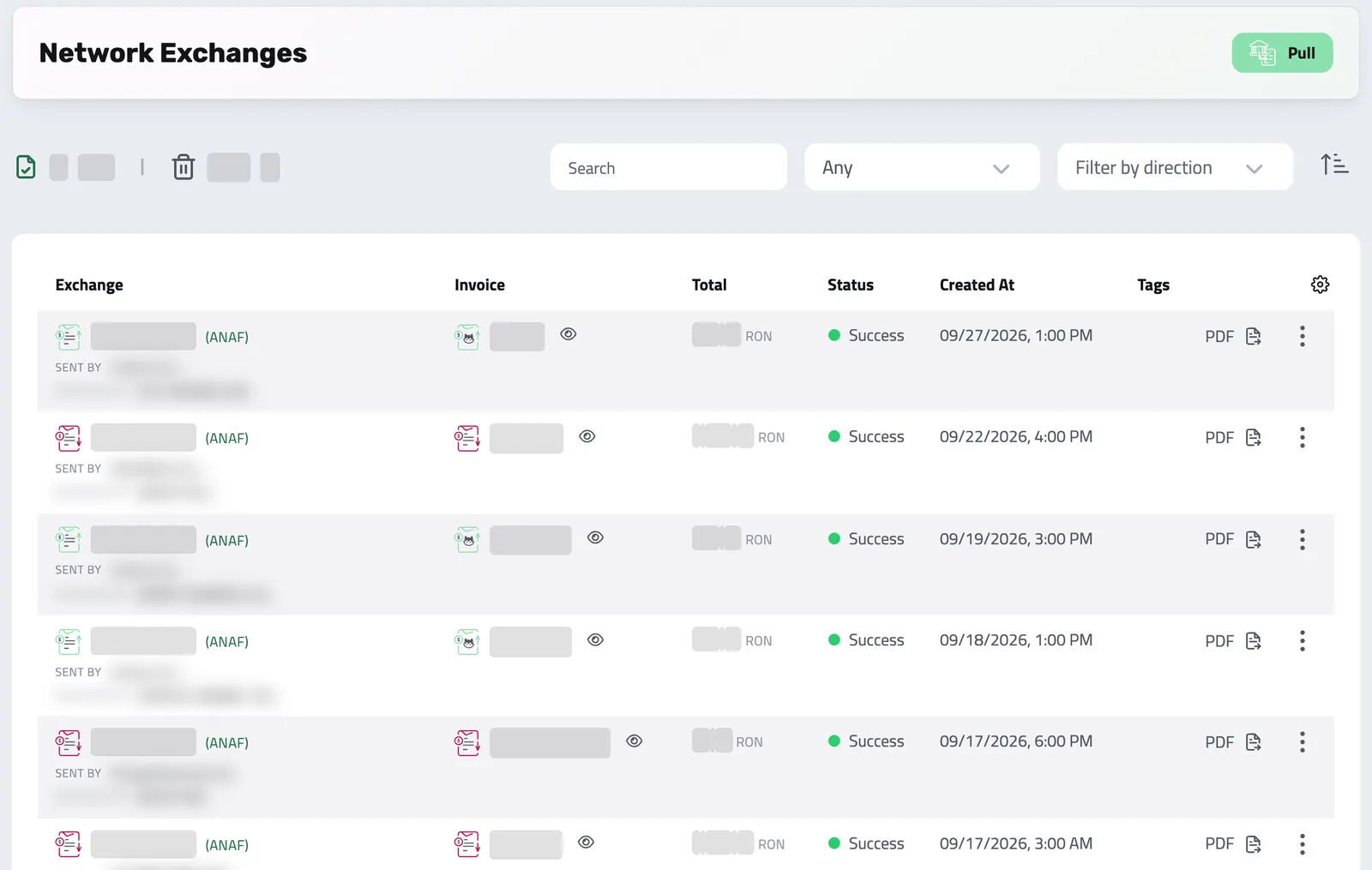
NETWORK EXCHANGES
Exchange Romanian invoices with ANAF from Enlivy
Review incoming invoices and choose when outgoing ones are submitted.
Connect your Romanian organization to ANAF eFactura and see incoming invoices, outgoing submissions and their statuses together. For other markets, download an electronic invoice file in a format Enlivy supports and submit it through the appropriate channel.
-
Manual work slows you down:
downloading XMLs, sorting emails, and uploading to government portals by hand is frustrating, error-prone, and time-consuming.
-
Requirements differ by country:
review the rules that apply to each invoice and choose the available submission route.
-
Sync incoming invoices automatically
Enlivy checks eFactura every hour and shows your incoming invoices in one list, so you can review them, record them, or link them to invoices you already have.
-
Submit to ANAF from Enlivy
Submit your invoices for Romanian clients to ANAF and follow each submission until ANAF accepts or rejects it.
-
Keep exchange status in view
See incoming invoices and the status of outgoing ANAF submissions in the same list.
-
Everything connected
Every exchange can be tagged and stays linked to its invoice, so you can trace it back to the rest of the record.
FULL LIFECYCLE
A full history for every exchange
See what happened to each invoice at ANAF, and when.
Each invoice keeps its exchanges with ANAF: when it was received or submitted, the status and the files to download (XML, PDF, ANAF's signature). A rejected submission stays on the invoice, next to every later attempt.
-
Track the full lifecycle:
every exchange, from reception to final status, is kept with its date and status.
-
Know which route is available:
Romanian ANAF exchange is connected; other supported formats are files you review and submit separately.
-
See every step
When each invoice was received or submitted, and with what result.
-
Status at a glance
Each exchange shows its status, from pending to accepted or rejected.
-
Fewer errors
Enlivy checks required details, such as your Romanian tax ID (CUI), before a submission goes to ANAF. ANAF's own checks show in the status.
-
Everything in one list
Manage every exchange from one list, with the invoice it belongs to.
MULTIPLE INPUT METHODS
One connection, every way to exchange
One ANAF connection lets you receive invoices, submit outgoing ones and review exchange status without moving between separate tools.
- Pull invoices from ANAF every hour, or whenever you ask
Automatically fetch incoming invoices from the eFactura system into Enlivy, instead of downloading XML files and email attachments.
- Submit outgoing invoices to ANAF
Submit invoices for Romanian clients to ANAF from Enlivy, yourself or on the schedule you set, and see the status of each submission.
- Review and record without retyping
See the XML data of the incoming invoice next to its fields, then link it to an invoice you already have in Enlivy or record it as a new one.
- Review fields before submitting
Built-in validation flags fields that need attention; check the document and its exchange result.
Smart search & filtering
Search by invoice number, company name, RO/CUI, direction, and more
Results update as you type, and every exchange is clickable for full context.
Getting started
-
Connect with ANAF
Sign in to ANAF from Enlivy with the digital certificate you already use for SPV (ANAF’s online portal), on a USB token or installed on your computer, and approve the access. Your organization needs its Romanian tax ID (CUI) in Enlivy.
-
Sync incoming invoices automatically
Once connected, Enlivy checks ANAF every hour for incoming invoices. You can also pull them yourself at any time.
-
Submit outgoing invoices
Submit the invoices you issue to Romanian clients to ANAF, yourself or on the schedule you configure, then check their exchange status.
CHOOSE YOUR SUBMISSION FLOW
Receive automatically, submit on your terms
For ANAF, choose manual submission or a configured automatic schedule.
Once your Romanian organization is connected, Enlivy can pull incoming invoices. For outgoing invoices to Romanian clients, you can submit them yourself or turn on automatic submission. Watch the exchange status and address connection warnings when access needs attention.
-
Incoming invoices, automatically:
Enlivy checks eFactura every hour and shows new incoming invoices in one list.
-
Automatic submission, on your schedule:
once you turn it on, Enlivy submits invoices for Romanian clients to ANAF 1, 2, 3, or 4 days after the issue date.
-
Full control when you want it:
submit any invoice yourself at any time, and follow each submission by its status.
-
Review due dates
Choose a submission delay that fits the deadline that applies to your invoices.
-
See what happened
Check the result and any connection warning instead of assuming a scheduled submission succeeded.
INCOMING INVOICES
Review a suggested tax match before registering
When you open an incoming electronic invoice, Enlivy can suggest a matching tax class from the document and your configured rates. Review the invoice and the suggestion before saving; a missing match does not prevent you from continuing with the ordinary invoice form.
CONNECTION STATUS
Know when ANAF access needs attention
If ANAF blocks access for an expired authorization or a tax-identifier issue, Enlivy records the block and warns the organization. Review the stated reason, correct access, and resume syncing after the connection recovers.
EUROPEAN E-INVOICING COVERAGE
How e-invoices move in each country
Enlivy connects directly to ANAF in Romania. In the other EU countries shown, Enlivy gives you an electronic invoice file to submit yourself.
-
Check the route for your country
See whether Enlivy connects to the exchange or provides a file for you to submit through another channel.
-
Ask about another connection
Tell us which institution matters to your business so we can assess the integration.
In Romania, Enlivy connects directly to ANAF for incoming and outgoing invoices. For the other countries shown, Enlivy creates a supported file that you review and submit. A generated file is not proof that the receiving institution accepted it or that every local requirement was met.
API reference
Network Exchanges from the API
Send e-invoices for your Romanian clients to ANAF eFactura, and pull the ones addressed to you, programmatically. A network exchange is a single transmission of an invoice to (or from) an institution; the supported institution is ANAF. Enlivy builds the compliant UBL document, submits it, and tracks the response through its lifecycle so you know whether a document was accepted, rejected, or still processing.
Exchanges are outbound (you submit an invoice you issued) or inbound (you pull documents addressed to you). This reference starts with the key action, pushing an invoice onto the network, then covers listing, inspecting, pulling inbound documents, and downloading the signed files. Every exchange carries a status you can poll.
Submit an issued invoice to a network institution. The invoice is the payload; there is no request body. Enlivy generates the compliant UBL, transmits it, and returns the resulting network-exchange record with its initial status. Which institutions an invoice can go to is exposed on the invoice itself.
/organizations/<organization_id>/invoices/<invoice_id> +1# 1. Discover eligible institutions for this invoice.
# invoice.peppol_exchange_push_options lists the institution ids you may push to;
# invoice.peppol_exchanges_pushed lists the ones already sent.
curl 'https://api.enlivy.com/organizations/<organization_id>/invoices/<invoice_id>' \
-H "Authorization: Bearer $ENLIVY_API_TOKEN" \
-H 'Accept: application/json'
# 2. Push to a specific institution. The id is a string, e.g. "anaf" (Romania / ANAF).
# no request body, the invoice is the document
curl -X POST 'https://api.enlivy.com/organizations/<organization_id>/invoices/<invoice_id>/peppol/anaf' \
-H "Authorization: Bearer $ENLIVY_API_TOKEN" \
-H 'Accept: application/json'
# The response is the network-exchange record. Poll its `status`:
# pending | processing | success | success_in_exchange_queue | success_pending_archive
# | change_required | rejected | rejected_at_exchange | failed | failed_credentials_expired
# A transport/connectivity failure to the institution returns HTTP 503. const baseUrl = "https://api.enlivy.com" ;
const token = process.env.ENLIVY_API_TOKEN;
const organizationId = "<organization_id>";
const invoiceId = "<invoice_id>";
const institution = "anaf";
const headers = {
Authorization: `Bearer ${token}`,
Accept: "application/json" ,
};
// 1. Discover eligible institutions for this invoice.
// invoice.peppol_exchange_push_options lists the institution ids you may push to;
// invoice.peppol_exchanges_pushed lists the ones already sent.
const invoice = await fetch(`${baseUrl}/organizations/${organizationId}/invoices/${invoiceId}` , {
method: "GET",
headers,
}).then((response) => response.json());
// 2. Push to a specific institution. The id is a string, e.g. "anaf" (Romania / ANAF).
// no request body, the invoice is the document
const exchange = await fetch(`${baseUrl}/organizations/${organizationId}/invoices/${invoiceId}/peppol/${institution}` , {
method: "POST",
headers,
}).then((response) => response.json());
// The response is the network-exchange record. Poll its `status`:
// pending | processing | success | success_in_exchange_queue | success_pending_archive
// | change_required | rejected | rejected_at_exchange | failed | failed_credentials_expired
// A transport/connectivity failure to the institution returns HTTP 503. List every exchange with pagination and filtering: scope to one invoice, filter by exchange status or by the linked invoice’s state, and bound by date. This is how you build a compliance dashboard of what’s been sent and where each document stands.
/organizations/<organization_id>/invoices/network-exchanges # filters: status, organization_invoice_id, invoice_state (the linked invoice's state),
# created_at_from/to, updated_at_from/to, ids
curl -G 'https://api.enlivy.com/organizations/<organization_id>/invoices/network-exchanges' \
--data-urlencode 'page=1' \
--data-urlencode 'limit=20' \
--data-urlencode 'status=success' \
--data-urlencode 'include=invoice' \
-H "Authorization: Bearer $ENLIVY_API_TOKEN" \
-H 'Accept: application/json' const baseUrl = "https://api.enlivy.com" ;
const token = process.env.ENLIVY_API_TOKEN;
const organizationId = "<organization_id>";
// filters: status, organization_invoice_id, invoice_state (the linked invoice's state),
// created_at_from/to, updated_at_from/to, ids
const query = new URLSearchParams({
page: "1",
limit: "20",
status: "success",
include: "invoice",
});
const result = await fetch(`${baseUrl}/organizations/${organizationId}/invoices/network-exchanges?${query}` , {
method: "GET",
headers: {
Authorization: `Bearer ${token}`,
Accept: "application/json" ,
},
}).then((response) => response.json());Retrieve a single exchange: its status, the institution’s exchange and message identifiers, the raw institution response_json, and the names of the generated files. Include parsed_data to get the parsed contents of the exchanged document, or invoice for the source invoice.
/organizations/<organization_id>/invoices/network-exchanges/<peppol_network_exchange_id> # includes: organization, invoice, parsed_data (the parsed UBL as structured data), tag_ids
curl -G 'https://api.enlivy.com/organizations/<organization_id>/invoices/network-exchanges/<peppol_network_exchange_id>' \
--data-urlencode 'include=parsed_data,invoice' \
-H "Authorization: Bearer $ENLIVY_API_TOKEN" \
-H 'Accept: application/json' const baseUrl = "https://api.enlivy.com" ;
const token = process.env.ENLIVY_API_TOKEN;
const organizationId = "<organization_id>";
const peppolNetworkExchangeId = "<peppol_network_exchange_id>";
// includes: organization, invoice, parsed_data (the parsed UBL as structured data), tag_ids
const query = new URLSearchParams({
include: "parsed_data,invoice",
});
const result = await fetch(`${baseUrl}/organizations/${organizationId}/invoices/network-exchanges/${peppolNetworkExchangeId}?${query}` , {
method: "GET",
headers: {
Authorization: `Bearer ${token}`,
Accept: "application/json" ,
},
}).then((response) => response.json());Fetch documents that were sent to you over an institution’s network, supplier invoices delivered through ANAF, for example. Enlivy retrieves and ingests them as inbound exchanges. Bound the sync with date_from.
/organizations/<organization_id>/invoices/network-exchanges/anaf/pull curl -G 'https://api.enlivy.com/organizations/<organization_id>/invoices/network-exchanges/anaf/pull' \
--data-urlencode 'date_from=2026-07-01' \
-H "Authorization: Bearer $ENLIVY_API_TOKEN" \
-H 'Accept: application/json' const baseUrl = "https://api.enlivy.com" ;
const token = process.env.ENLIVY_API_TOKEN;
const organizationId = "<organization_id>";
const institutionId = "anaf";
const query = new URLSearchParams({
date_from: "2026-07-01",
});
const result = await fetch(`${baseUrl}/organizations/${organizationId}/invoices/network-exchanges/${institutionId}/pull?${query}` , {
method: "GET",
headers: {
Authorization: `Bearer ${token}`,
Accept: "application/json" ,
},
}).then((response) => response.json());Pull the artifacts of an exchange: the compliant UBL/XML document, its digital signature, and the human-readable PDF. Each returns a file stream.
/organizations/<organization_id>/invoices/network-exchanges/<peppol_network_exchange_id>/download +2# the signed UBL / XML document
curl 'https://api.enlivy.com/organizations/<organization_id>/invoices/network-exchanges/<peppol_network_exchange_id>/download' \
-H "Authorization: Bearer $ENLIVY_API_TOKEN" \
--remote-name --remote-header-name
# the detached digital signature
curl 'https://api.enlivy.com/organizations/<organization_id>/invoices/network-exchanges/<peppol_network_exchange_id>/download-signature' \
-H "Authorization: Bearer $ENLIVY_API_TOKEN" \
--remote-name --remote-header-name
# the human-readable PDF rendering
curl 'https://api.enlivy.com/organizations/<organization_id>/invoices/network-exchanges/<peppol_network_exchange_id>/download-pdf' \
-H "Authorization: Bearer $ENLIVY_API_TOKEN" \
--remote-name --remote-header-nameconst baseUrl = "https://api.enlivy.com" ;
const token = process.env.ENLIVY_API_TOKEN;
const organizationId = "<organization_id>";
const peppolNetworkExchangeId = "<peppol_network_exchange_id>";
const headers = {
Authorization: `Bearer ${token}`,
};
// the signed UBL / XML document
const xml = await fetch(`${baseUrl}/organizations/${organizationId}/invoices/network-exchanges/${peppolNetworkExchangeId}/download` , {
method: "GET",
headers,
}).then((response) => response.blob());
// the detached digital signature
const signature = await fetch(`${baseUrl}/organizations/${organizationId}/invoices/network-exchanges/${peppolNetworkExchangeId}/download-signature` , {
method: "GET",
headers,
}).then((response) => response.blob());
// the human-readable PDF rendering
const pdf = await fetch(`${baseUrl}/organizations/${organizationId}/invoices/network-exchanges/${peppolNetworkExchangeId}/download-pdf` , {
method: "GET",
headers,
}).then((response) => response.blob());Retrieve the institution-side status and validation details for an exchange, useful when a document comes back as change_required or rejected and you need the reasons to correct and resubmit.
/organizations/<organization_id>/invoices/network-exchanges/<peppol_network_exchange_id>/information curl 'https://api.enlivy.com/organizations/<organization_id>/invoices/network-exchanges/<peppol_network_exchange_id>/information' \
-H "Authorization: Bearer $ENLIVY_API_TOKEN" \
-H 'Accept: application/json' const baseUrl = "https://api.enlivy.com" ;
const token = process.env.ENLIVY_API_TOKEN;
const organizationId = "<organization_id>";
const peppolNetworkExchangeId = "<peppol_network_exchange_id>";
const result = await fetch(`${baseUrl}/organizations/${organizationId}/invoices/network-exchanges/${peppolNetworkExchangeId}/information` , {
method: "GET",
headers: {
Authorization: `Bearer ${token}`,
Accept: "application/json" ,
},
}).then((response) => response.json());Where it fits
Part of these setups
- Agencies and studios Optional Adds Romania's eFactura for an agency registered there. Enlivy sends your invoices for Romanian clients to ANAF once you connect your ANAF account and turn submission on. See the setup
- Course authors Optional Adds eFactura for a Romanian business. Connect your ANAF account, then submit invoices for Romanian clients yourself or let Enlivy do it. See the setup
- Monthly billing Optional Sends invoices to Romanian clients through ANAF, and brings your suppliers' e-invoices in. See the setup
- Sales teams Optional Adds eFactura for a Romanian business. Connect your ANAF account, then submit invoices for Romanian clients yourself or let Enlivy do it. See the setup
Works together with
- Invoices Create an invoice, send it to your client, and connect the contract, receipt or bank transaction that belongs with it. For Romanian eFactura, use the configured ANAF connection.
- Receipts Record money in and money out, keep the payment file with each receipt, and let Enlivy issue the receipt when you mark an invoice paid with one of the payment methods you set for automatic receipts.
- Taxes Give a product or invoice line a tax class, and Enlivy applies the rate that fits the customer's status and location. For companies based in 32 European countries, Enlivy keeps ready-made classes up to date.
- Payslips Your accountant works out the figures, and you record each amount in Enlivy on its own line, under your country's payroll code. Enlivy checks that the lines match the payslip's totals.
- Data Export Choose the period and the record types, and download one archive for your accountant, with a summary spreadsheet for each type if you want one. Free on every plan.
- MCP Connect Claude, ChatGPT, Cursor, or another MCP-compatible assistant to work with your invoices, contracts, and pipeline, within your own permissions.