

Products
Build a reusable catalog of your services and goods
Build a reusable catalog of everything you sell, services or goods, with pricing, units, tax settings, and descriptions set once. Every product is ready to add to a proposal or invoice.
Add your first productFree account, no card needed.
WHAT IT IS
Set up each product once, then invoice it
Turn your services and items into clear, invoice-ready products.
Billing hours or shipping boxes? Each product keeps its price, unit and tax class, so every invoice line starts from the same details.
-
Digital or physical, services or goods
Easily add everything you offer, from consulting hours to retail items, with all the key details you need. With support for unit types, pricing, and descriptions, Enlivy gives you a flexible structure that fits any type of product or service.
-
One source of truth
Keep product names, prices and tax settings in one searchable list, with the matching Stripe product if you sell through Stripe.
-
Ready to invoice, always
Every product you add is immediately available when creating proposals or invoices. That means faster billing, fewer mistakes, and a smoother experience for both your team and your clients.
BUILD ONCE, USE EVERYWHERE
One catalog, ready for every invoice
Add a product once and use it on invoices, proposals and billing packages (the ready-made offers that proposals and subscriptions start from).
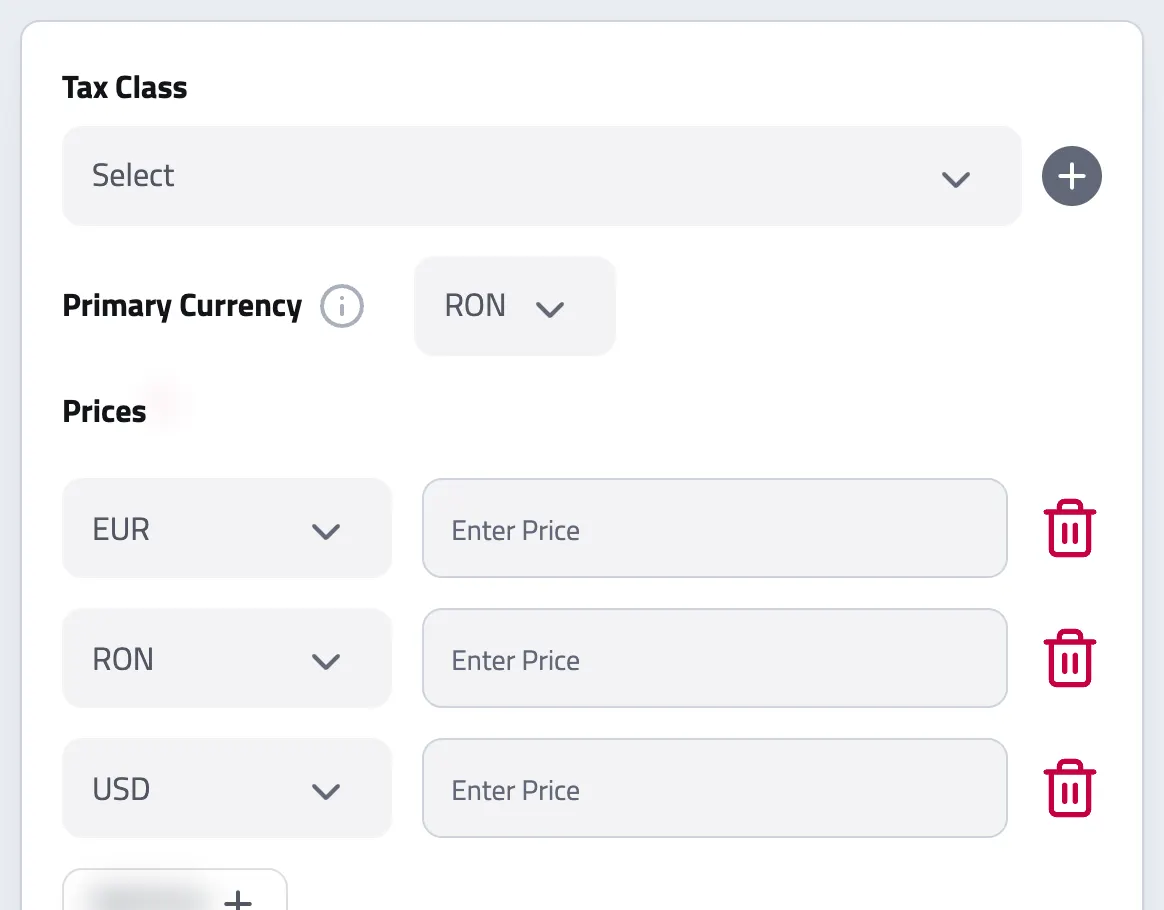
Products are the reusable building blocks of everything you bill. Set the name, price, unit, tax class, and e-invoicing details once, and drop the product into any document without retyping or hunting for the same details.
In a billing package, the same products become the options in your price calculator and the lines of the proposal, and the contract can list them. From a given quantity up, a product can take a different unit price.
-
Centralized product management
Manage every item and service from one list. Update the name, price, or unit, and it is ready the next time you add that product to an invoice.
-
Flexible product types
Add services, digital items, physical goods, or bonuses, with multi-currency pricing and per-language names and descriptions. Use only the fields your business actually needs.
-
A unit the e-invoice can read
The unit is a real UN/ECE code, not free text, so an hour bills as an hour on every e-invoice and prints in the reader's own language.
-
Edit products anytime
Reprice, relabel, change the tax class, or toggle whether a product is sold. Deleted products can be restored for 30 days.
-
Find products quickly
Search by name, alias, description, or type, and filter your catalog in one click, no matter how many products you keep.
THE PRODUCT CATALOG
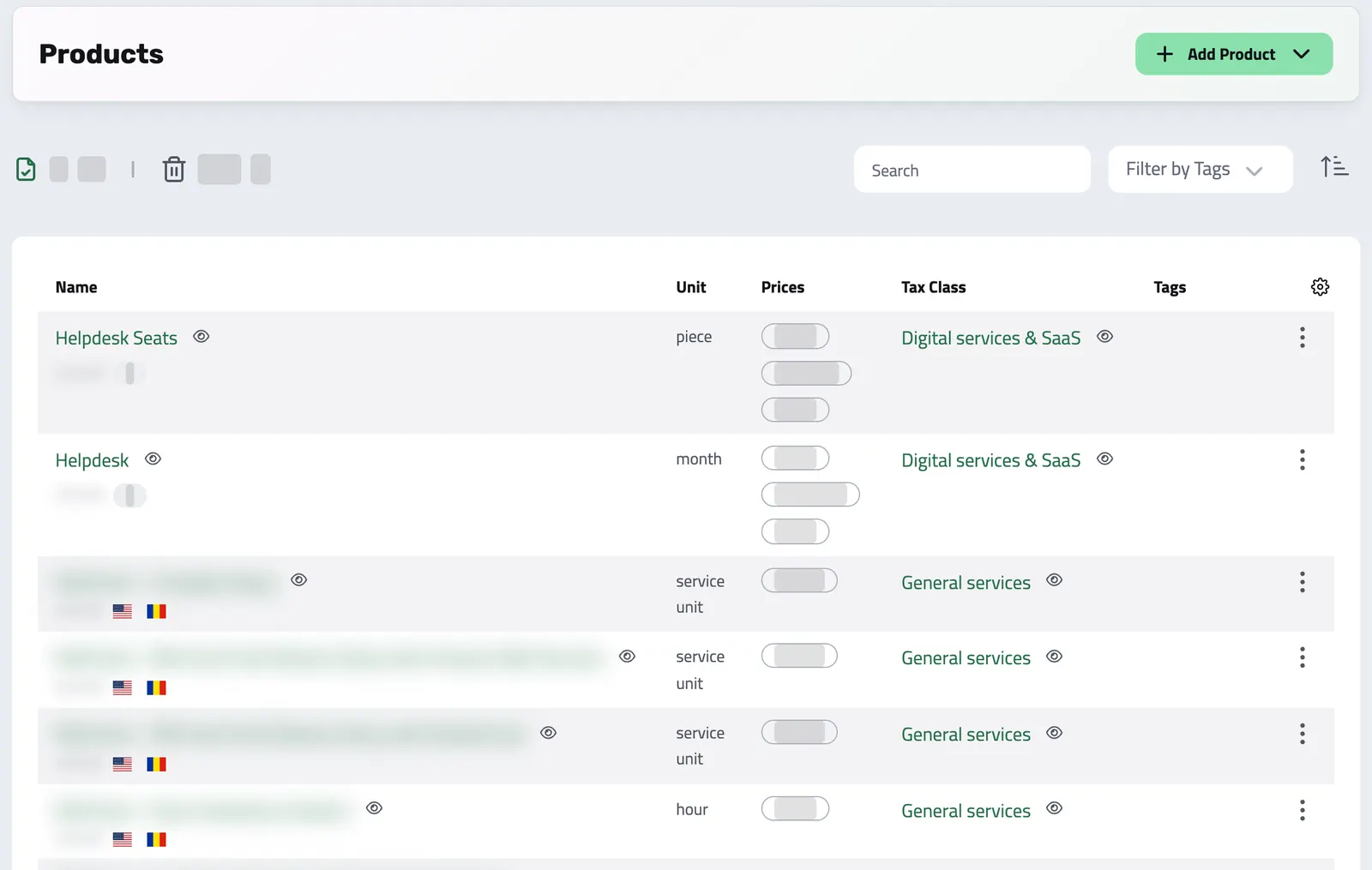
Your whole catalog, in one searchable list
Search your services, goods, and digital items by name, type, or unit. Every product is priced, tax-ready, and one click from any invoice.
SPEAKS YOUR CLIENT'S LANGUAGE
Every product can carry each of your languages
A product name is not a single string. It holds a version for each language your organization uses, from the six Enlivy supports (English, Romanian, German, French, Dutch, and Danish), so every invoice line renders in the reader's language when that version exists.
{
  "en": "Invoicing",
  "ro": "Facturare",
  "de": "Rechnungsstellung",
  "fr": "Facturation",
  "nl": "Facturatie",
  "da": "Fakturering"
}| English | Invoicing | / month |
|---|---|---|
| Română | Facturare | / lună |
| Deutsch | Rechnungsstellung | / monat |
| Français | Facturation | / mois |
| Nederlands | Facturatie | / maand |
| Dansk | Fakturering | / måned |
Translations work the same way across the whole platform.
WHY PRODUCTS
Why use products in Enlivy?
Less retyping, fewer mistakes, faster invoicing.
A shared, reusable catalog keeps every document consistent and every teammate aligned, so billing stops being a source of errors and delays.
-
Create once, reuse anytime
Stop retyping the same information. Your catalog is ready whenever you need it, on invoices, proposals, and recurring billing.
-
Fewer mistakes
A product carries its name, unit, price, and tax details onto each document, so pricing and descriptions stay consistent everywhere.
-
Fast, clean invoicing
Pick a product on an invoice, and its name, unit, price and tax class fill in the line. A price in another currency is converted to the invoice currency for you to check.
-
Clear for your team
Everyone in your organization works from the same product list: aligned, accurate, and easy to manage.
FROM CATALOG TO INVOICE
Bring a catalog price into the invoice currency
When a catalog item's price and an invoice use different currencies, the invoice form can convert the price before filling the line. Review the proposed amount and rate before issuing; conversion depends on an available rate and the invoice's pricing choices.
Creating a product is easy
Enter the details once.
The product is then ready for every proposal and invoice, with no retyping and no hunting for the right price.
-
Start from the products section
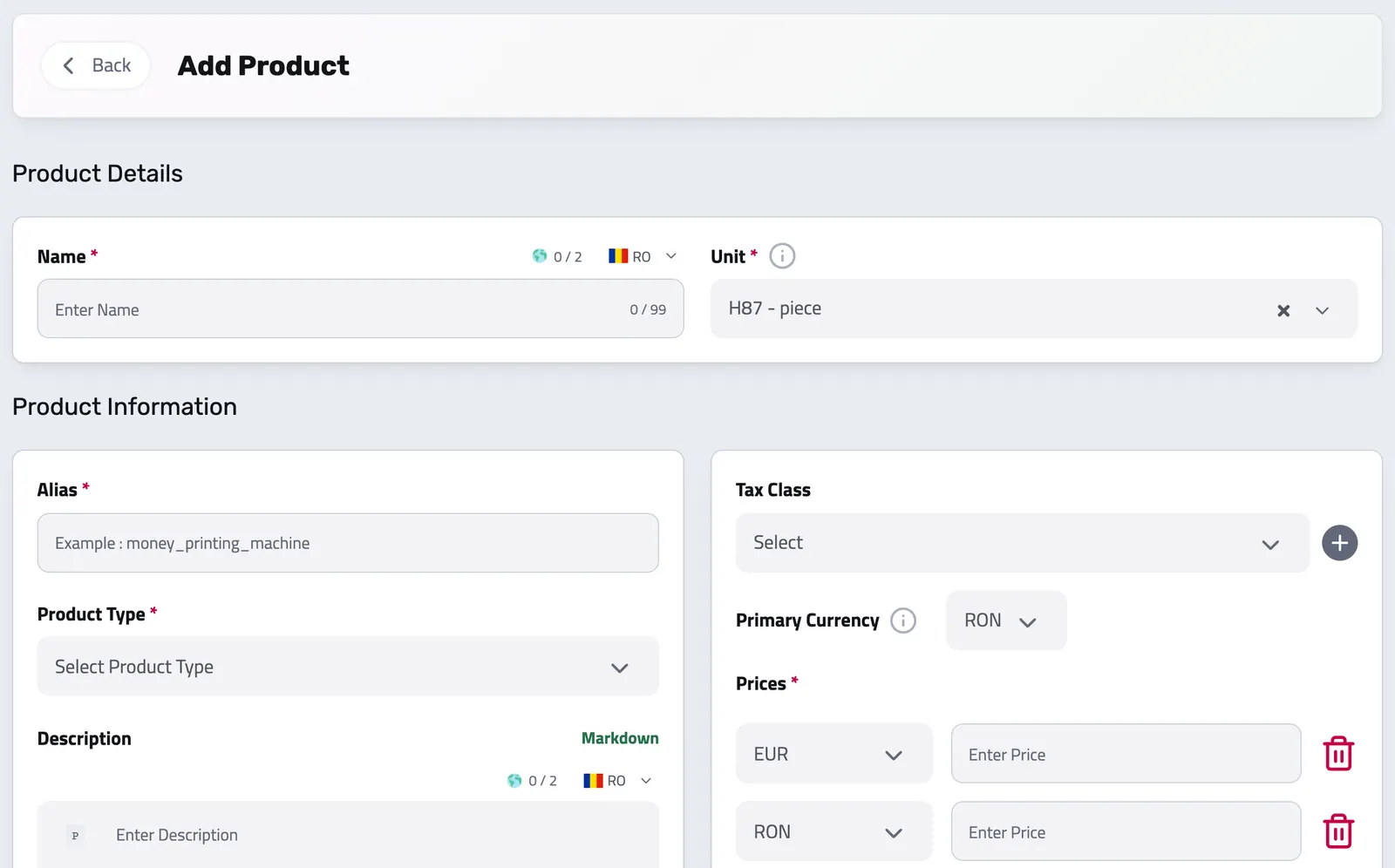
From the Enlivy dashboard, use the left-side menu to go to Products, then click the Add Product button.
-
Fill in the product details
Enter key info like the name, alias, type, description, and price. Keep it simple, or get specific, it’s up to you.
-
Your product is ready
Your product is saved and ready to add to any invoice. You can find it in the Products list.
API reference
Product management from the API
Keep your catalog in sync from your own systems. The Products API gives you programmatic control over the reusable line items you sell (services, digital goods, physical products, and bonuses), each with multi-currency pricing, per-locale names, tax class, and the metadata needed for compliant e-invoicing. Products created here drop straight into invoices, proposals, and billing schedules.
The examples below cover the core operations: listing and searching products, creating one, editing it, and removing it.
Query your catalog with pagination, filtering, and full-text search. Filter by name or description, fetch specific ids, and expand the tax class inline.
/organizations/<organization_id>/products # filters: name, description, ids (or q=... for full-text search)
# includes: organization, tax_class, tag_ids, deleted_by_user
curl -G 'https://api.enlivy.com/organizations/<organization_id>/products' \
--data-urlencode 'page=1' \
--data-urlencode 'limit=20' \
--data-urlencode 'name=Consulting' \
--data-urlencode 'include=tax_class' \
-H "Authorization: Bearer $ENLIVY_API_TOKEN" \
-H 'Accept: application/json' const baseUrl = "https://api.enlivy.com" ;
const token = process.env.ENLIVY_API_TOKEN;
const organizationId = "<organization_id>";
// filters: name, description, ids (or q=... for full-text search)
// includes: organization, tax_class, tag_ids, deleted_by_user
const query = new URLSearchParams({
page: "1",
limit: "20",
name: "Consulting",
include: "tax_class",
});
const result = await fetch(`${baseUrl}/organizations/${organizationId}/products?${query}` , {
method: "GET",
headers: {
Authorization: `Bearer ${token}`,
Accept: "application/json" ,
},
}).then((response) => response.json());Add a product to your catalog. A product needs a type and a price_map; everything else (localized names, tax class, barcodes, and e-invoicing metadata) is optional.
/organizations/<organization_id>/products curl -X POST 'https://api.enlivy.com/organizations/<organization_id>/products' \
-H "Authorization: Bearer $ENLIVY_API_TOKEN" \
-H 'Accept: application/json' \
-H 'Content-Type: application/json' \
-d '{
"type": "service",
"price_map": {
"EUR": "49.90",
"USD": "54.00"
},
"primary_currency": "EUR",
"name_lang_map": {
"en": "Consulting Hour",
"ro": "Oră de consultanță"
},
"unit_code": "HUR",
"description_lang_map": {
"en": "One hour of advisory services."
},
"alias": "consulting-hour",
"organization_tax_class_id": "<tax_class_id>",
"is_sold": true,
"invoice_schema_map": {
"classification_identifier_cpv": "79411000-8",
"peppol_billing_unit_code": "HUR"
},
"ean_number": null,
"upc_number": null,
"stripe_product_id_list": [
"prod_XXXXXXXX"
]
}'const baseUrl = "https://api.enlivy.com" ;
const token = process.env.ENLIVY_API_TOKEN;
const organizationId = "<organization_id>";
const result = await fetch(`${baseUrl}/organizations/${organizationId}/products` , {
method: "POST",
headers: {
Authorization: `Bearer ${token}`,
Accept: "application/json" ,
"Content-Type": "application/json" ,
},
body: JSON.stringify({
// required: digital | physical | service | bonus
type: "service",
// required: a { currency: amount } map (amounts max 2 decimals).
// With 2+ currencies, primary_currency becomes required.
price_map: {
EUR: "49.90",
USD: "54.00",
},
primary_currency: "EUR",
// per-locale maps (not plain strings)
name_lang_map: {
en: "Consulting Hour",
ro: "Oră de consultanță",
},
// the Peppol unit code, 3 characters: HUR for an hour, H87 for a piece
unit_code: "HUR",
description_lang_map: { en: "One hour of advisory services." },
// optional; unique per organization (alpha-dash)
alias: "consulting-hour",
organization_tax_class_id: "<tax_class_id>",
// whether it is actively offered
is_sold: true,
// optional e-invoicing metadata (used when the product lands on an invoice line)
invoice_schema_map: {
// CPV code
classification_identifier_cpv: "79411000-8",
// PEPPOL unit code
peppol_billing_unit_code: "HUR",
},
// optional identifiers
ean_number: null,
upc_number: null,
stripe_product_id_list: [
// each id must start with "prod_"
"prod_XXXXXXXX",
],
}),
}).then((response) => response.json());Update any part of a product: reprice it, relabel it, change its tax class, or toggle whether it is sold. Send only the fields you want to change.
/organizations/<organization_id>/products/<product_id> curl -X PUT 'https://api.enlivy.com/organizations/<organization_id>/products/<product_id>' \
-H "Authorization: Bearer $ENLIVY_API_TOKEN" \
-H 'Accept: application/json' \
-H 'Content-Type: application/json' \
-d '{
"price_map": {
"EUR": "59.90",
"USD": "64.00"
},
"primary_currency": "EUR",
"name_lang_map": {
"en": "Consulting Hour, Senior"
},
"is_sold": false
}'const baseUrl = "https://api.enlivy.com" ;
const token = process.env.ENLIVY_API_TOKEN;
const organizationId = "<organization_id>";
const productId = "<product_id>";
const result = await fetch(`${baseUrl}/organizations/${organizationId}/products/${productId}` , {
method: "PUT",
headers: {
Authorization: `Bearer ${token}`,
Accept: "application/json" ,
"Content-Type": "application/json" ,
},
body: JSON.stringify({
// reprice: the price_map replaces the stored one
price_map: {
EUR: "59.90",
USD: "64.00",
},
primary_currency: "EUR",
name_lang_map: { en: "Consulting Hour, Senior" },
is_sold: false,
}),
}).then((response) => response.json());Soft-delete a product so it is no longer offered. It can be restored later.
/organizations/<organization_id>/products/<product_id> # soft delete; restore via POST /products/restore/{productId}
curl -X DELETE 'https://api.enlivy.com/organizations/<organization_id>/products/<product_id>' \
-H "Authorization: Bearer $ENLIVY_API_TOKEN" \
-H 'Accept: application/json' const baseUrl = "https://api.enlivy.com" ;
const token = process.env.ENLIVY_API_TOKEN;
const organizationId = "<organization_id>";
const productId = "<product_id>";
// soft delete; restore via POST /products/restore/{productId}
const result = await fetch(`${baseUrl}/organizations/${organizationId}/products/${productId}` , {
method: "DELETE",
headers: {
Authorization: `Bearer ${token}`,
Accept: "application/json" ,
},
}).then((response) => response.json());Works together with
- Invoices Create an invoice, send it to your client, and connect the contract, receipt or bank transaction that belongs with it. For Romanian eFactura, use the configured ANAF connection.
- Receipts Record money in and money out, keep the payment file with each receipt, and let Enlivy issue the receipt when you mark an invoice paid with one of the payment methods you set for automatic receipts.
- Billing Packages Sell one package on six billing cycles and let customers manage their subscription. With the Billing Schedules pack, Enlivy invoices each cycle and charges cards through your Stripe account.
- Billing Schedules Set up a subscription or payment plan and see what is paid and what is pending. For your clients, Enlivy issues each cycle's invoice on the billing date and charges a saved card, if there is one.
- Proposals Quote the work in detail, share it with the customer and follow its progress through acceptance, signature and payment when those steps apply.
- Sales Pipeline See which opportunities are moving forward, review the conversation before you follow up and keep proposals close to the deal.
- Data Export Choose the period and the record types, and download one archive for your accountant, with a summary spreadsheet for each type if you want one. Free on every plan.
- MCP Connect Claude, ChatGPT, Cursor, or another MCP-compatible assistant to work with your invoices, contracts, and pipeline, within your own permissions.