

Taxes
Resolve VAT and Tax Rates for the Documents You Issue
Stop picking VAT rates by hand. Assign a tax class to a product or invoice line and Enlivy resolves the correct rate automatically, based on who the customer is and where they are, with the right EU codes for e-invoicing built in.
Set up your taxesFree account, no card needed.
THE ENLIVY TAX ENGINE
Every Line Taxed by the Rules You Set
Assign a Tax Class. Enlivy resolves the right rate automatically, based on who the customer is and where they are.
Taxes no longer mean just adding a percentage to an invoice. The customer's country, business status, VAT number, EU rules, reverse charge, and e-invoice requirements can completely change the treatment of the same sale.
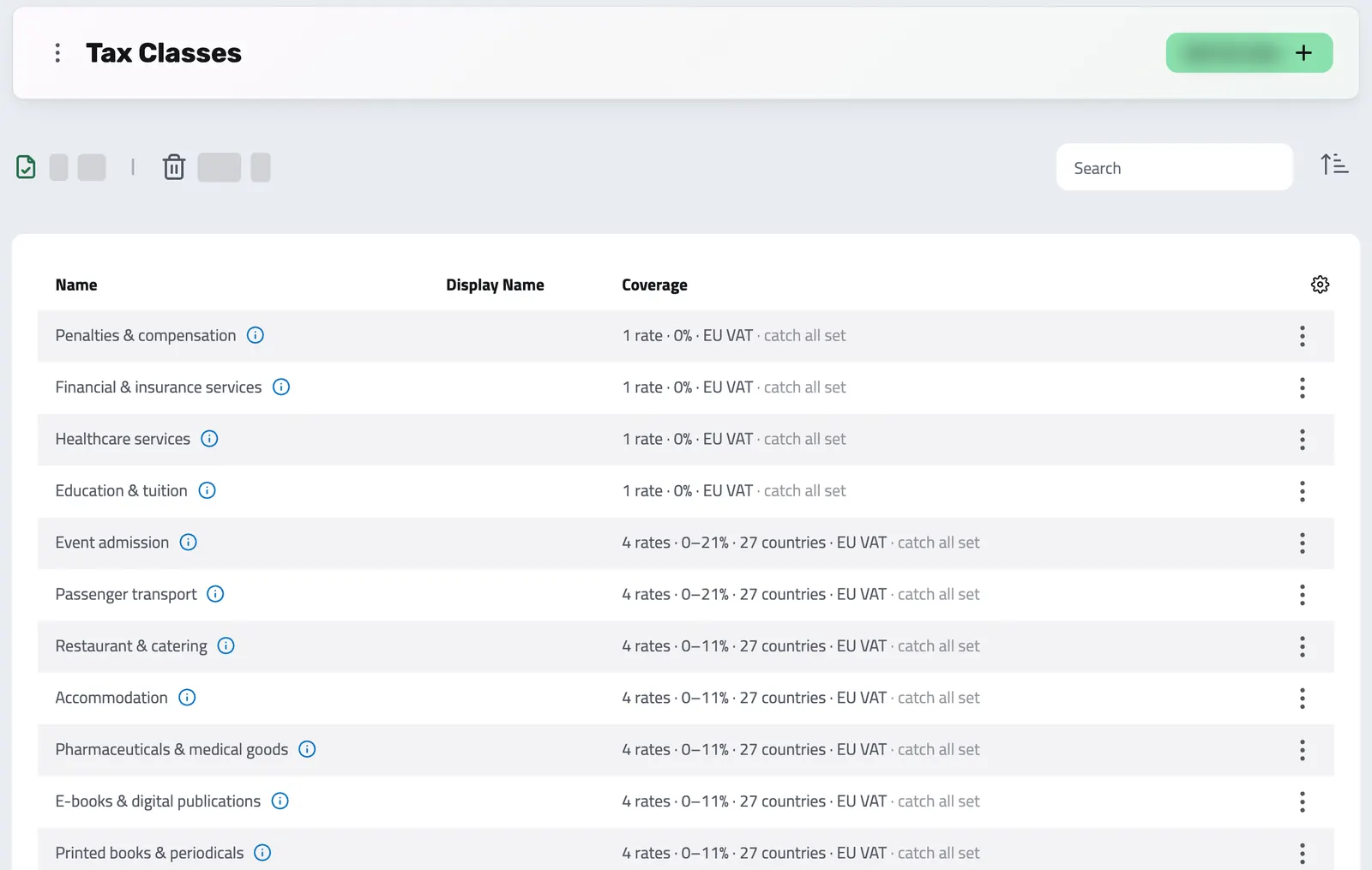
A Tax Class is a semantic product category, the way Stripe models product tax codes: Books, Foodstuffs, Digital services, Exempt. You tag a product with the category it is, never a percentage by hand. Underneath each class sits a set of tax rates, one row per country or selling scenario, and at invoice time Enlivy resolves the single applicable rate by the buyer's country and tax status, taking the highest-priority match.
- Bring tax rates across from Stripe when you import subscriptions, de-duplicated, with no re-entry
- Set each rate as inclusive or exclusive
- Preview which rate applies to any customer before you send, with Simulate Mapping
- Changes to the platform-managed tax catalog are logged
-
One label, the right rate every time
Assign a Tax Class to a product, a proposal line, or an invoice line. Enlivy resolves the correct rate from who the customer is and where they sit: consumer or business, EU VAT registered or not.
-
Build your own rate set
Create a class per product category (goods, books, digital services), then add the rate rows underneath: one per country, a 0% EU B2B reverse charge, and a rest-of-world catch-all, each with its own priority in the resolution ladder.
-
Tax details for electronic invoices
Add VAT category and exemption reason codes where needed, so supported electronic invoice files include more than a number and a percentage.
-
Proven at scale
The same engine calculates the tax on Enlivy's own subscription billing, and tax rates imported from Stripe stay linked per rate.
Keep Tax Rules Together
Configure rates, review which rule applies, and carry the tax details into supported electronic invoice files.
- Rate Selection
Enlivy filters and ranks all rates in a class against the customer's country, region, business status, and VAT registration, and applies the highest-priority match. No manual picking.
- EU B2B Reverse Charge
Configure a 0% rate for eligible EU business sales, with the relevant category and exemption reason codes. Review the result before issuing an invoice.
- Catch-All Safety Net
A Tax Rate with no location set covers every sale that doesn't match a specific country. Without one, uncovered sales go out with no tax, silently. The simulator warns you when this is the case.
- Tax Resolved at Billing Time
Tax is determined when each invoice is generated, not when the quote was signed. VAT changes mid-contract, and customer status changes, flow onto the next invoice automatically.
- Structured Invoice Details
Enlivy can include line-level VAT categories, a grouped VAT breakdown and party VAT numbers in supported electronic invoice exports.
- Inclusive & Exclusive Pricing
Mark a tax rate as inclusive and Enlivy extracts the VAT from the price. The customer pays the listed amount; the invoice breakdown is still complete and correct.
- Country, Region & Postal Targeting
Location targeting works for any country down to region and postal code level. A single rate can cover multiple countries, or zero, to act as a global catch-all.
- Multilingual
Tax Class names, descriptions, EU VAT category codes, and exemption code labels are stored and displayed in multiple languages.
THE ENLIVY ADVANTAGE
Stop Keeping Tax Rules in a Spreadsheet. Use One System.
| Capability | Enlivy Taxes | Manual / Spreadsheet Approach |
|---|---|---|
| Rate selection | Automatic by country, business status, and VAT registration | Manual pick per invoice line, error-prone |
| EU B2B reverse charge | Configured once, applied automatically with correct codes | Remembered per invoice, often missed or miscoded |
| VAT rate changes mid-contract | Each invoice resolves at generation time, always current | Frozen at the rate when the contract was created |
| Electronic invoice tax details | VAT category and exemption reason codes where applicable | Details must be added to an electronic invoice separately |
| Inclusive pricing | Per-rate flag, Enlivy extracts VAT | Manual calculation each time, rounding errors accumulate |
| Multi-country coverage | One Tax Class covers all countries with a catch-all | Separate lookup or spreadsheet column per country |
| Stripe tax sync | Imported with your Stripe subscriptions, de-duplicated, tagged | Re-entered by hand, duplicates accumulate |
| Exempt invoices | Requires a valid VATEX reason code, audit-proof by default | "Exempt" typed as text, rejected by e-invoicing platforms |
Get Started in Minutes
Everything you need to configure tax, from scratch to fully covered.
-
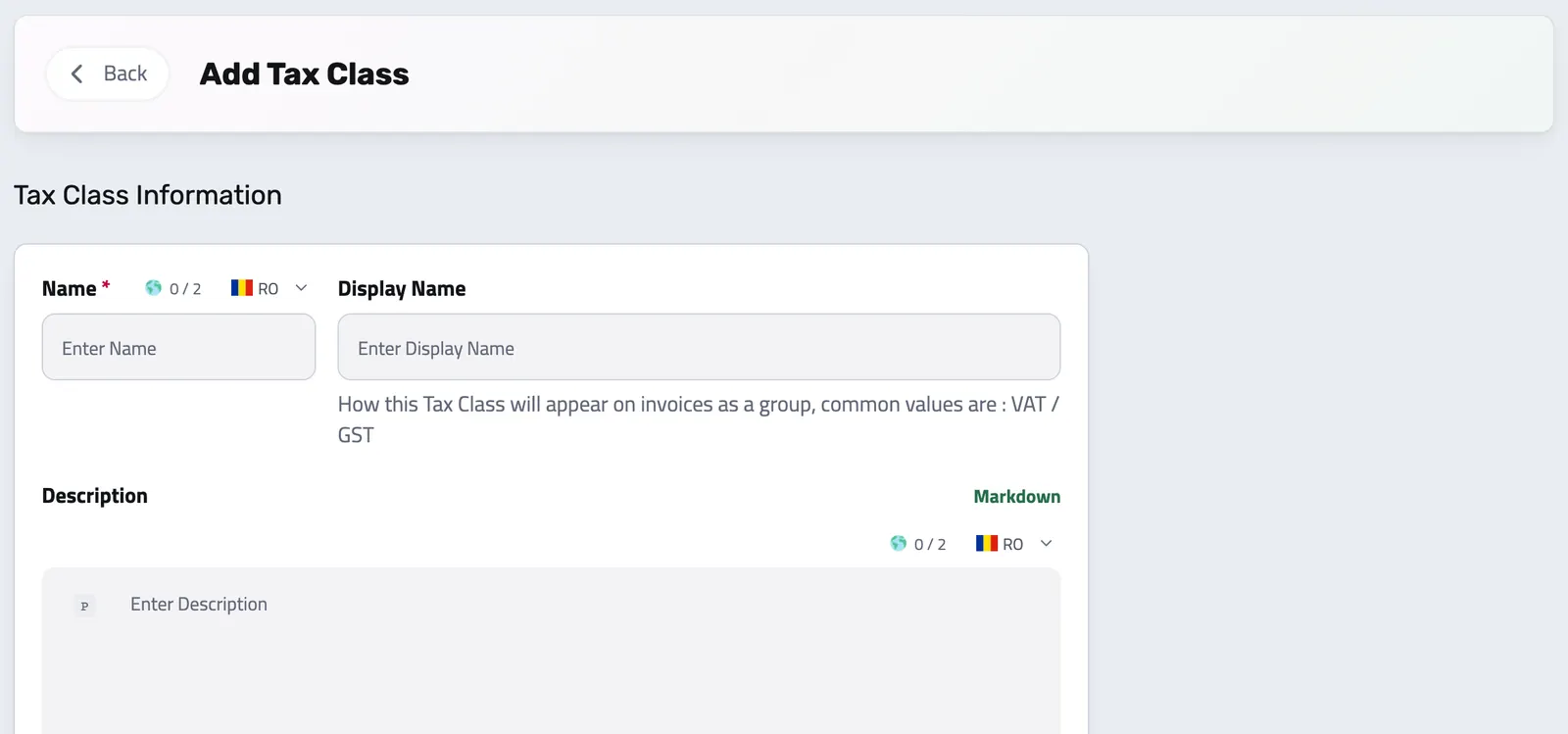
Create a Tax Class
Add Tax Class. Give it a name (what you’ll see in dropdowns), an optional display name for invoices (e.g. VAT, GST), and an optional description. The class is ready to hold Tax Rates.
-
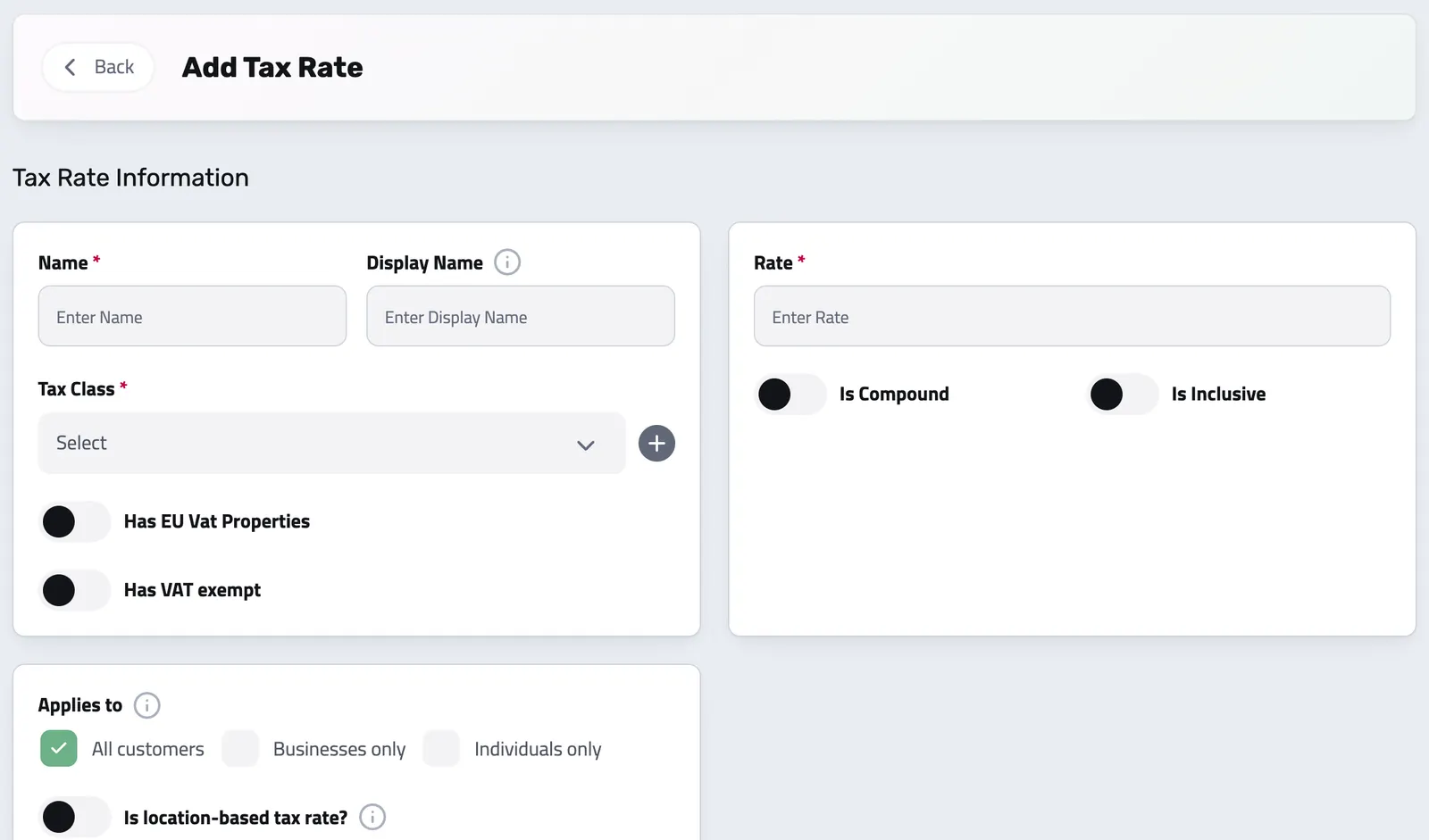
Add Tax Rates
Add a Tax Rate. Set the percentage, who it applies to, and whether it’s location-based. Assign a priority so Enlivy knows which rate wins when multiple match.
CHANGE RULES WITHOUT LOSING THE PAST
Retire a tax class with its connections in view
Before retiring a class, inspect the records that still refer to it; retiring is refused while a live product, schedule, proposal, or package still uses it. The class can leave active use while existing documents keep the tax decision they already recorded. A new incoming document can suggest a class from the library, with uncertain matches left for review.
Tax Across Your Enlivy Workspace
Tax doesn’t live in isolation. The same Tax Class configuration powers every step of the commerce workflow, from first quote to final government e-invoice.
- Products
Assign a default Tax Class to every product. It travels with the product to any invoice or proposal line.
- Proposals
Proposal lines carry the Tax Class, not a frozen rate. The rate is resolved at billing time, so changes between quote and invoice are always reflected correctly.
- Billing Schedules
Recurring plans resolve tax at each invoice's generation time. Month 7 of a 12-month plan uses the current rate, not the one from when the contract started.
- Invoices & Receipts
Tax is stored at two levels, per line item (full detail) and per invoice (grouped summary for PEPPOL). Both are automatically kept in sync.
- Stripe
When you import subscriptions from Stripe, the tax rates they use come across too, de-duplicated and named with a Stripe prefix for easy identification.
- Network Exchanges (eFactura)
Tax details flow into supported electronic invoice files. Romanian ANAF submission uses the configured connection; files for other systems need separate review and submission.
API Reference
Tax Management from the API
Enlivy models tax the way Stripe models product tax codes, not one class per country. A tax class is a semantic product category (Standard goods & services, Books, Foodstuffs, Digital services, Exempt), and you tag each product with the category it is, never a percentage by hand. Underneath each class sits a set of tax rates, one per country or selling scenario, and at invoice time Enlivy resolves the single applicable rate from the buyer's country and tax status, taking the highest-priority match.
The examples below cover both layers: the class (the category) and the rates (the country rows that resolve underneath it).
List your product-tax categories. Include tax_rates_overview for a summary of the rate set resolving under each class.
/organizations/<organization_id>/tax-classes # filters: name, description, ids
# include tax_rates_overview for a per-class summary of the rate set
curl -G 'https://api.enlivy.com/organizations/<organization_id>/tax-classes' \
--data-urlencode 'page=1' \
--data-urlencode 'limit=20' \
--data-urlencode 'include=tax_rates_overview' \
-H "Authorization: Bearer $ENLIVY_API_TOKEN" \
-H 'Accept: application/json' const baseUrl = "https://api.enlivy.com" ;
const token = process.env.ENLIVY_API_TOKEN;
const organizationId = "<organization_id>";
// filters: name, description, ids
// include tax_rates_overview for a per-class summary of the rate set
const query = new URLSearchParams({
page: "1",
limit: "20",
include: "tax_rates_overview",
});
const result = await fetch(`${baseUrl}/organizations/${organizationId}/tax-classes?${query}` , {
method: "GET",
headers: {
Authorization: `Bearer ${token}`,
Accept: "application/json" ,
},
}).then((response) => response.json());Create one class per product category you sell. A class is a category, not a country and not a single rate; the country rows live underneath it. Products then point their organization_tax_class_id at the category they belong to.
/organizations/<organization_id>/tax-classes # Create one class per product CATEGORY you sell (Standard goods & services, Books,
# Foodstuffs, Accommodation, Digital services / SaaS, Exempt). A class is a category,
# not a country and not a single rate; the country rows live underneath it.
curl -X POST 'https://api.enlivy.com/organizations/<organization_id>/tax-classes' \
-H "Authorization: Bearer $ENLIVY_API_TOKEN" \
-H 'Accept: application/json' \
-H 'Content-Type: application/json' \
-d '{
"name_lang_map": {
"en": "Books & publications",
"ro": "Cărți și publicații"
},
"description_lang_map": {
"en": "Reduced-rate category for books and periodicals."
}
}'const baseUrl = "https://api.enlivy.com" ;
const token = process.env.ENLIVY_API_TOKEN;
const organizationId = "<organization_id>";
// Create one class per product CATEGORY you sell (Standard goods & services, Books,
// Foodstuffs, Accommodation, Digital services / SaaS, Exempt). A class is a category,
// not a country and not a single rate; the country rows live underneath it.
const result = await fetch(`${baseUrl}/organizations/${organizationId}/tax-classes` , {
method: "POST",
headers: {
Authorization: `Bearer ${token}`,
Accept: "application/json" ,
"Content-Type": "application/json" ,
},
body: JSON.stringify({
// the category, not a rate: per-locale maps
name_lang_map: {
en: "Books & publications",
ro: "Cărți și publicații",
},
description_lang_map: { en: "Reduced-rate category for books and periodicals." },
}),
}).then((response) => response.json());Update a category's labels, or soft-delete it (restore later). Deleting a class removes the category its rate rows resolve under, so remove or reassign those rows first.
/organizations/<organization_id>/tax-classes/<tax_class_id> +1# Update a category's labels
curl -X PUT 'https://api.enlivy.com/organizations/<organization_id>/tax-classes/<tax_class_id>' \
-H "Authorization: Bearer $ENLIVY_API_TOKEN" \
-H 'Accept: application/json' \
-H 'Content-Type: application/json' \
-d '{
"name_lang_map": {
"en": "Books & publications (2026)"
}
}'
# soft delete; restore via POST /tax-classes/restore/{taxClassId}
curl -X DELETE 'https://api.enlivy.com/organizations/<organization_id>/tax-classes/<tax_class_id>' \
-H "Authorization: Bearer $ENLIVY_API_TOKEN" \
-H 'Accept: application/json' const baseUrl = "https://api.enlivy.com" ;
const token = process.env.ENLIVY_API_TOKEN;
const organizationId = "<organization_id>";
const taxClassId = "<tax_class_id>";
// Update a category's labels
const result1 = await fetch(`${baseUrl}/organizations/${organizationId}/tax-classes/${taxClassId}` , {
method: "PUT",
headers: {
Authorization: `Bearer ${token}`,
Accept: "application/json" ,
"Content-Type": "application/json" ,
},
body: JSON.stringify({
name_lang_map: { en: "Books & publications (2026)" },
}),
}).then((response) => response.json());
// soft delete; restore via POST /tax-classes/restore/{taxClassId}
const result2 = await fetch(`${baseUrl}/organizations/${organizationId}/tax-classes/${taxClassId}` , {
method: "DELETE",
headers: {
Authorization: `Bearer ${token}`,
Accept: "application/json" ,
},
}).then((response) => response.json());List the rate rows. Expand the parent class and the locations each row applies to. For a per-class summary, use the class's tax_rates_overview include instead.
/organizations/<organization_id>/tax-rates # includes: organization, organization_tax_class, locations
curl -G 'https://api.enlivy.com/organizations/<organization_id>/tax-rates' \
--data-urlencode 'page=1' \
--data-urlencode 'limit=50' \
--data-urlencode 'include=organization_tax_class,locations' \
-H "Authorization: Bearer $ENLIVY_API_TOKEN" \
-H 'Accept: application/json' const baseUrl = "https://api.enlivy.com" ;
const token = process.env.ENLIVY_API_TOKEN;
const organizationId = "<organization_id>";
// includes: organization, organization_tax_class, locations
const query = new URLSearchParams({
page: "1",
limit: "50",
include: "organization_tax_class,locations",
});
const result = await fetch(`${baseUrl}/organizations/${organizationId}/tax-rates?${query}` , {
method: "GET",
headers: {
Authorization: `Bearer ${token}`,
Accept: "application/json" ,
},
}).then((response) => response.json());A tax rate is one row in a class's rate set, not a standalone tax. Each row declares a scope, an EN16931 VAT category, and a priority; at invoice time Enlivy takes the highest-priority matching row. The canonical set: home-country domestic, EU B2B reverse charge, per-country OSS, and a rest-of-world catch-all.
/organizations/<organization_id>/tax-rates +3# A tax rate is ONE ROW in a class's rate set, not a standalone tax. Each row declares a
# scope (locations and/or buyer conditions), an EN16931 VAT category (eu_vat_class), and a
# priority. At invoice time Enlivy takes the highest-priority row whose scope + buyer match.
# The canonical rate set for one category (home country = Romania): four archetypes.
#
# Home-country domestic: the default when selling within Romania
curl -X POST 'https://api.enlivy.com/organizations/<organization_id>/tax-rates' \
-H "Authorization: Bearer $ENLIVY_API_TOKEN" \
-H 'Accept: application/json' \
-H 'Content-Type: application/json' \
-d '{
"organization_tax_class_id": "<standard_goods_class_id>",
"has_eu_vat_properties": true,
"is_compound": false,
"is_inclusive": false,
"name": "RO Domestic 21%",
"rate": 21,
"priority": 1000,
"eu_vat_class": "S",
"has_locations": true,
"locations": [
{
"country_code": "RO"
}
]
}'
# EU B2B reverse charge: 0%, matches ONLY VAT-registered businesses in other EU states
curl -X POST 'https://api.enlivy.com/organizations/<organization_id>/tax-rates' \
-H "Authorization: Bearer $ENLIVY_API_TOKEN" \
-H 'Accept: application/json' \
-H 'Content-Type: application/json' \
-d '{
"organization_tax_class_id": "<standard_goods_class_id>",
"has_eu_vat_properties": true,
"is_compound": false,
"is_inclusive": false,
"name": "EU B2B Reverse Charge",
"rate": 0,
"priority": 900,
"eu_vat_class": "AE",
"vatex_code": "VATEX-EU-AE",
"is_business_entity": true,
"is_eu_vat_registered": true,
"has_locations": true,
"locations": [
{
"country_code": "DE"
},
{
"country_code": "FR"
}
]
}'
# Per-country EU domestic (B2C digital / OSS): charge the buyer's own country rate
curl -X POST 'https://api.enlivy.com/organizations/<organization_id>/tax-rates' \
-H "Authorization: Bearer $ENLIVY_API_TOKEN" \
-H 'Accept: application/json' \
-H 'Content-Type: application/json' \
-d '{
"organization_tax_class_id": "<standard_goods_class_id>",
"has_eu_vat_properties": true,
"is_compound": false,
"is_inclusive": false,
"name": "DE Domestic 19%",
"rate": 19,
"priority": 800,
"eu_vat_class": "S",
"has_locations": true,
"locations": [
{
"country_code": "DE"
}
]
}'
# Rest of world: outside scope, 0%, no locations = catch-all fallback
curl -X POST 'https://api.enlivy.com/organizations/<organization_id>/tax-rates' \
-H "Authorization: Bearer $ENLIVY_API_TOKEN" \
-H 'Accept: application/json' \
-H 'Content-Type: application/json' \
-d '{
"organization_tax_class_id": "<standard_goods_class_id>",
"has_eu_vat_properties": true,
"is_compound": false,
"is_inclusive": false,
"name": "Rest of World (Outside Scope)",
"rate": 0,
"priority": 100,
"eu_vat_class": "O",
"vatex_code": "VATEX-EU-O",
"has_locations": false
}'const baseUrl = "https://api.enlivy.com" ;
const token = process.env.ENLIVY_API_TOKEN;
const organizationId = "<organization_id>";
const headers = {
Authorization: `Bearer ${token}`,
Accept: "application/json" ,
"Content-Type": "application/json" ,
};
// A tax rate is ONE ROW in a class's rate set, not a standalone tax. Each row declares a
// scope (locations and/or buyer conditions), an EN16931 VAT category (eu_vat_class), and a
// priority. At invoice time Enlivy takes the highest-priority row whose scope + buyer match.
// The canonical rate set for one category (home country = Romania): four archetypes.
//
// Home-country domestic: the default when selling within Romania
const result1 = await fetch(`${baseUrl}/organizations/${organizationId}/tax-rates` , {
method: "POST",
headers,
body: JSON.stringify({
organization_tax_class_id: "<standard_goods_class_id>",
has_eu_vat_properties: true,
is_compound: false,
is_inclusive: false,
name: "RO Domestic 21%",
rate: 21,
priority: 1000,
// Standard-rated, stamped on the invoice line
eu_vat_class: "S",
has_locations: true,
locations: [{ country_code: "RO" }],
}),
}).then((response) => response.json());
// EU B2B reverse charge: 0%, matches ONLY VAT-registered businesses in other EU states
const result2 = await fetch(`${baseUrl}/organizations/${organizationId}/tax-rates` , {
method: "POST",
headers,
body: JSON.stringify({
organization_tax_class_id: "<standard_goods_class_id>",
has_eu_vat_properties: true,
is_compound: false,
is_inclusive: false,
name: "EU B2B Reverse Charge",
rate: 0,
priority: 900,
eu_vat_class: "AE",
// exemption reason (PEPPOL)
vatex_code: "VATEX-EU-AE",
// buyer-qualification gates
is_business_entity: true,
is_eu_vat_registered: true,
has_locations: true,
locations: [{ country_code: "DE" }, { country_code: "FR" }],
}),
}).then((response) => response.json());
// Per-country EU domestic (B2C digital / OSS): charge the buyer's own country rate
const result3 = await fetch(`${baseUrl}/organizations/${organizationId}/tax-rates` , {
method: "POST",
headers,
body: JSON.stringify({
organization_tax_class_id: "<standard_goods_class_id>",
has_eu_vat_properties: true,
is_compound: false,
is_inclusive: false,
name: "DE Domestic 19%",
rate: 19,
priority: 800,
eu_vat_class: "S",
has_locations: true,
locations: [{ country_code: "DE" }],
}),
}).then((response) => response.json());
// Rest of world: outside scope, 0%, no locations = catch-all fallback
const result4 = await fetch(`${baseUrl}/organizations/${organizationId}/tax-rates` , {
method: "POST",
headers,
body: JSON.stringify({
organization_tax_class_id: "<standard_goods_class_id>",
has_eu_vat_properties: true,
is_compound: false,
is_inclusive: false,
name: "Rest of World (Outside Scope)",
rate: 0,
priority: 100,
eu_vat_class: "O",
vatex_code: "VATEX-EU-O",
has_locations: false,
}),
}).then((response) => response.json());Adjust a single row: change its percentage, VAT category, scope, or priority in the resolution ladder. Send only the fields you are changing.
/organizations/<organization_id>/tax-rates/<tax_rate_id> # Adjust a single row: its percentage, VAT category, scope, or priority in the ladder.
# Send only the fields you are changing.
curl -X PUT 'https://api.enlivy.com/organizations/<organization_id>/tax-rates/<tax_rate_id>' \
-H "Authorization: Bearer $ENLIVY_API_TOKEN" \
-H 'Accept: application/json' \
-H 'Content-Type: application/json' \
-d '{
"rate": 20,
"display_name": "VAT 20%"
}'const baseUrl = "https://api.enlivy.com" ;
const token = process.env.ENLIVY_API_TOKEN;
const organizationId = "<organization_id>";
const taxRateId = "<tax_rate_id>";
// Adjust a single row: its percentage, VAT category, scope, or priority in the ladder.
// Send only the fields you are changing.
const result = await fetch(`${baseUrl}/organizations/${organizationId}/tax-rates/${taxRateId}` , {
method: "PUT",
headers: {
Authorization: `Bearer ${token}`,
Accept: "application/json" ,
"Content-Type": "application/json" ,
},
body: JSON.stringify({
// e.g. the RO domestic rate changes
rate: 20,
display_name: "VAT 20%",
}),
}).then((response) => response.json());Soft-delete a single row from a class's set, for example to retire a country you no longer sell into. It can be restored later.
/organizations/<organization_id>/tax-rates/<tax_rate_id> # soft delete; restore via POST /tax-rates/restore/{taxRateId}
curl -X DELETE 'https://api.enlivy.com/organizations/<organization_id>/tax-rates/<tax_rate_id>' \
-H "Authorization: Bearer $ENLIVY_API_TOKEN" \
-H 'Accept: application/json' const baseUrl = "https://api.enlivy.com" ;
const token = process.env.ENLIVY_API_TOKEN;
const organizationId = "<organization_id>";
const taxRateId = "<tax_rate_id>";
// soft delete; restore via POST /tax-rates/restore/{taxRateId}
const result = await fetch(`${baseUrl}/organizations/${organizationId}/tax-rates/${taxRateId}` , {
method: "DELETE",
headers: {
Authorization: `Bearer ${token}`,
Accept: "application/json" ,
},
}).then((response) => response.json());Works together with
- Invoices Create an invoice, send it to your client, and connect the contract, receipt or bank transaction that belongs with it. For Romanian e-Factura, use the configured ANAF connection.
- Document Intake Start with a document, choose where it belongs and review the form; an AI reading you request can suggest its details.
- Network Exchanges For Romanian organizations, connect ANAF eFactura to receive invoices and submit the ones you issue to Romanian clients, manually or on a configured schedule. See the exchange status in Enlivy. For other markets, download a supported electronic invoice file for review and separate submission.
- Receipts Record money in and money out, keep supporting files together, and connect a receipt to its related invoice or contract when needed.
- Payslips Your accountant works out the figures. Enlivy is where they land: every amount on its own coded line, in the vocabulary your country actually uses, checked against the payslip's own totals and tied to the employment, the contract and the payment it belongs to.
- Data Export Export your invoices, receipts, payslips, contracts, and transactions in the format and folder structure your accountant expects, for any date range. Built in, at no extra cost, on every plan.
- MCP Connect Enlivy to Claude, ChatGPT, Cursor, or any AI assistant through MCP. Ask about your invoices, contracts, and pipeline, and get real work done, safely scoped to exactly what your own account can already do.