

Reports
Turn Scattered Updates into Structured Team Reports
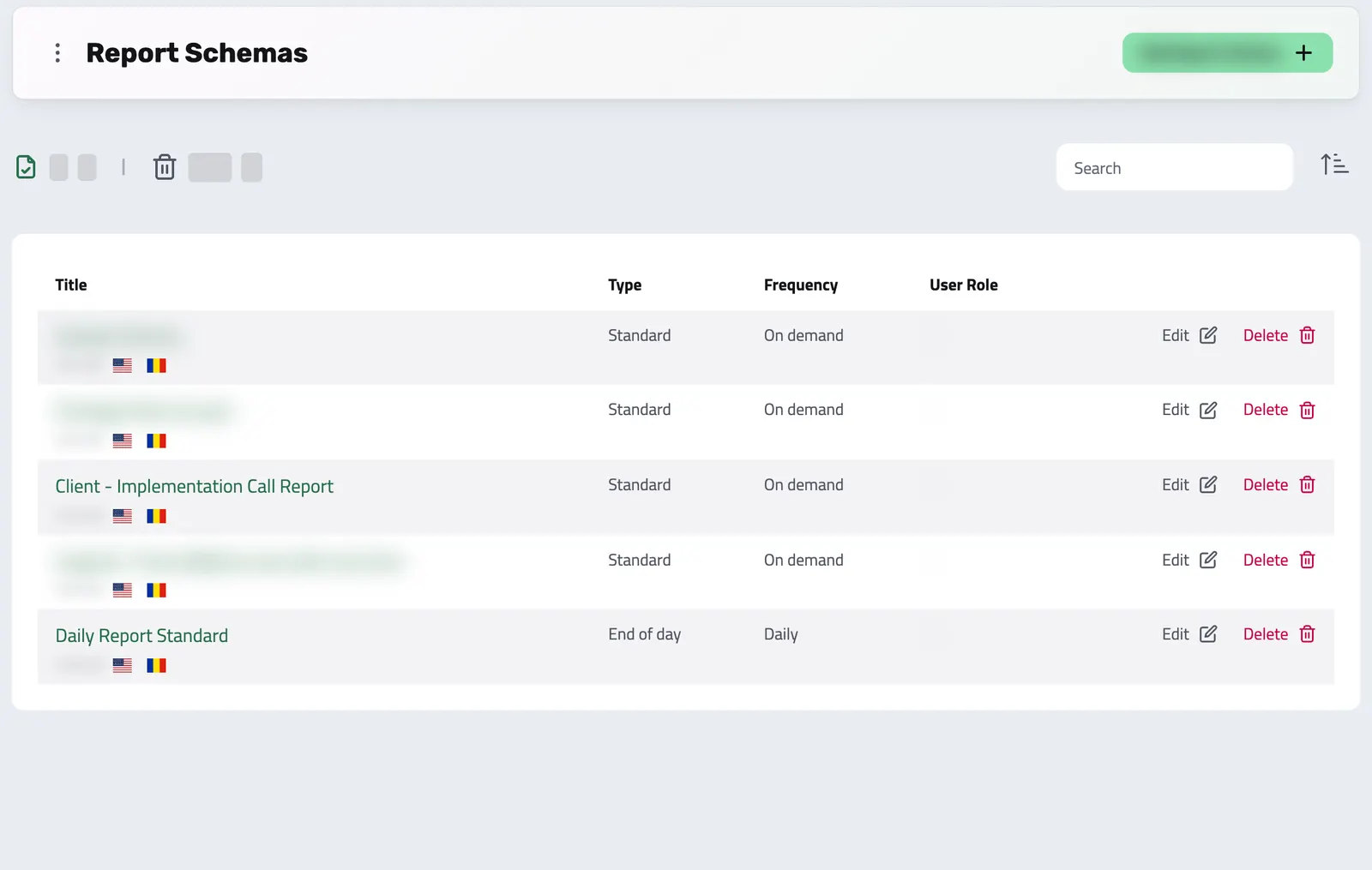
Replace updates spread across chat and email with structured reports your team fills in. You define the questions and the expected rhythm once with a reusable schema, share it with the people who answer it, and every submission lands in Enlivy, ready to compare.
Create a free accountFree account, no card needed. The Reports · Standard pack is €6.99/month, excluding VAT, and you add it in the app.
THE REPORTS ADVANTAGE
How Enlivy Reports Keep Teams Aligned and Informed
Structured updates that save time and improve clarity
Reports in Enlivy are designed to eliminate guesswork.
Instead of chasing information in emails or chat threads, you get organized, role-specific answers in the same format every time.
-
Smart Role Targeting
Decide who can submit each schema, who sees only their own reports, and who sees everyone else's, through projects and roles.
-
Customizable Data Collection
Mix and match fields like text, dropdowns, timesheets, or checkboxes to gather exactly the information you need.
-
Consistent Reporting Cycles
Label each schema daily, weekly, quarterly, or on demand, so everyone knows the expected rhythm.
-
Easy Tracking & Insights
Reports stay on record, so you can review submissions, compare data, and track progress over time.
What Reports Change for Your Organization
Clarity, accountability, and better decisions.
With Enlivy Reports, updates aren’t just routine, they become actionable insights.
By standardizing how information is collected, you eliminate confusion, reduce repetitive follow-ups, and give everyone a clear view of progress.
Reports help teams:
-
Stay aligned without endless meetings
-
Spot trends and bottlenecks early
-
Keep stakeholders informed
-
Focus more on doing the work, not reporting it
Report Schemas
The Blueprint Behind Every Report
Define the structure. Collect the right data. Every time.
Report Schemas are the backbone of the Reports feature in Enlivy.
They define exactly what questions should be asked, who needs to answer them, and how often answers are expected.
Instead of each person writing updates their own way, schemas bring consistency and clarity, ensuring every report follows the same format.
By creating a schema once, you save time, maintain structure, and collect clean, comparable data that’s easy to analyze. Think of it as the blueprint that keeps reporting organized and reliable.
-
Consistent Structure
Every user answers the same predefined questions, making reports easy to read and compare.
-
Role-Based Assignments
Share each schema through a project and decide who can submit it, who sees only their own reports, and who sees everyone else's.
-
Flexible Frequency
Mark a schema as daily, weekly, quarterly, or on demand, so everyone knows the expected rhythm.
FULL CONTROL
What Can You Customize in a Report Schema?
Full control over your reporting structure
A Report Schema in Enlivy isn't just a static form, it's a flexible blueprint for how your reports are created, displayed, and filled out.
You decide what data needs to be collected, who should provide it, and how it should appear, ensuring consistency across your entire team.
-
General Settings
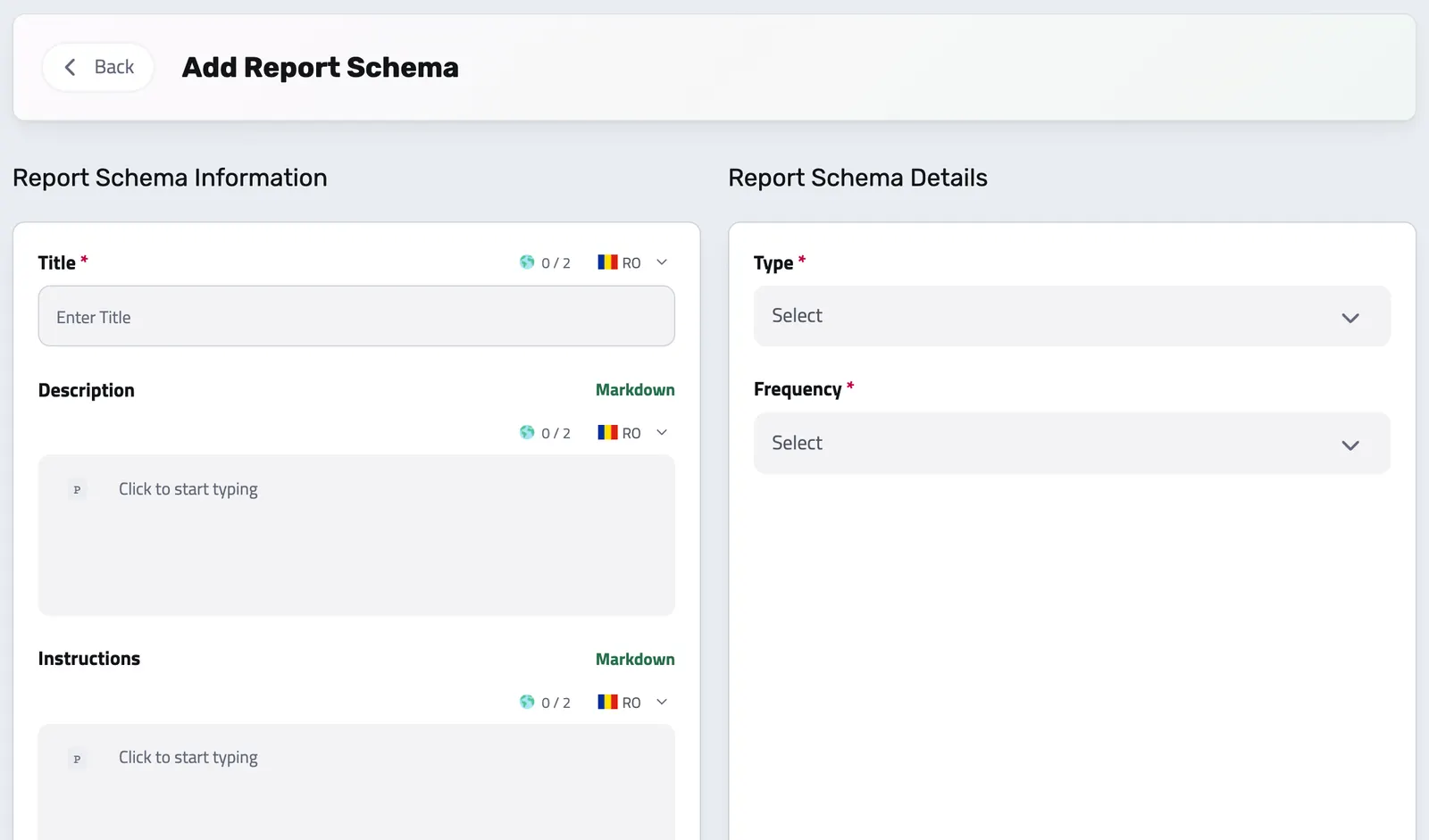
Set the title, description, instructions, and frequency for each schema, in each of your languages.
-
Field Styles
Adjust how each field is styled, so the form stays clean and easy to fill in.
-
Report Fields
Add questions or fields in formats like text, dropdowns, radio buttons, or timesheets.
-
Conditional Logic
Show or hide fields based on previous answers, so each report asks only what applies.
How Reports Work in Enlivy
Turn updates into structured, easy-to-track insights.
In many organizations, updates are shared randomly, some via chat, some in long emails, others forgotten entirely.
With Enlivy, Reports give you a single, organized way to collect updates, track progress, and keep everyone accountable.
-
Define the Report Schema
First, you create a Report Schema, a reusable template that decides what questions to ask, who should answer them, and how often.
Example:
- A Daily Report for employees with fields like “What did you accomplish today?”
- A Weekly Summary for managers with questions about team progress and blockers.
-
The Right People Open the Right Schema
Once a schema is saved and shared, the people with access open it from their Reports section and submit it when it is due.
Example:
- Employees fill in the daily schema in their Reports section each morning.
- Managers submit the weekly one on Friday.
The schema’s frequency tells everyone the expected rhythm. Enlivy does not create the report for them or send reminders.
-
Users Fill and Submit Their Reports
Users simply open their pending report, answer the predefined fields (like text, radio buttons, timesheets, etc.), and submit. The process is clear, quick, and structured, so no one wastes time figuring out what to write.
-
Managers & Admins Review the Data
Once submitted, reports are instantly available for review. You can:
- Browse individual reports
- Compare responses over time
- Spot trends, blockers, or missing updates
Example:
- A manager sees the whole team’s daily reports together, without searching through chats or emails.
- A client gets a clear, structured project update instead of fragmented messages.
Works together with
- Users Easily customize roles and permissions in Enlivy for clients, partners, accountants, and administrators, ensuring secure and efficient access.
- Dashboard See the work and numbers that matter to you, then customize the dashboard by adding and arranging available widgets.
- Sales Pipeline See which opportunities are moving forward, review the conversation before you follow up and keep proposals close to the deal.
- Data Export Export your invoices, receipts, payslips, contracts, and transactions in the format and folder structure your accountant expects, for any date range. Built in, at no extra cost, on every plan.
- MCP Connect Enlivy to Claude, ChatGPT, Cursor, or any AI assistant through MCP. Ask about your invoices, contracts, and pipeline, and get real work done, safely scoped to exactly what your own account can already do.