

Billing Schedules
Track Every Subscription, Retainer, and Payment Plan in One Place
Set up a subscription, retainer, or payment plan, link its invoices and receipts, and see exactly how much has been paid, what is pending, and where each relationship stands.
Create a free accountFree account, no card needed. The Billing Schedules pack is €9.99/month, excluding VAT, and you add it in the app.
FLEXIBLE BILLING
Bill Any Deal, Any Shape
Subscriptions, payment plans, or both in one schedule. You pick the right billing for each customer.
Every billing schedule runs one of two ways: Enlivy runs it end to end, or it mirrors a subscription you already run elsewhere. You choose per customer, and you can use both at once.
App-managed schedules bill in two shapes, recurring subscriptions and fixed payment plans, and can mix them in a single schedule: a setup fee, a finite intro period, then an open-ended retainer. Set it once.
-
Recurring subscriptions
The same charge repeats on any cadence, weekly to yearly, indefinitely or until an end date.
-
Fixed payment plans
A finite set of installments, each its own amount and date, invoiced on schedule and charged automatically when a card is on file.
-
Phased and mixed
Step pricing up or down across phases, or combine a one-off fee, an intro rate, and an ongoing subscription in one schedule.
-
You run it, or you mirror it
Let Enlivy run new billing end to end, or import subscriptions you already run and keep them in sync, no migration.
HANDS-OFF BY DEFAULT
Payments That Run Themselves
Set the schedule once. Enlivy invoices, applies the tax and charges saved cards every cycle.
Each cycle, Enlivy generates the invoice, numbered and taxed, and where a card is on file it charges automatically, through your own Stripe account, so the money goes straight to you.
It keeps itself honest too: a card payment marks its invoice paid as soon as Stripe confirms it, and an hourly check against Stripe catches any confirmation that went missing.
-
Invoiced when due
An hourly process checks every active schedule and raises each invoice once it is due.
-
Charged automatically
Saved cards are charged off-session when the invoice is created, with no customer interaction and no accidental double-bills.
-
Your account, your money
Charges run through your own payment account, so funds go straight to you, never to Enlivy.
-
Self-correcting
Card payments mark their invoice paid when Stripe confirms them, and an hourly check fixes any confirmation that went missing.
-
Bank transfer and manual too
Not everything is a card. Manual and bank-transfer methods are tracked right alongside the automatic ones.
Where Did That Money Go?
Payments scattered across folders, inboxes, and spreadsheets, and no clean answer when someone asks what a client has actually paid.
-
Client payment confusion
Without Enlivy: A client has paid you monthly for 8 months. How much in total? What is still pending? You should not have to go back through old records to answer.
With Enlivy: One schedule shows every invoice and payment for a client, with totals and pending amounts always current.
-
No long-term visibility
Without Enlivy: You know what happened this month, but how much has this supplier cost you over the year? The data exists, just spread across a year of separate records.
With Enlivy: Every schedule keeps the full arc of the relationship, so the yearly picture is one click, not an investigation.
-
Unstructured payment history
Without Enlivy: Invoices in one folder, receipts in another, confirmations in email. Answering "how much did we pay them?" means searching all three.
With Enlivy: Invoices, receipts, and payments live on the schedule they belong to, as one structured, running history.
-
Manual reconciliation
Without Enlivy: Month-end means hours of spreadsheet work matching payments to invoices, calculating totals, and hoping the numbers are right.
With Enlivy: Card payments settle their invoice on their own and bank transfers are linked in a click, so the totals stay current without the spreadsheet.
THE ENGINE BEHIND IT
Safe to Let Customers Self-Serve
Handing customers the controls is only a good idea if the machine behind the controls is trustworthy.
- Byte-exact price grandfathering
When a customer changes plan, the items they already have keep their exact agreed price, currency, and quantity, to the cent, across unlimited changes. Raise list prices without a churn event.
- A preview that equals the charge
The "what will this cost me?" screen runs the real billing logic in memory, with no write and no risk, at the exchange rates in force when you confirm. There will be no surprises on the invoice.
- Fair, one-directional proration
Upgrades charge only the net, time-weighted difference as one clean invoice. Downgrades never pay cash back out. Foreign-priced lines are converted before netting.
- One package, every currency
Price the same package per currency, and bill each customer in their own. If a rate is missing or stale, the charge aborts rather than mis-bills. Correctness over collection.
- No double charges, ever
Charges are row-locked and idempotency-keyed, so a double-click, a retry, or a collision with the billing run cannot charge a customer twice.
- Card-loss auto-recovery
If a card expires, the subscription pauses itself instead of failing repeatedly. The moment a working card is added, it resumes and collects the balance owed. Revenue is not lost to an expired card.
Customer Self-Service, Set Per Schedule
Every billing schedule carries its own self-service rules. Each one can defer to the package default or override it, so you decide exactly what a customer can do on their own.
- Change plan
Use package default · Allow · Don't allow
- Cancel subscription
Use package default · Allow · Don't allow
- Pause & resume
Use package default · Allow · Don't allow
TRY IT
Reconfigure a Live Subscription
This is the real Change Package Terms editor. Open the drawer, add or edit a line, pick a proration mode, and watch the preview recompute, exactly what a customer sees.
CAPABILITIES
Everything You Need to Track Recurring Payments
From automatic invoicing to audit-ready trails, built for businesses that need answers, not just data.
- Unified Dashboard
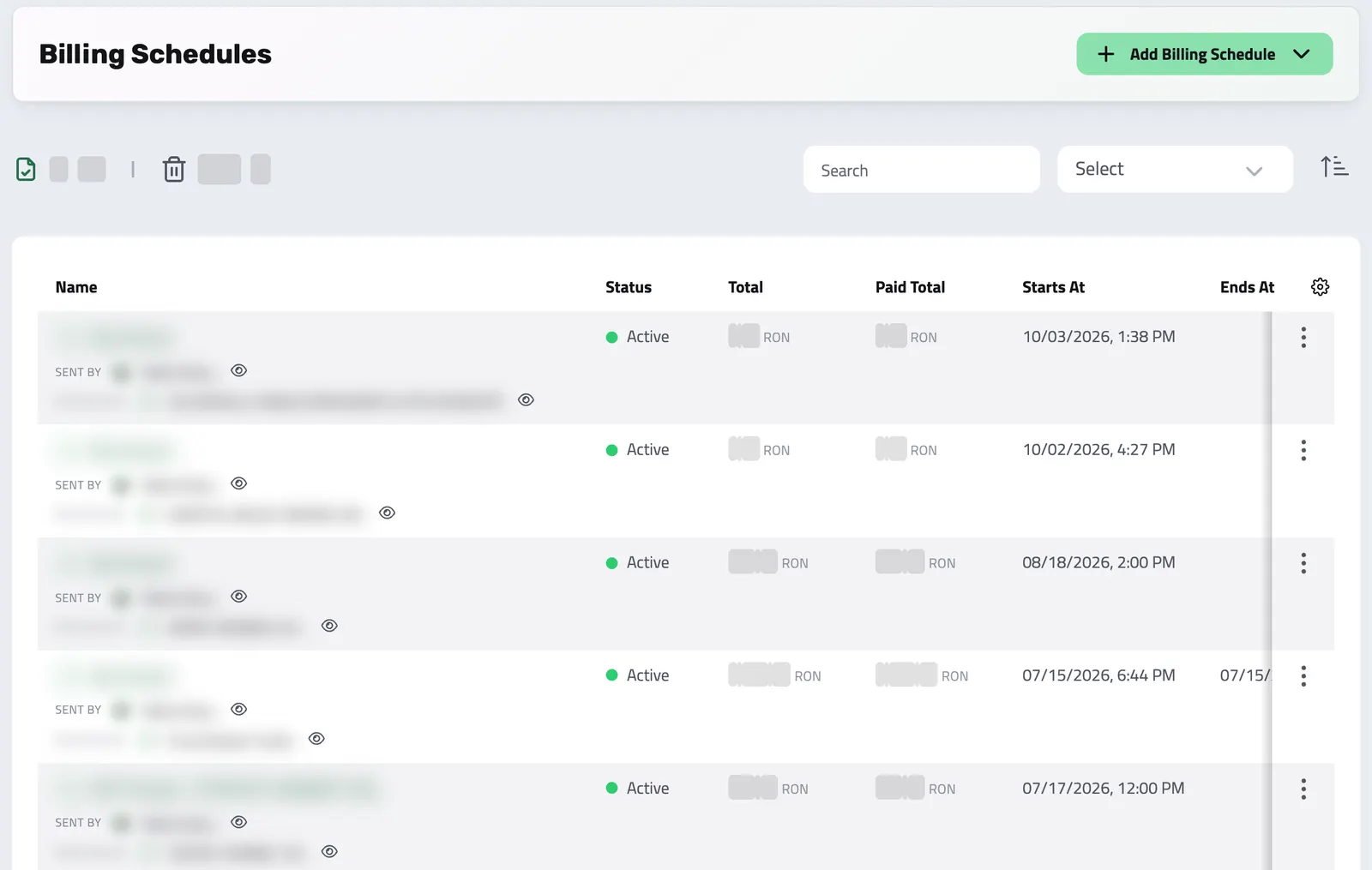
See all billing schedules in one list: inbound and outbound, active and completed. Filter by direction, status, sender, or recipient.
- Visible Email Recipients
On a schedule, see whether email notifications are on and which address receives them. A custom recipient can replace the receiving user address; configured CC addresses remain visible.
- Hourly Auto-Invoicing
An hourly background process watches every active schedule. When a payment is due, the invoice is generated automatically: numbered, taxed, and ready.
- Off-Session Card Charging
Cards are charged automatically when each invoice is created, no customer interaction needed. Idempotent charging means no accidental double-bills, ever.
- Document Linking
Link invoices, receipts, or payslips to any schedule. Enlivy auto-populates amounts, taxes, and payment status; saving hours every month.
- Flexible Frequencies
Weekly, bi-weekly, monthly, or yearly. Open-ended or bounded by an end date. Each phase can also have a fixed number of occurrences before stepping to the next.
- Multi-Currency Billing
Quote in one currency, bill in another. Enlivy converts each invoice at the reference exchange rate for its date, with an optional conversion fee for FX spread, every cycle.
- Status Management
Mark schedules as pending, active, or cancelled. Keep your dashboard clean and focused on what matters now.
- Reuse & Edit
Clone existing schedules for similar arrangements. Edit active schedules as agreements change.
NOTIFICATION VISIBILITY
See who a schedule will notify
The schedule shows whether email notifications are active, its resolved recipient and any configured CC addresses. Check this before relying on a payment notice.
Structure Every Financial Relationship
-
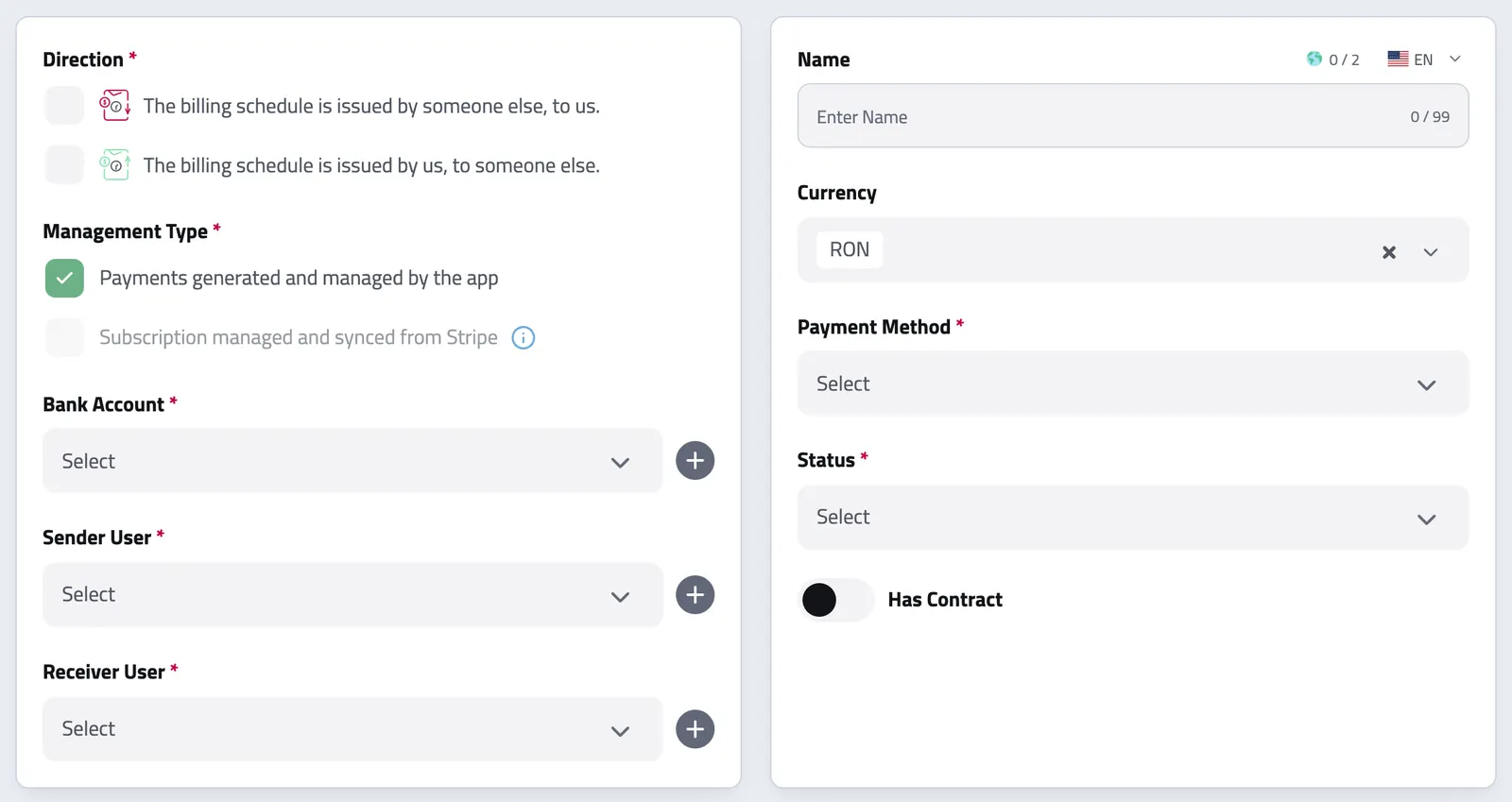
Create Your Schedule
Set up any billing relationship in seconds. Choose direction (client paying you or you paying a supplier), type (subscription or payment plan), and frequency.
-
Link Your Documents
Connect invoices, receipts, or payslips to your schedule. Enlivy automatically pulls amounts, tax info, and payment status: building your payment history without manual entry.
-
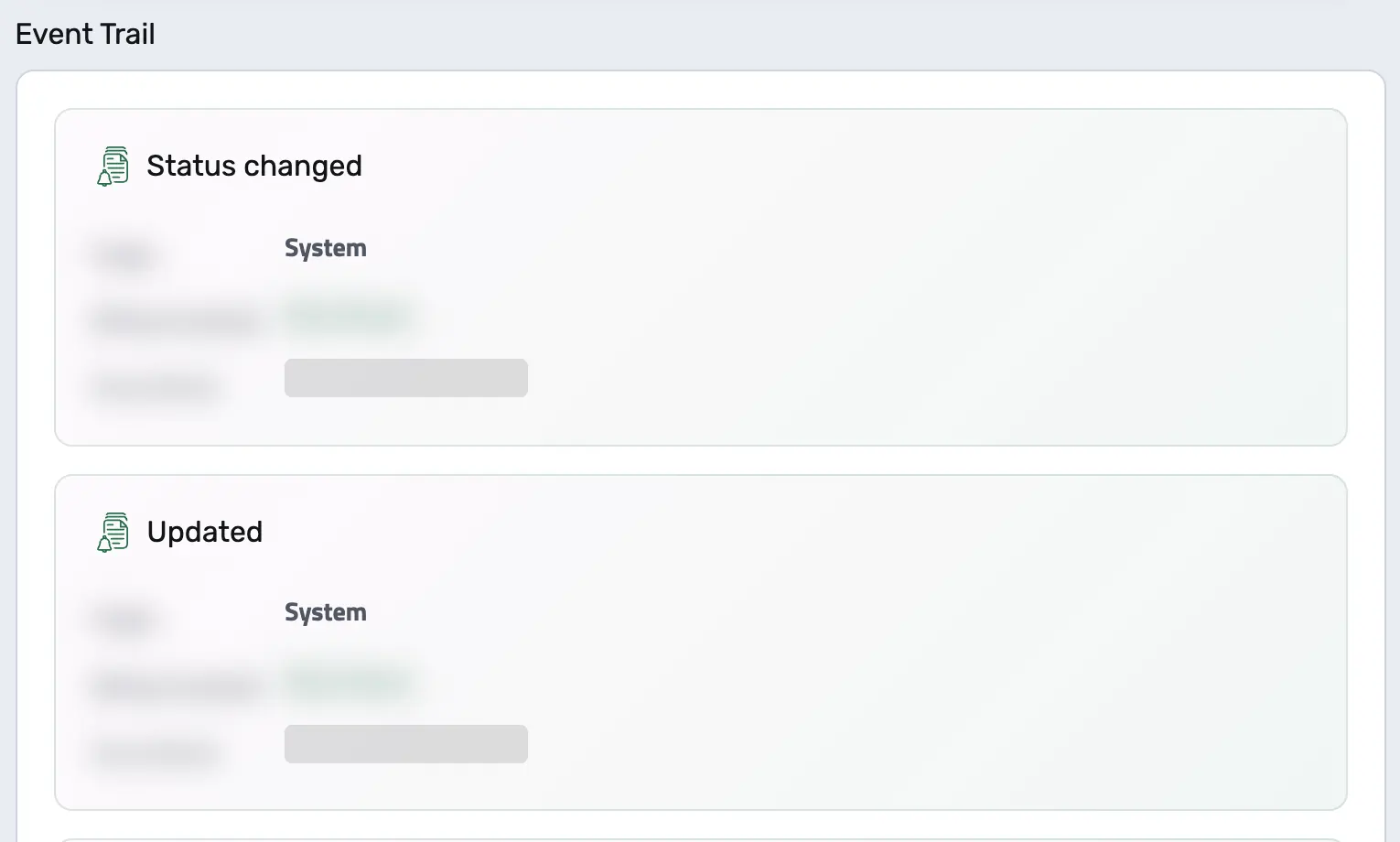
Watch It Update
As invoices get paid or receipts are processed, the billing schedule updates to reflect the current state, so nobody chases statuses in a spreadsheet.
-
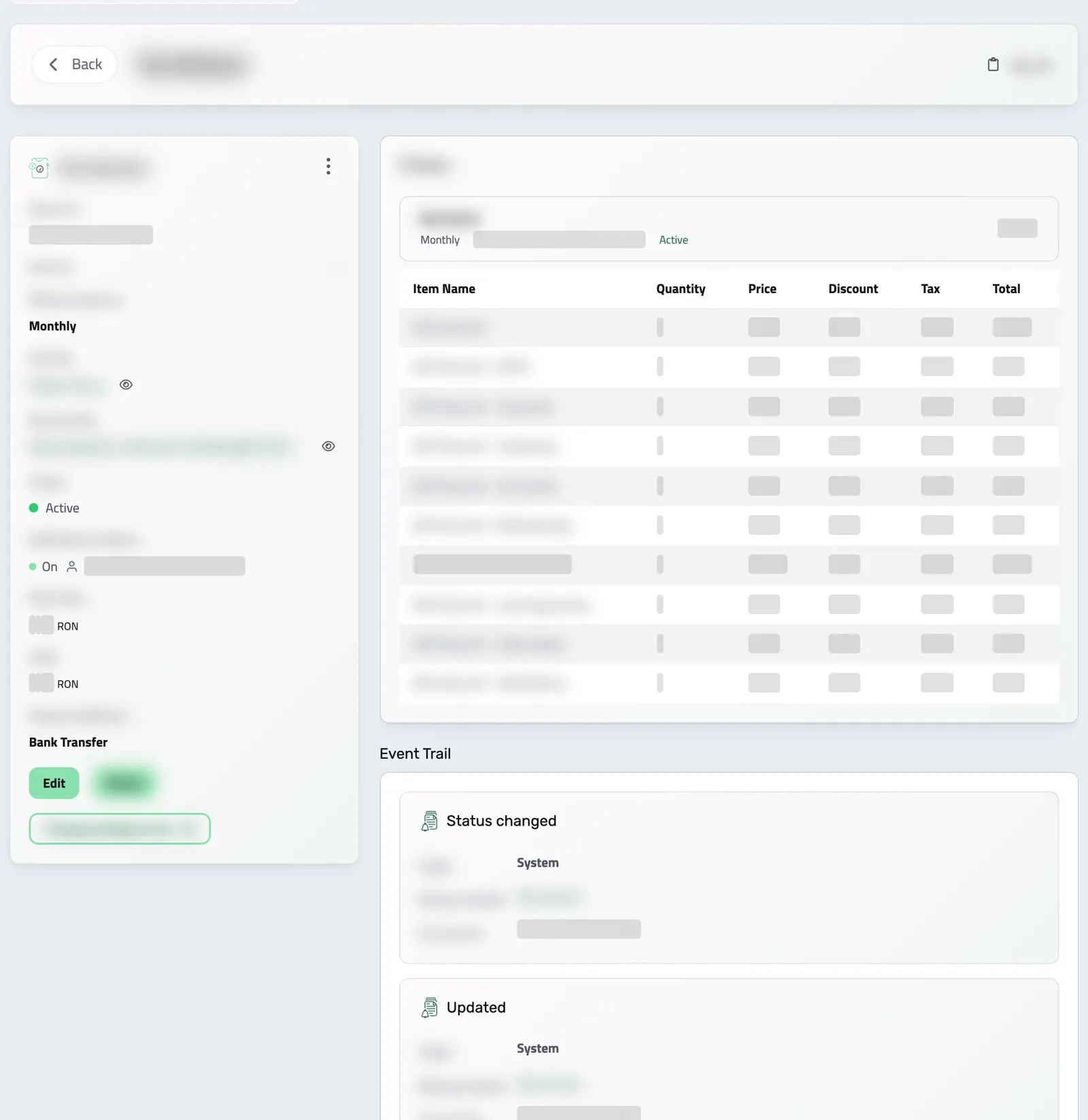
See The Complete Picture
View total amounts paid, payment dates, pending invoices, and exactly where every financial relationship stands: instantly, from one dashboard.
API Reference
Billing Schedules from the API
Automate recurring revenue end-to-end. An app-managed billing schedule is run entirely by Enlivy: it generates invoices on the cadence you define, charges the saved payment method, and moves through its own lifecycle: pending, active, paused, cancelling, completed. You define the composition once; the engine bills it on schedule.
This reference covers app-managed schedules only. Enlivy also supports Stripe-hosted schedules, where Stripe owns the subscription and runs the billing. Those are managed on Stripe’s side, so their creation and modification aren’t covered here. You can compose an app-managed schedule two ways: from raw phases (your own recurring line items and cadence) or from a subscription billing package (a reusable template). The examples below cover both, plus listing, editing, reconfiguring, and cancelling.
Query your schedules with pagination, filtering, and full-text search. Filter by status, direction (outbound / inbound), sender, receiver, contract, bank account, or any of the date ranges (starts_at, ends_at, created_at, updated_at). Expand the phases and generated payments inline.
/organizations/<organization_id>/billing-schedules # status: pending | active | payment_method_required | paused | cancelling | completed | cancelled
curl -G 'https://api.enlivy.com/organizations/<organization_id>/billing-schedules' \
--data-urlencode 'page=1' \
--data-urlencode 'limit=20' \
--data-urlencode 'status=active' \
--data-urlencode 'direction=outbound' \
--data-urlencode 'include=receiver_user,phases,payments' \
--data-urlencode 'include_meta=navigation' \
-H "Authorization: Bearer $ENLIVY_API_TOKEN" \
-H 'Accept: application/json' const baseUrl = "https://api.enlivy.com" ;
const token = process.env.ENLIVY_API_TOKEN;
const organizationId = "<organization_id>";
// status: pending | active | payment_method_required | paused | cancelling | completed | cancelled
const query = new URLSearchParams({
page: "1",
limit: "20",
status: "active",
direction: "outbound",
include: "receiver_user,phases,payments",
include_meta: "navigation",
});
const result = await fetch(`${baseUrl}/organizations/${organizationId}/billing-schedules?${query}` , {
method: "GET",
headers: {
Authorization: `Bearer ${token}`,
Accept: "application/json" ,
},
}).then((response) => response.json());Retrieve a single schedule with everything attached: its phases and line items, the payments generated so far, the counterparties, and the linked package or contract. Read next_payment_create_at to see when the engine bills next, and total / paid_total for progress.
/organizations/<organization_id>/billing-schedules/<billing_schedule_id> # includes: sender_user, receiver_user, contract, billing_package,
# subscription_term, phases, payments, deleted_by_user
curl -G 'https://api.enlivy.com/organizations/<organization_id>/billing-schedules/<billing_schedule_id>' \
--data-urlencode 'include=phases,payments,receiver_user,billing_package' \
-H "Authorization: Bearer $ENLIVY_API_TOKEN" \
-H 'Accept: application/json' const baseUrl = "https://api.enlivy.com" ;
const token = process.env.ENLIVY_API_TOKEN;
const organizationId = "<organization_id>";
const billingScheduleId = "<billing_schedule_id>";
// includes: sender_user, receiver_user, contract, billing_package,
// subscription_term, phases, payments, deleted_by_user
const query = new URLSearchParams({
include: "phases,payments,receiver_user,billing_package",
});
const result = await fetch(`${baseUrl}/organizations/${organizationId}/billing-schedules/${billingScheduleId}?${query}` , {
method: "GET",
headers: {
Authorization: `Bearer ${token}`,
Accept: "application/json" ,
},
}).then((response) => response.json());The most direct way to bill: define one or more phases, each with its own cadence and line items. The engine issues an invoice per phase occurrence and charges it. Phases are exclusive to app-managed schedules.
/organizations/<organization_id>/billing-schedules curl -X POST 'https://api.enlivy.com/organizations/<organization_id>/billing-schedules' \
-H "Authorization: Bearer $ENLIVY_API_TOKEN" \
-H 'Accept: application/json' \
-H 'Content-Type: application/json' \
-d '{
"management_type": "app_managed",
"direction": "outbound",
"status": "active",
"organization_sender_user_id": "<org_user_sender_id>",
"organization_receiver_user_id": "<org_user_receiver_id>",
"currency": "EUR",
"payment_method": "stripe_card_payment",
"organization_user_payment_method_id": "<payment_method_id>",
"name_lang_map": {
"en": "Monthly Retainer"
},
"note_lang_map": {
"en": "Includes support and hosting."
},
"is_email_notifications_active": true,
"email_notifications_to": "billing@acme.example",
"customer_can_reconfigure": false,
"customer_can_cancel": true,
"customer_can_pause": false,
"phases": [
{
"frequency": "monthly",
"execute_after": "2026-08-01",
"max_occurrences": 12,
"due_date_type": "custom_days",
"due_date_days": 14,
"order": 0,
"line_items": [
{
"name_lang_map": {
"en": "Retainer"
},
"quantity": 1,
"price": 500,
"organization_tax_class_id": "<tax_class_id>"
},
{
"organization_product_id": "<product_id>",
"quantity": 2,
"price": 49.9
}
]
}
]
}'const baseUrl = "https://api.enlivy.com" ;
const token = process.env.ENLIVY_API_TOKEN;
const organizationId = "<organization_id>";
const result = await fetch(`${baseUrl}/organizations/${organizationId}/billing-schedules` , {
method: "POST",
headers: {
Authorization: `Bearer ${token}`,
Accept: "application/json" ,
"Content-Type": "application/json" ,
},
body: JSON.stringify({
// this reference only covers app_managed
management_type: "app_managed",
// outbound = you bill a customer; inbound = you are billed
direction: "outbound",
// start billing right away
status: "active",
// the biller (you)
organization_sender_user_id: "<org_user_sender_id>",
// the customer (required for outbound)
organization_receiver_user_id: "<org_user_receiver_id>",
currency: "EUR",
// bank_transfer | card_payment | stripe_card_payment | paypal | cash | paid_by_personal_funds
payment_method: "stripe_card_payment",
// saved card to auto-charge (must belong to the receiver)
organization_user_payment_method_id: "<payment_method_id>",
name_lang_map: {
// per-locale maps, not plain strings
en: "Monthly Retainer",
},
note_lang_map: { en: "Includes support and hosting." },
is_email_notifications_active: true,
email_notifications_to: "billing@acme.example",
// customer self-service toggles (what the recipient may do from the portal)
customer_can_reconfigure: false,
customer_can_cancel: true,
customer_can_pause: false,
// totals + dates (total, paid_total, starts_at, ends_at, next_payment_create_at)
// are computed by the engine, do NOT send them.
// phases are valid ONLY for app_managed (stripe_hosted rejects them). Max 20.
phases: [
{
// weekly | biweekly | monthly | yearly
frequency: "monthly",
// first run date for this phase
execute_after: "2026-08-01",
// stop after N invoices (omit for open-ended)
max_occurrences: 12,
// immediate | end_of_month | custom_days
due_date_type: "custom_days",
// required only when due_date_type = custom_days
due_date_days: 14,
order: 0,
line_items: [
{
name_lang_map: {
// required unless organization_product_id is set
en: "Retainer",
},
quantity: 1,
// money: signed decimal in MAJOR units (not cents)
price: 500,
organization_tax_class_id: "<tax_class_id>",
},
{
// pulls name / tax defaults from the product
organization_product_id: "<product_id>",
quantity: 2,
price: 49.9,
},
],
},
],
}),
}).then((response) => response.json());Instead of hand-building phases, materialize the schedule from a reusable subscription billing package. The package owns the composition, you just pick the cadence variant and which group items to include.
/organizations/<organization_id>/billing-schedules/from-billing-package # The package supplies the phases and the line items, so none are sent here.
curl -X POST 'https://api.enlivy.com/organizations/<organization_id>/billing-schedules/from-billing-package' \
-H "Authorization: Bearer $ENLIVY_API_TOKEN" \
-H 'Accept: application/json' \
-H 'Content-Type: application/json' \
-d '{
"organization_billing_package_id": "<billing_package_id>",
"organization_billing_package_subscription_term_id": "<subscription_term_id>",
"selected_group_items": [
{
"id": "<group_item_id>",
"quantity": 1
},
{
"id": "<other_group_item_id>",
"quantity": 3
}
],
"organization_sender_user_id": "<org_user_sender_id>",
"organization_receiver_user_id": "<org_user_receiver_id>",
"status": "active",
"payment_method": "bank_transfer",
"currency": "EUR",
"start_at": "2026-11-01",
"is_email_notifications_active": true
}'const baseUrl = "https://api.enlivy.com" ;
const token = process.env.ENLIVY_API_TOKEN;
const organizationId = "<organization_id>";
// The package supplies the phases and the line items, so none are sent here.
const result = await fetch(`${baseUrl}/organizations/${organizationId}/billing-schedules/from-billing-package` , {
method: "POST",
headers: {
Authorization: `Bearer ${token}`,
Accept: "application/json" ,
"Content-Type": "application/json" ,
},
body: JSON.stringify({
// attach a SUBSCRIPTION package, it defines the phases & line items
organization_billing_package_id: "<billing_package_id>",
// optional: pick the cadence variant; omit to use the package default
organization_billing_package_subscription_term_id: "<subscription_term_id>",
// optional: choose which package group items (and quantities) to include
selected_group_items: [
{ id: "<group_item_id>", quantity: 1 },
{ id: "<other_group_item_id>", quantity: 3 },
],
organization_sender_user_id: "<org_user_sender_id>",
organization_receiver_user_id: "<org_user_receiver_id>",
// pending | active
status: "active",
payment_method: "bank_transfer",
currency: "EUR",
start_at: "2026-11-01",
is_email_notifications_active: true,
}),
}).then((response) => response.json());Update metadata (name, notes, notification settings, self-service toggles) and drive the lifecycle by moving status: pause an active schedule, resume a paused one, or set it to cancel. Send only what you want to change.
/organizations/<organization_id>/billing-schedules/<billing_schedule_id> # to change WHAT gets billed on a package-managed schedule,
# use /reconfigure below rather than editing here.
curl -X PUT 'https://api.enlivy.com/organizations/<organization_id>/billing-schedules/<billing_schedule_id>' \
-H "Authorization: Bearer $ENLIVY_API_TOKEN" \
-H 'Accept: application/json' \
-H 'Content-Type: application/json' \
-d '{
"status": "paused",
"note_lang_map": {
"en": "Paused at customer request."
},
"is_email_notifications_active": false,
"customer_can_cancel": true
}'const baseUrl = "https://api.enlivy.com" ;
const token = process.env.ENLIVY_API_TOKEN;
const organizationId = "<organization_id>";
const billingScheduleId = "<billing_schedule_id>";
// to change WHAT gets billed on a package-managed schedule,
// use /reconfigure below rather than editing here.
const result = await fetch(`${baseUrl}/organizations/${organizationId}/billing-schedules/${billingScheduleId}` , {
method: "PUT",
headers: {
Authorization: `Bearer ${token}`,
Accept: "application/json" ,
"Content-Type": "application/json" ,
},
body: JSON.stringify({
// lifecycle: active <-> paused; set "cancelling" to stop at the end of the cycle
status: "paused",
note_lang_map: { en: "Paused at customer request." },
is_email_notifications_active: false,
customer_can_cancel: true,
}),
}).then((response) => response.json());Change what a package-managed schedule bills: swap the package, change the term, adjust selected items and quantities, override prices, or add one-off custom line items. Always preview first: the preview endpoint returns the resulting composition and any proration before a cent is charged.
/organizations/<organization_id>/billing-schedules/<billing_schedule_id>/preview-reconfigure +1# 1. Preview, no changes are applied; returns the new composition + proration
curl -X POST 'https://api.enlivy.com/organizations/<organization_id>/billing-schedules/<billing_schedule_id>/preview-reconfigure' \
-H "Authorization: Bearer $ENLIVY_API_TOKEN" \
-H 'Accept: application/json' \
-H 'Content-Type: application/json' \
-d '{
"organization_billing_package_id": "<billing_package_id>",
"organization_billing_package_subscription_term_id": "<subscription_term_id>",
"selected_group_items": [
{
"id": "<group_item_id>",
"quantity": 2,
"price_override": 39,
"pricing_currency": "EUR"
}
],
"custom_line_items": [
{
"name_lang_map": {
"en": "One-off setup"
},
"quantity": 1,
"price": 150
}
],
"proration_mode": "prorate_next_invoice"
}'
# 2. Apply
curl -X PUT 'https://api.enlivy.com/organizations/<organization_id>/billing-schedules/<billing_schedule_id>/reconfigure' \
-H "Authorization: Bearer $ENLIVY_API_TOKEN" \
-H 'Accept: application/json' \
-H 'Content-Type: application/json' \
-d '{
"organization_billing_package_id": "<billing_package_id>",
"organization_billing_package_subscription_term_id": "<subscription_term_id>",
"selected_group_items": [
{
"id": "<group_item_id>",
"quantity": 2,
"price_override": 39,
"pricing_currency": "EUR"
}
],
"custom_line_items": [
{
"name_lang_map": {
"en": "One-off setup"
},
"quantity": 1,
"price": 150
}
],
"proration_mode": "prorate_next_invoice"
}'const baseUrl = "https://api.enlivy.com" ;
const token = process.env.ENLIVY_API_TOKEN;
const organizationId = "<organization_id>";
const billingScheduleId = "<billing_schedule_id>";
const headers = {
Authorization: `Bearer ${token}`,
Accept: "application/json" ,
"Content-Type": "application/json" ,
};
// 1. Preview, no changes are applied; returns the new composition + proration
const result1 = await fetch(`${baseUrl}/organizations/${organizationId}/billing-schedules/${billingScheduleId}/preview-reconfigure` , {
method: "POST",
headers,
body: JSON.stringify({
organization_billing_package_id: "<billing_package_id>",
organization_billing_package_subscription_term_id: "<subscription_term_id>",
selected_group_items: [
// price_override + pricing_currency let you deviate from the package price
{
id: "<group_item_id>",
quantity: 2,
price_override: 39,
pricing_currency: "EUR",
},
],
custom_line_items: [{ name_lang_map: { en: "One-off setup" }, quantity: 1, price: 150 }],
// how the switch is billed: none | prorate_immediately | prorate_next_invoice
// (prorate_immediately requires an active schedule)
proration_mode: "prorate_next_invoice",
}),
}).then((response) => response.json());
// 2. Apply
const result2 = await fetch(`${baseUrl}/organizations/${organizationId}/billing-schedules/${billingScheduleId}/reconfigure` , {
method: "PUT",
headers,
body: JSON.stringify({
organization_billing_package_id: "<billing_package_id>",
organization_billing_package_subscription_term_id: "<subscription_term_id>",
selected_group_items: [
// price_override + pricing_currency let you deviate from the package price
{
id: "<group_item_id>",
quantity: 2,
price_override: 39,
pricing_currency: "EUR",
},
],
custom_line_items: [{ name_lang_map: { en: "One-off setup" }, quantity: 1, price: 150 }],
// how the switch is billed: none | prorate_immediately | prorate_next_invoice
// (prorate_immediately requires an active schedule)
proration_mode: "prorate_next_invoice",
}),
}).then((response) => response.json());Read aggregate recurring-revenue analytics across your schedules: a point-in-time summary (with forward projection) or a history_monthly breakdown, to power MRR dashboards without pulling every schedule yourself.
/organizations/<organization_id>/billing-schedules/analytics/summary # analyticsType: summary | history_monthly
curl -G 'https://api.enlivy.com/organizations/<organization_id>/billing-schedules/analytics/summary' \
--data-urlencode 'start_date=2026-01-01T00:00:00Z' \
--data-urlencode 'end_date=2026-12-31T23:59:59Z' \
--data-urlencode 'direction=outbound' \
--data-urlencode 'convert_to_currency=EUR' \
-H "Authorization: Bearer $ENLIVY_API_TOKEN" \
-H 'Accept: application/json' const baseUrl = "https://api.enlivy.com" ;
const token = process.env.ENLIVY_API_TOKEN;
const organizationId = "<organization_id>";
const analyticsType = "summary";
// analyticsType: summary | history_monthly
const query = new URLSearchParams({
start_date: "2026-01-01T00:00:00Z",
end_date: "2026-12-31T23:59:59Z",
direction: "outbound",
convert_to_currency: "EUR",
});
const result = await fetch(`${baseUrl}/organizations/${organizationId}/billing-schedules/analytics/${analyticsType}?${query}` , {
method: "GET",
headers: {
Authorization: `Bearer ${token}`,
Accept: "application/json" ,
},
}).then((response) => response.json());Soft-delete a schedule. Prefer setting status to cancelling (stops future billing at the end of the cycle) when you want to keep the record; delete when you want it gone. It can be restored later.
/organizations/<organization_id>/billing-schedules/<billing_schedule_id> # soft delete, restore via POST /billing-schedules/restore/{scheduleId}
curl -X DELETE 'https://api.enlivy.com/organizations/<organization_id>/billing-schedules/<billing_schedule_id>' \
-H "Authorization: Bearer $ENLIVY_API_TOKEN" \
-H 'Accept: application/json' const baseUrl = "https://api.enlivy.com" ;
const token = process.env.ENLIVY_API_TOKEN;
const organizationId = "<organization_id>";
const billingScheduleId = "<billing_schedule_id>";
// soft delete, restore via POST /billing-schedules/restore/{scheduleId}
const result = await fetch(`${baseUrl}/organizations/${organizationId}/billing-schedules/${billingScheduleId}` , {
method: "DELETE",
headers: {
Authorization: `Bearer ${token}`,
Accept: "application/json" ,
},
}).then((response) => response.json());Where it fits
Part of these setups
- Agencies and studios Core part Each payment plan and maintenance plan invoices when each payment falls due, by card or bank transfer. See the setup
- Course authors Core part Every due date creates the invoice and charges the saved card. See the setup
- Monthly billing Core part Each client's plan, billing date and payment method. Every cycle creates the invoice and charges saved cards. See the setup
- Sales teams Optional Adds recurring revenue. Each plan invoices when payments fall due and charges saved cards. See the setup
Works together with
- Invoices Create an invoice, send it to your client, and connect the contract, receipt or bank transaction that belongs with it. For Romanian e-Factura, use the configured ANAF connection.
- Receipts Record money in and money out, keep supporting files together, and connect a receipt to its related invoice or contract when needed.
- Payslips Your accountant works out the figures. Enlivy is where they land: every amount on its own coded line, in the vocabulary your country actually uses, checked against the payslip's own totals and tied to the employment, the contract and the payment it belongs to.
- Users Easily customize roles and permissions in Enlivy for clients, partners, accountants, and administrators, ensuring secure and efficient access.
- Contracts Draft contracts from templates, send them for signature with SMS or email identity verification, and track every signature and renewal.
- Billing Packages Build a plan once and offer it weekly, monthly, yearly, or anything in between. Customers subscribe and manage their card from a branded portal, and switch cycle, change tier, pause, or cancel when you allow it. With the Billing Schedules pack, each cycle is invoiced for you and card payments are collected through your own Stripe account.
- Slack Integration Stop checking dashboards to find out what changed. Enlivy brings important moments directly into Slack, from payments and proposals to Helpdesk conversations. Connect once, choose your events and route them to the right channels.
- MCP Connect Enlivy to Claude, ChatGPT, Cursor, or any AI assistant through MCP. Ask about your invoices, contracts, and pipeline, and get real work done, safely scoped to exactly what your own account can already do.