

Bank Transactions
Classify and Connect Bank Transactions to Invoices and Receipts
Bring every transaction into Enlivy: synced from your bank, imported from a file, or entered by hand. Then tie each one to the invoice, receipt, or payslip it belongs to, so every payment sits next to the document it settles.
Import your first statementFree account, no card needed.
WHY IT MATTERS
Always Know Where Your Money Went
One place for every transaction, no matter how the data arrives.
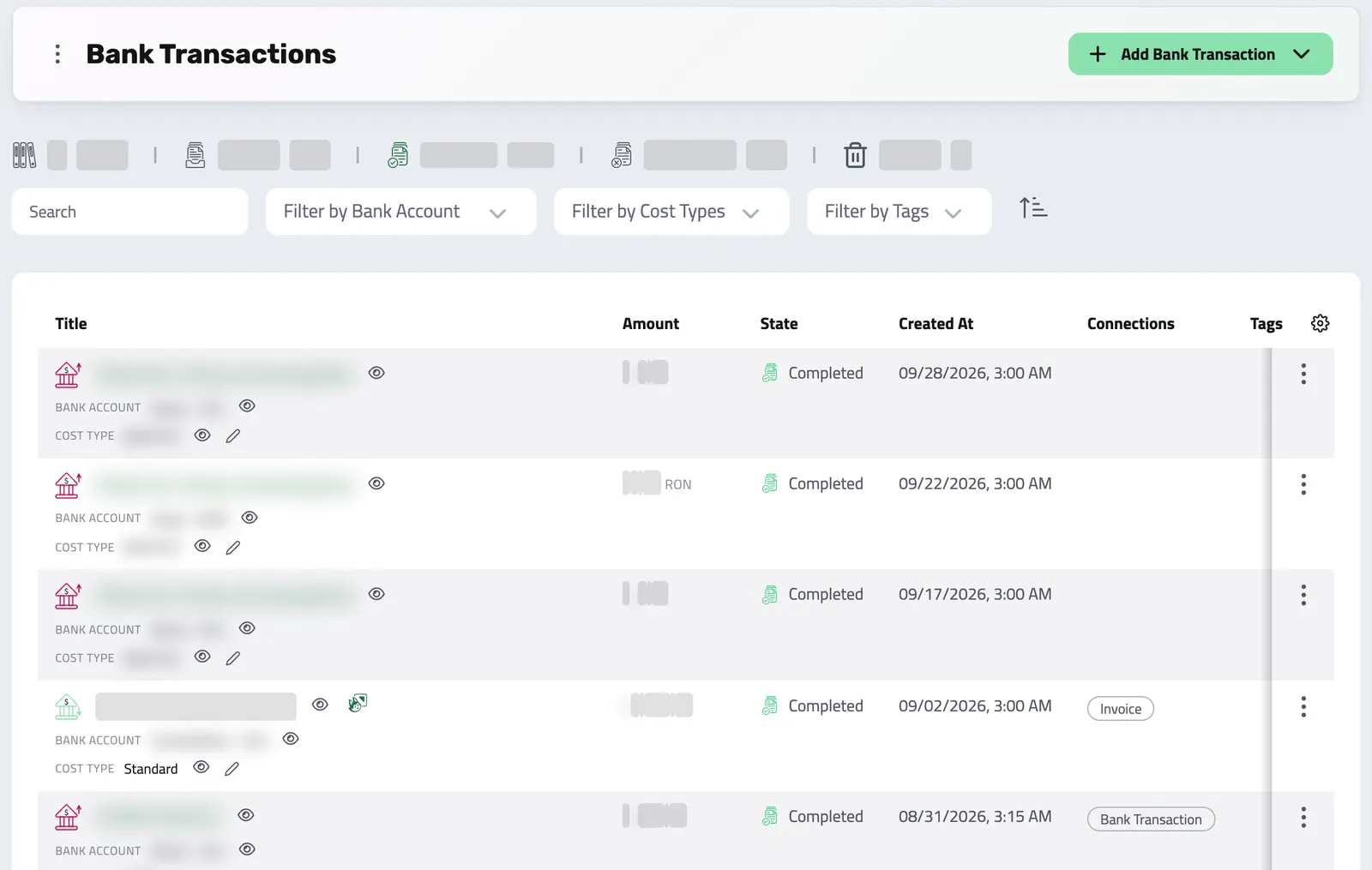
Every payment, transfer, and expense is brought together and linked with context, whether it is synced from your bank, imported from a file, or entered by hand.
Most tools stop at documents. Enlivy links each transaction to the documents it settles, so you see the full financial picture.
-
Financial visibility:
see all your accounts, currencies, and payment sources side by side.
-
Everything organized and searchable:
from connected bank feeds to internal transfers.
-
Everything connected
Classify each transaction and link it to the invoice, receipt, or payslip it settles.
-
What is paid, and what is not
See which transactions are linked to a document and which still need one.
-
Where your money goes
See where money flows each month, and why.
-
Every invoice accounted for
Match payments to the invoices they settle, so nothing slips through.
-
Payroll and taxes, confirmed
Check that a salary payout went through, and find tax payments by their cost type.
THREE WAYS TO ADD
3 Ways to Add Transactions
Sync it, import it, or enter it by hand. However the data arrives, it lands in the same organized place, ready to classify and reconcile.
- Bank Sync
(Recommended) Connect your bank securely with the Banking pack. Enlivy fetches your latest transactions on a regular sync.
- Works with the banks our PSD2 provider supports in your country
- Works via PSD2-compliant providers
- No credentials stored, and access is read-only
- Syncs several times a day on a schedule
Ideal for teams who want ongoing visibility without manual work.
- CSV Import
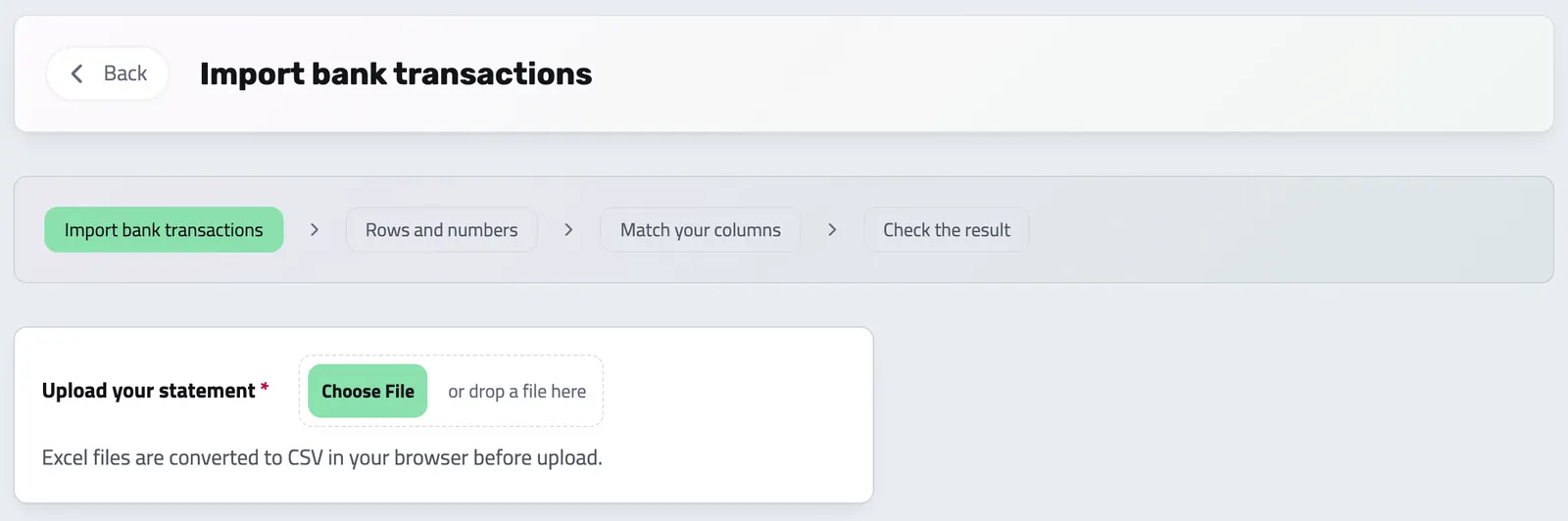
Have an export from your bank or another tool? Drop it in, and we will help you map the data in minutes.
- Works with CSV exports from your bank or accounting software
- No formatting stress, we guide you step by step
- Map the columns and pick the rows to import
- Manual Entry
Quickly log one-off transactions like internal payments, reimbursements, or corrections.
- Takes seconds
- Great for edge cases or cash handling
- Easily connect to people, documents, or notes
Perfect when you need to track something that is not in your bank yet.
Transactions That Talk to Your Business
Classify each transaction by type and, where needed, connect it to the record it settles. When your Stripe balance syncs with the Banking pack, Stripe processing fees appear as separate outgoing rows, so the payment and its costs can be reviewed independently.
- Client payment via Stripe + $256.33
- Type
- Standard, sale
- Links to
- Invoice INV-0042
- Stripe processing fee - $7.73
- Type
- Processing fee
- Links to
- Filed by type
- Monthly payroll run -8,600.00 RON
- Type
- Wage
- Links to
- Employee payslip
- Payroll and VAT to the tax authority -4,090.00 RON
- Type
- Wage Taxes / VAT
- Links to
- Filed by type
- Anthropic Claude subscription -180.00 EUR
- Type
- Software / SaaS
- Links to
- Filed by type
- Transfer between your own accounts 1,500.00 RON
- Type
- Internal transfer
- Links to
- Matching transaction
Type says what a transaction is. Link says which record it settles. A row needing a required connection stays unbalanced until its linked amounts match. Stripe fee rows can remain in the backlog for review; a processing fee is classified automatically only when that organization setting exists.
PAYMENT AND FEES
Review the Stripe payment and its fees separately
The payment and each processing or conversion fee have their own bank transaction rows. Review their classification and connections without hiding the fee inside the payment total.
HOW IT WORKS
It's Really Simple
-
Add Transactions
Sync your bank, upload a file, or enter them manually.
-
Review and Connect
Categorize and link them to invoices, payslips, or internal transfers.
-
Track and Report
Monitor cash flow, find unbalanced or unclassified rows, and prepare clean reports.
Every transaction, in the same list.
Is my data secure with Enlivy?
Yes. Enlivy uses industry-grade encryption, secure authentication, and PSD2-compliant bank connections. Your login credentials are never stored or visible to us. All data syncs are read-only and fully under your control.
Which banks and services can I connect?
You can connect accounts from a wide range of supported banks and fintech providers including Revolut, ING, Wise, PayPal, Raiffeisen, Banca Transilvania, and many others. If your bank isn’t on the list, you can still upload your transactions using a CSV file.
Can I manage multiple bank accounts or companies?
Yes. You can add bank accounts across different banks and currencies. Connecting an account for automatic sync needs the Banking pack, and the Bank Connections add-on raises how many you can connect. Each company is its own organization in Enlivy, with its own accounts, filters and account tags, and you switch between organizations in the app.
How often is my bank data updated?
Synced accounts refresh automatically, several times a day. Enlivy handles the syncing behind the scenes.
Can I categorize or tag transactions?
Absolutely. You can assign each transaction a cost type, such as “software”, “rent”, “salary”, “subscription”, “supplier invoice” or “tax payment”, or any custom cost type you define.
Can I link transactions to invoices or other records?
Yes. Every transaction can be linked to invoices, receipts, payslips, other bank transactions, or users such as a client or supplier. This helps you track who paid what, match income and expenses to clients, and keep your accounting audit-ready.
Can I edit transactions or fix mistakes after syncing?
Yes. Transactions can be edited to correct labels, add notes, or change categorizations. You can also override amounts or descriptions if needed (e.g. to fix formatting errors from CSV imports).
API Reference
Bank Transactions from the API
Bring every movement through your accounts into one ledger, then make sense of it. Bank transactions land in Enlivy from bank sync, Stripe payouts, or manual entry, and the API lets you classify them by cost type and reconcile them against the invoices, receipts, and payslips they settle. Each transaction tracks its own state, from backlog to fully connected.
Two resources work together: cost types (your reusable classification vocabulary like “Payroll”, “Client Payment”, “Software”, each declaring what it may be linked to) and bank transactions, the movements themselves. The examples below cover both, plus listing, filtering, reconciling, and analytics.
List the cost types you classify transactions with. Each carries a localized label, whether a link to a business entity is required, and which entity types it may connect to.
/organizations/<organization_id>/bank-transaction-cost-types curl -G 'https://api.enlivy.com/organizations/<organization_id>/bank-transaction-cost-types' \
--data-urlencode 'page=1' \
--data-urlencode 'limit=50' \
-H "Authorization: Bearer $ENLIVY_API_TOKEN" \
-H 'Accept: application/json' const baseUrl = "https://api.enlivy.com" ;
const token = process.env.ENLIVY_API_TOKEN;
const organizationId = "<organization_id>";
const query = new URLSearchParams({
page: "1",
limit: "50",
});
const result = await fetch(`${baseUrl}/organizations/${organizationId}/bank-transaction-cost-types?${query}` , {
method: "GET",
headers: {
Authorization: `Bearer ${token}`,
Accept: "application/json" ,
},
}).then((response) => response.json());Define a classification category. Set whether transactions of this type must be reconciled, and, if so, which entity types they may be connected to. Cost types can be nested under a parent for a hierarchy.
/organizations/<organization_id>/bank-transaction-cost-types curl -X POST 'https://api.enlivy.com/organizations/<organization_id>/bank-transaction-cost-types' \
-H "Authorization: Bearer $ENLIVY_API_TOKEN" \
-H 'Accept: application/json' \
-H 'Content-Type: application/json' \
-d '{
"title_lang_map": {
"en": "Client Payment",
"ro": "Încasare client"
},
"connection_required": true,
"connection_types": [
"invoice",
"receipt"
],
"organization_bank_transaction_cost_type_id": null
}'const baseUrl = "https://api.enlivy.com" ;
const token = process.env.ENLIVY_API_TOKEN;
const organizationId = "<organization_id>";
const result = await fetch(`${baseUrl}/organizations/${organizationId}/bank-transaction-cost-types` , {
method: "POST",
headers: {
Authorization: `Bearer ${token}`,
Accept: "application/json" ,
"Content-Type": "application/json" ,
},
body: JSON.stringify({
title_lang_map: {
en: "Client Payment",
// per-locale map
ro: "Încasare client",
},
// does a transaction of this type have to be linked to a business entity?
connection_required: true,
// which entity types it may be connected to (required when connection_required = true)
// options: invoice | receipt | payslip | bank_transaction | user
connection_types: [
"invoice",
"receipt",
],
// optional: parent cost type for a nested / hierarchical category
organization_bank_transaction_cost_type_id: null,
}),
}).then((response) => response.json());Query transactions with pagination, search, and filters. Filter by classification state, direction, or by a specific connected entity, and bound by date. Expand the assigned cost type and the connected entities inline.
/organizations/<organization_id>/bank-transactions # state: backlog | classified | connected | connected_partially | danger | trashed
# find transactions connected to a specific entity, send BOTH params together:
# `&connection_entity_type=invoice&connection_entity_id=invoice_id` +
# free-text search with q=... (min 3 chars) instead of ids
curl -G 'https://api.enlivy.com/organizations/<organization_id>/bank-transactions' \
--data-urlencode 'page=1' \
--data-urlencode 'limit=20' \
--data-urlencode 'state=backlog' \
--data-urlencode 'direction=inbound' \
--data-urlencode 'include=cost_type,connection_entities,bank_account' \
-H "Authorization: Bearer $ENLIVY_API_TOKEN" \
-H 'Accept: application/json' const baseUrl = "https://api.enlivy.com" ;
const token = process.env.ENLIVY_API_TOKEN;
const organizationId = "<organization_id>";
// state: backlog | classified | connected | connected_partially | danger | trashed
// find transactions connected to a specific entity, send BOTH params together:
// `&connection_entity_type=invoice&connection_entity_id=invoice_id` +
// free-text search with q=... (min 3 chars) instead of ids
const query = new URLSearchParams({
page: "1",
limit: "20",
state: "backlog",
direction: "inbound",
include: "cost_type,connection_entities,bank_account",
});
const result = await fetch(`${baseUrl}/organizations/${organizationId}/bank-transactions?${query}` , {
method: "GET",
headers: {
Authorization: `Bearer ${token}`,
Accept: "application/json" ,
},
}).then((response) => response.json());Retrieve a single transaction: its amount and currency, direction, the assigned cost type, the entities it’s connected to, and any Stripe payout / reporting metadata for synced transactions.
/organizations/<organization_id>/bank-transactions/<bank_transaction_id> # includes: organization, bank_account, cost_type, connection_entities, deleted_by_user, tag_ids
curl -G 'https://api.enlivy.com/organizations/<organization_id>/bank-transactions/<bank_transaction_id>' \
--data-urlencode 'include=cost_type,connection_entities,bank_account' \
-H "Authorization: Bearer $ENLIVY_API_TOKEN" \
-H 'Accept: application/json' const baseUrl = "https://api.enlivy.com" ;
const token = process.env.ENLIVY_API_TOKEN;
const organizationId = "<organization_id>";
const bankTransactionId = "<bank_transaction_id>";
// includes: organization, bank_account, cost_type, connection_entities, deleted_by_user, tag_ids
const query = new URLSearchParams({
include: "cost_type,connection_entities,bank_account",
});
const result = await fetch(`${baseUrl}/organizations/${organizationId}/bank-transactions/${bankTransactionId}?${query}` , {
method: "GET",
headers: {
Authorization: `Bearer ${token}`,
Accept: "application/json" ,
},
}).then((response) => response.json());Record a transaction manually (most transactions arrive automatically via bank sync or Stripe). You can classify it in the same call by passing a cost type and its connections.
/organizations/<organization_id>/bank-transactions # state is managed by classification (defaults to "backlog"), no need to set it.
# optionally classify inline with organization_bank_transaction_cost_type_id + connection_entities (see below).
curl -X POST 'https://api.enlivy.com/organizations/<organization_id>/bank-transactions' \
-H "Authorization: Bearer $ENLIVY_API_TOKEN" \
-H 'Accept: application/json' \
-H 'Content-Type: application/json' \
-d '{
"hash": "unique-dedupe-key",
"title": "Incoming transfer from Acme Studio",
"amount": 1200,
"currency": "EUR",
"organization_bank_account_id": "<bank_account_id>",
"sender_label": "ACME STUDIO SRL",
"note": "Invoice #2026-0142 settlement"
}'const baseUrl = "https://api.enlivy.com" ;
const token = process.env.ENLIVY_API_TOKEN;
const organizationId = "<organization_id>";
// state is managed by classification (defaults to "backlog"), no need to set it.
// optionally classify inline with organization_bank_transaction_cost_type_id + connection_entities (see below).
const result = await fetch(`${baseUrl}/organizations/${organizationId}/bank-transactions` , {
method: "POST",
headers: {
Authorization: `Bearer ${token}`,
Accept: "application/json" ,
"Content-Type": "application/json" ,
},
body: JSON.stringify({
// required; unique within a bank account (import de-dup key)
hash: "unique-dedupe-key",
title: "Incoming transfer from Acme Studio",
// money: signed decimal in MAJOR units (not cents)
amount: 1200,
// direction is DERIVED from the sign (positive = inbound, negative = outbound)
currency: "EUR",
organization_bank_account_id: "<bank_account_id>",
// free-text counterpart name from the bank feed
sender_label: "ACME STUDIO SRL",
note: "Invoice #2026-0142 settlement",
}),
}).then((response) => response.json());The heart of the workflow. Assign a cost type to classify the transaction, then connect it to the entities it settles. Enlivy advances the transaction’s state as you go: assigning a cost type marks it classified; connecting entities marks it connected (or connected_partially if the linked amounts don’t cover the full transaction).
/organizations/<organization_id>/bank-transactions/<bank_transaction_id> curl -X PUT 'https://api.enlivy.com/organizations/<organization_id>/bank-transactions/<bank_transaction_id>' \
-H "Authorization: Bearer $ENLIVY_API_TOKEN" \
-H 'Accept: application/json' \
-H 'Content-Type: application/json' \
-d '{
"organization_bank_transaction_cost_type_id": "<cost_type_id>",
"connection_entities": [
{
"connection_entity_type": "invoice",
"connection_entity_id": "<invoice_id>",
"amount": 1000
},
{
"connection_entity_type": "receipt",
"connection_entity_id": "<receipt_id>",
"amount": 200
}
]
}'const baseUrl = "https://api.enlivy.com" ;
const token = process.env.ENLIVY_API_TOKEN;
const organizationId = "<organization_id>";
const bankTransactionId = "<bank_transaction_id>";
const result = await fetch(`${baseUrl}/organizations/${organizationId}/bank-transactions/${bankTransactionId}` , {
method: "PUT",
headers: {
Authorization: `Bearer ${token}`,
Accept: "application/json" ,
"Content-Type": "application/json" ,
},
body: JSON.stringify({
// 1. Classify, assign a cost type. Moves state: backlog -> classified.
organization_bank_transaction_cost_type_id: "<cost_type_id>",
// 2. Reconcile, link the transaction to what it pays for.
// connection_entity_type must be one of the cost type's allowed connection_types.
// The array is an UPSERT:
// { connection_entity_type, connection_entity_id, amount } -> create a link
// { id } -> keep an existing link
// { id, _deleted: true } -> remove a link
// (omitting an existing link does NOT delete it)
// Amounts covering the full transaction -> "connected"; partial -> "connected_partially".
connection_entities: [
{
connection_entity_type: "invoice",
connection_entity_id: "<invoice_id>",
amount: 1000,
},
{
connection_entity_type: "receipt",
connection_entity_id: "<receipt_id>",
amount: 200,
},
],
}),
}).then((response) => response.json());Read aggregate cash-flow analytics across your transactions: a point-in-time summary or a history_monthly breakdown, scoped by account, direction, state, and date range, and convertible to a single reporting currency.
/organizations/<organization_id>/bank-transactions/analytics/summary # analyticsType: summary | history_monthly
curl -G 'https://api.enlivy.com/organizations/<organization_id>/bank-transactions/analytics/summary' \
--data-urlencode 'start_date=2026-01-01' \
--data-urlencode 'end_date=2026-12-31' \
--data-urlencode 'direction=outbound' \
--data-urlencode 'convert_to_currency=EUR' \
-H "Authorization: Bearer $ENLIVY_API_TOKEN" \
-H 'Accept: application/json' const baseUrl = "https://api.enlivy.com" ;
const token = process.env.ENLIVY_API_TOKEN;
const organizationId = "<organization_id>";
const analyticsType = "summary";
// analyticsType: summary | history_monthly
const query = new URLSearchParams({
start_date: "2026-01-01",
end_date: "2026-12-31",
direction: "outbound",
convert_to_currency: "EUR",
});
const result = await fetch(`${baseUrl}/organizations/${organizationId}/bank-transactions/analytics/${analyticsType}?${query}` , {
method: "GET",
headers: {
Authorization: `Bearer ${token}`,
Accept: "application/json" ,
},
}).then((response) => response.json());Soft-delete a transaction (its state becomes trashed). It can be restored later.
/organizations/<organization_id>/bank-transactions/<bank_transaction_id> # soft delete, restore via POST /bank-transactions/restore/{transactionId}
curl -X DELETE 'https://api.enlivy.com/organizations/<organization_id>/bank-transactions/<bank_transaction_id>' \
-H "Authorization: Bearer $ENLIVY_API_TOKEN" \
-H 'Accept: application/json' const baseUrl = "https://api.enlivy.com" ;
const token = process.env.ENLIVY_API_TOKEN;
const organizationId = "<organization_id>";
const bankTransactionId = "<bank_transaction_id>";
// soft delete, restore via POST /bank-transactions/restore/{transactionId}
const result = await fetch(`${baseUrl}/organizations/${organizationId}/bank-transactions/${bankTransactionId}` , {
method: "DELETE",
headers: {
Authorization: `Bearer ${token}`,
Accept: "application/json" ,
},
}).then((response) => response.json());Where it fits
Part of these setups
Works together with
- Bank Account Data See every connected account, balance, and transaction in one dashboard. Synced securely, kept current, and linked to the rest of your records.
- Data Export Export your invoices, receipts, payslips, contracts, and transactions in the format and folder structure your accountant expects, for any date range. Built in, at no extra cost, on every plan.
- Invoices Create an invoice, send it to your client, and connect the contract, receipt or bank transaction that belongs with it. For Romanian e-Factura, use the configured ANAF connection.
- Payslips Your accountant works out the figures. Enlivy is where they land: every amount on its own coded line, in the vocabulary your country actually uses, checked against the payslip's own totals and tied to the employment, the contract and the payment it belongs to.
- Receipts Record money in and money out, keep supporting files together, and connect a receipt to its related invoice or contract when needed.
- MCP Connect Enlivy to Claude, ChatGPT, Cursor, or any AI assistant through MCP. Ask about your invoices, contracts, and pipeline, and get real work done, safely scoped to exactly what your own account can already do.