

Sales Pipeline
Know where each sales opportunity stands
See which opportunities are moving forward, review the conversation before you follow up and keep proposals close to the deal.
Add your first prospectFree account, no card needed.
SALES PIPELINE
Pick up the next conversation with context
A client asks for a quote. You need to know what happens next.
Record each opportunity, note what you discussed and move it through your sales stages. A free account holds up to 5 Prospects in total, won and lost ones included. The Sales pack removes the limit.
-
Make the stages yours
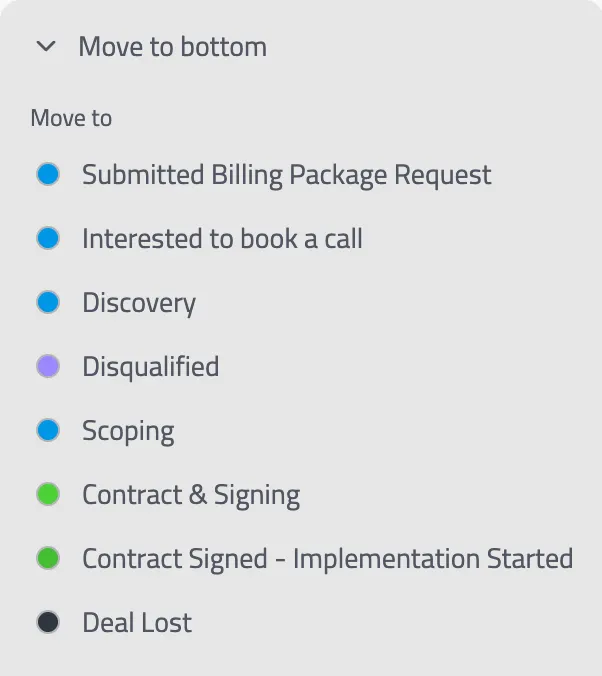
Name and order stages for each pipeline, and set what the team must record when it advances a Prospect along each path.
-
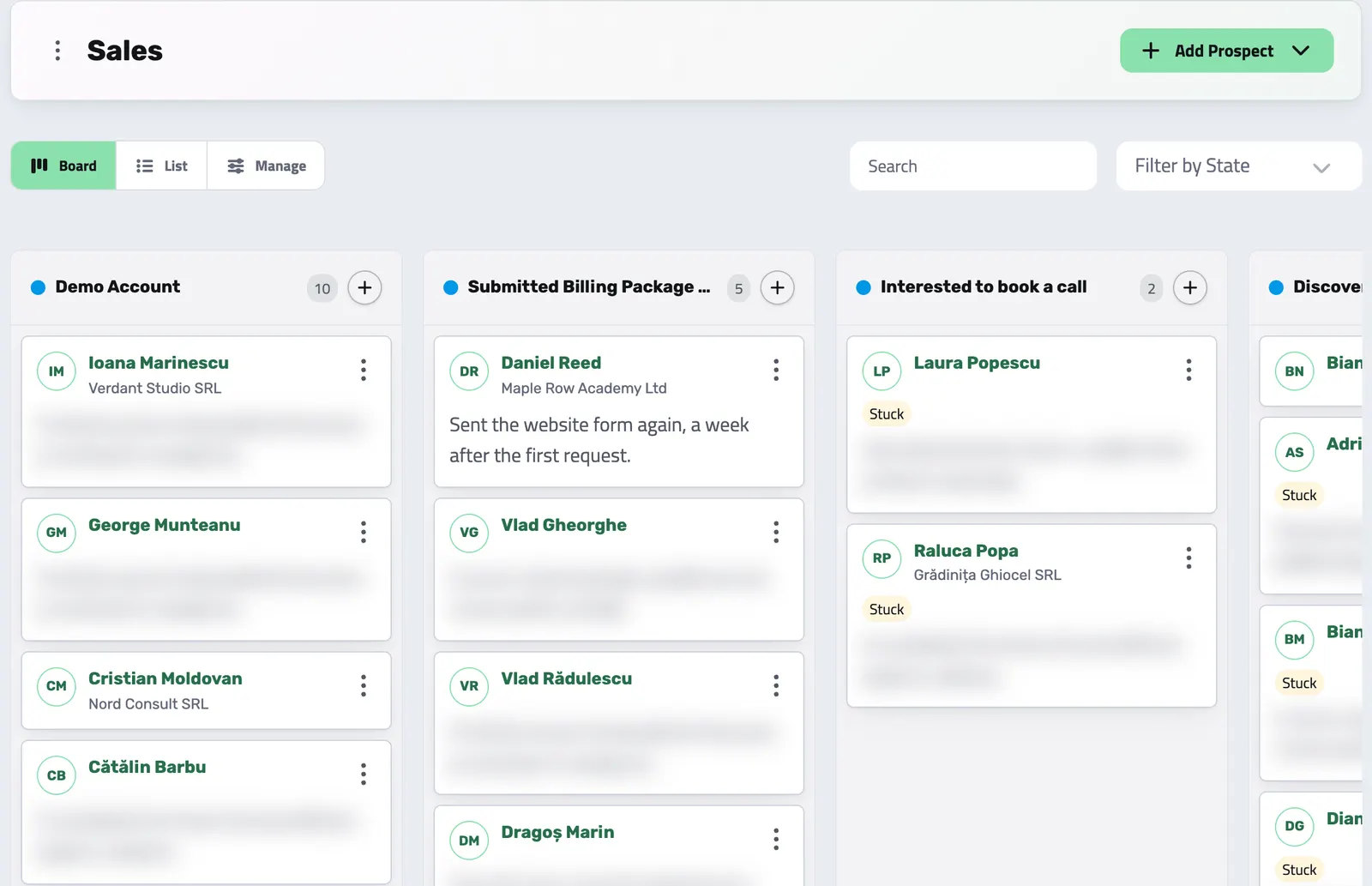
Work the board
See Prospects as cards, drag them between stages and keep their order clear within a stage. Teammates who have the board open see each move without reloading the page.
-
Keep the details together
Open a Prospect to see its project, its activity, the proposals addressed to it and the tasks linked to it.
A CLEAR NEXT STEP
Agree on what the team needs before moving a deal
Advancing a Prospect along a path can ask for a note, a result or a report filed from one of your report forms (a Reports pack feature). The team records what happened before the deal moves on, while each sales process keeps its own paths.
-
Separate processes
Keep a different path for each kind of sale instead of forcing every opportunity onto one board.
-
Record what changed
The move and the information supplied with it become part of the Prospect's history.
From interest to the work you sell
-
Capture the opportunity
Add a Prospect by hand, from a CSV file or from a Helpdesk conversation (Helpdesk pack). Enlivy adds requests from the price calculator on your website as Prospects, each with a proposal, once you set an intake stage.
-
Choose the right pipeline
Work it on the board that matches the sales process and move through the stages that apply.
-
Keep the record
Log calls, meetings and outcomes. Download a current Prospect brief when you need a portable view of the deal.
-
Send the proposal
Address a proposal to the Prospect, or review the one a price calculator request created, and send it from the Prospect’s page. Once you make the Prospect a client, you continue from the accepted proposal to the contract and invoices instead of copying the deal into another tool.
DUPLICATE REVIEW
Compare possible duplicates before combining them
Possible duplicates appear with match signals and a confidence level for your team to review. Compare the records, choose the Prospect to keep and decide which fields survive. The merged record keeps the connected activity and proposals. Some conflicting identities, projects or won and lost outcomes block the merge; a completed merge cannot be undone.
-
Review before merging
Candidate ranking helps you find overlap, while a person makes the final decision.
-
Keep the commercial history
Related activities and proposals move with the record that is absorbed.
PORTABLE DEAL CONTEXT
Take a current Prospect brief into the next conversation
Download a PDF brief from the Prospect's menu in the list or on its card. It shows the stage and pipeline, source, budget, owner, summary and activity history in your organization's branding. The PDF is made when you download it, so download it again after the Prospect changes.
API reference
Prospect management from the API
Wire your lead capture, CRM, and sales automation straight into Enlivy. The Prospects API lets you work with your sales pipelines: create leads from any source, move them through configured stages, and log each touchpoint.
The examples below cover listing and filtering Prospects, creating a lead, moving it through configured stages, and recording activities such as calls and meetings. The API also exposes boards, duplicate review and merge, and a downloadable brief.
Pull your pipeline into any dashboard or sync job. Query prospects with pagination, filter by stage, owner, source, or date range, and full-text search by name, company, or email. Expand related records such as the current stage and the assigned team member.
/organizations/<organization_id>/prospects curl -G 'https://api.enlivy.com/organizations/<organization_id>/prospects' \
--data-urlencode 'page=1' \
--data-urlencode 'limit=20' \
--data-urlencode 'source_type=inbound' \
--data-urlencode 'include=organization_prospect_stage,assigned_organization_user' \
--data-urlencode 'include_meta=navigation' \
-H "Authorization: Bearer $ENLIVY_API_TOKEN" \
-H 'Accept: application/json' const baseUrl = "https://api.enlivy.com" ;
const token = process.env.ENLIVY_API_TOKEN;
const organizationId = "<organization_id>";
const query = new URLSearchParams({
page: "1",
limit: "20",
source_type: "inbound",
include: "organization_prospect_stage,assigned_organization_user",
include_meta: "navigation",
});
const result = await fetch(`${baseUrl}/organizations/${organizationId}/prospects?${query}` , {
method: "GET",
headers: {
Authorization: `Bearer ${token}`,
Accept: "application/json" ,
},
}).then((response) => response.json());Retrieve a single prospect with everything attached to it: contact details, source attribution, budget, current pipeline stage, and lifecycle timestamps such as qualified, won, and lost.
/organizations/<organization_id>/prospects/<prospect_id> curl -G 'https://api.enlivy.com/organizations/<organization_id>/prospects/<prospect_id>' \
--data-urlencode 'include=organization_prospect_stage,assigned_organization_user' \
-H "Authorization: Bearer $ENLIVY_API_TOKEN" \
-H 'Accept: application/json' const baseUrl = "https://api.enlivy.com" ;
const token = process.env.ENLIVY_API_TOKEN;
const organizationId = "<organization_id>";
const prospectId = "<prospect_id>";
const query = new URLSearchParams({
include: "organization_prospect_stage,assigned_organization_user",
});
const result = await fetch(`${baseUrl}/organizations/${organizationId}/prospects/${prospectId}?${query}` , {
method: "GET",
headers: {
Authorization: `Bearer ${token}`,
Accept: "application/json" ,
},
}).then((response) => response.json());Capture a lead from any source: a landing page, an ad campaign, an outbound list, or your own app. Send a person, a company, or both, tag where it came from, and drop it straight onto your pipeline.
/organizations/<organization_id>/prospects curl -X POST 'https://api.enlivy.com/organizations/<organization_id>/prospects' \
-H "Authorization: Bearer $ENLIVY_API_TOKEN" \
-H 'Accept: application/json' \
-H 'Content-Type: application/json' \
-d '{
"first_name": "Jane",
"last_name": "Doe",
"company_name": "Acme Studio",
"email": "jane@acme.example",
"source_type": "inbound",
"source_channel": "website",
"source_campaign": "summer-launch",
"summary": "Requested a demo from the pricing page.",
"budget": "5000",
"budget_currency": "EUR"
}'const baseUrl = "https://api.enlivy.com" ;
const token = process.env.ENLIVY_API_TOKEN;
const organizationId = "<organization_id>";
const result = await fetch(`${baseUrl}/organizations/${organizationId}/prospects` , {
method: "POST",
headers: {
Authorization: `Bearer ${token}`,
Accept: "application/json" ,
"Content-Type": "application/json" ,
},
body: JSON.stringify({
first_name: "Jane",
last_name: "Doe",
company_name: "Acme Studio",
email: "jane@acme.example",
source_type: "inbound",
source_channel: "website",
source_campaign: "summer-launch",
summary: "Requested a demo from the pricing page.",
budget: "5000",
budget_currency: "EUR",
}),
}).then((response) => response.json());Update a prospect’s contact details, owner, budget, summary, or lifecycle state (qualified, disqualified, won, lost). You only send the fields you want to change.
/organizations/<organization_id>/prospects/<prospect_id> curl -X PUT 'https://api.enlivy.com/organizations/<organization_id>/prospects/<prospect_id>' \
-H "Authorization: Bearer $ENLIVY_API_TOKEN" \
-H 'Accept: application/json' \
-H 'Content-Type: application/json' \
-d '{
"summary": "Budget confirmed, decision expected next week.",
"budget": "8000",
"budget_currency": "EUR"
}'const baseUrl = "https://api.enlivy.com" ;
const token = process.env.ENLIVY_API_TOKEN;
const organizationId = "<organization_id>";
const prospectId = "<prospect_id>";
const result = await fetch(`${baseUrl}/organizations/${organizationId}/prospects/${prospectId}` , {
method: "PUT",
headers: {
Authorization: `Bearer ${token}`,
Accept: "application/json" ,
"Content-Type": "application/json" ,
},
body: JSON.stringify({
summary: "Budget confirmed, decision expected next week.",
budget: "8000",
budget_currency: "EUR",
}),
}).then((response) => response.json());Move a prospect along a configured stage path. Each advance records who performed it and can include an outcome, note, and linked report. The advance also appears on the prospect timeline.
/organizations/<organization_id>/prospects/<prospect_id>/advance curl -X POST 'https://api.enlivy.com/organizations/<organization_id>/prospects/<prospect_id>/advance' \
-H "Authorization: Bearer $ENLIVY_API_TOKEN" \
-H 'Accept: application/json' \
-H 'Content-Type: application/json' \
-d '{
"organization_prospect_stage_path_id": "stage_path_id_here",
"outcome": "Qualified, budget and timeline confirmed.",
"description": "Moved from New to Qualified after the discovery call."
}'const baseUrl = "https://api.enlivy.com" ;
const token = process.env.ENLIVY_API_TOKEN;
const organizationId = "<organization_id>";
const prospectId = "<prospect_id>";
const result = await fetch(`${baseUrl}/organizations/${organizationId}/prospects/${prospectId}/advance` , {
method: "POST",
headers: {
Authorization: `Bearer ${token}`,
Accept: "application/json" ,
"Content-Type": "application/json" ,
},
body: JSON.stringify({
organization_prospect_stage_path_id: "stage_path_id_here",
outcome: "Qualified, budget and timeline confirmed.",
description: "Moved from New to Qualified after the discovery call.",
}),
}).then((response) => response.json());Record a touchpoint on a prospect: a call, a meeting, an email, a note. Activities build the prospect’s timeline and give your team a shared, chronological history of every interaction.
/organizations/<organization_id>/prospect-activities curl -X POST 'https://api.enlivy.com/organizations/<organization_id>/prospect-activities' \
-H "Authorization: Bearer $ENLIVY_API_TOKEN" \
-H 'Accept: application/json' \
-H 'Content-Type: application/json' \
-d '{
"organization_prospect_id": "prospect_id_here",
"title": "Discovery call",
"description": "Walked through pricing and the onboarding timeline.",
"outcome": "Positive, sending a proposal next week.",
"activity_at": "2026-07-03 15:30:00"
}'const baseUrl = "https://api.enlivy.com" ;
const token = process.env.ENLIVY_API_TOKEN;
const organizationId = "<organization_id>";
const result = await fetch(`${baseUrl}/organizations/${organizationId}/prospect-activities` , {
method: "POST",
headers: {
Authorization: `Bearer ${token}`,
Accept: "application/json" ,
"Content-Type": "application/json" ,
},
body: JSON.stringify({
organization_prospect_id: "prospect_id_here",
title: "Discovery call",
description: "Walked through pricing and the onboarding timeline.",
outcome: "Positive, sending a proposal next week.",
activity_at: "2026-07-03 15:30:00",
}),
}).then((response) => response.json());Read the activity feed across your organization. Expand each entry with the Prospect it belongs to, the team member who performed it, and any linked report or stage transition.
/organizations/<organization_id>/prospect-activities curl -G 'https://api.enlivy.com/organizations/<organization_id>/prospect-activities' \
--data-urlencode 'page=1' \
--data-urlencode 'limit=20' \
--data-urlencode 'include=organization_prospect,performed_by_organization_user' \
--data-urlencode 'include_meta=navigation' \
-H "Authorization: Bearer $ENLIVY_API_TOKEN" \
-H 'Accept: application/json' const baseUrl = "https://api.enlivy.com" ;
const token = process.env.ENLIVY_API_TOKEN;
const organizationId = "<organization_id>";
const query = new URLSearchParams({
page: "1",
limit: "20",
include: "organization_prospect,performed_by_organization_user",
include_meta: "navigation",
});
const result = await fetch(`${baseUrl}/organizations/${organizationId}/prospect-activities?${query}` , {
method: "GET",
headers: {
Authorization: `Bearer ${token}`,
Accept: "application/json" ,
},
}).then((response) => response.json());Where it fits
Part of these setups
- Sales teams Core A pipeline per sales process, your own stages, and duplicate checks before records are merged. See the setup
- Agencies and studios Optional Adds a pipeline for new requests, with your own stages and a brief for each call. See the setup
- Course authors Optional Adds a pipeline for leads from DMs, forms and webinars, visible to you and your closer. See the setup
Works together with
- Products Build a reusable catalog of everything you sell, services or goods, with pricing, units, tax settings, and descriptions set once. Every product is ready to add to a proposal or invoice.
- Proposals Quote the work in detail, share it with the customer and follow its progress through acceptance, signature and payment when those steps apply.
- Helpdesk Website chat, client portal messages and email from your connected mailbox arrive in shared inboxes. Your team assigns and answers them, and reviews email from unknown senders.
- Tasks Keep team work beside the invoices, prospects and projects it concerns. Tasks are included for every organization at no extra charge, with no separate Tasks subscription or task-count quota.
- Data Export Choose the period and the record types, and download one archive for your accountant, with a summary spreadsheet for each type if you want one. Free on every plan.
- MCP Connect Claude, ChatGPT, Cursor, or another MCP-compatible assistant to work with your invoices, contracts, and pipeline, within your own permissions.