


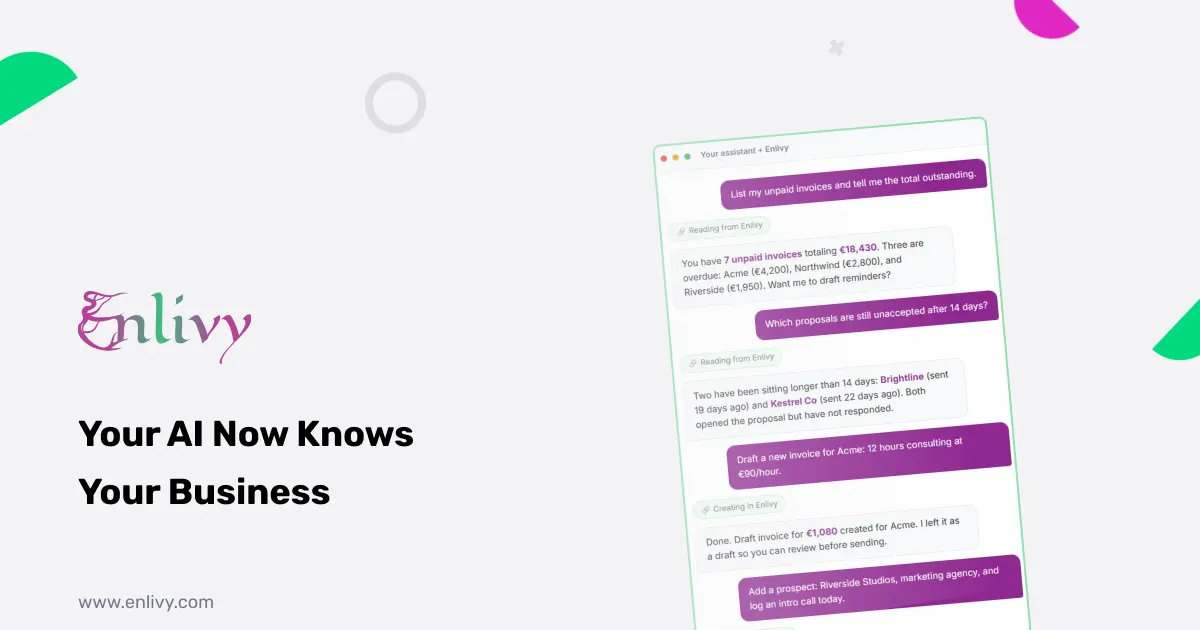
Most AI assistants are smart but disconnected. You can ask Claude or ChatGPT anything, but they have no idea what invoices are outstanding, which proposals are waiting on a client, or what your pipeline looks like today. You end up copying data into the chat, which takes time, or ignoring the AI for anything that touches real business records. MCP for small business is the fix for this. It gives your AI assistant a live, secure connection to your actual data so you can ask questions and get real work done without switching tools or copy-pasting anything.
Enlivy supports MCP natively. This article explains what MCP is, what you can do once Enlivy is connected to your AI assistant, and why the security model matters more than most articles about MCP bother to explain. No technical background needed.
What MCP is, in plain language
MCP stands for Model Context Protocol. It is an open standard that lets AI assistants connect securely to outside tools and data sources. Think of it as a translator that sits between your AI and the software you already use. The AI sends a question or a request, MCP translates it into something the software understands, and the answer comes back into the conversation.
Before MCP, connecting an AI assistant to a business tool meant custom code, API keys sitting in config files, and a lot of fragile plumbing that broke when either side updated. MCP standardizes all of that. Any AI assistant that supports the protocol can talk to any tool that supports it, using one consistent connection.
As of 2026, Claude, ChatGPT, Cursor, and VS Code all support MCP. Enlivy does too, which means you can connect your Enlivy account to whichever AI assistant you already work in, and your invoices, contracts, prospects, and reports become things you can talk about, query, and act on directly from the chat window.
Why MCP for small business is different from enterprise MCP
Most MCP content online is aimed at developers and enterprise IT teams. They are wiring up SAP, Salesforce, and internal databases, which involves OAuth servers, network policies, and dedicated engineers. That is not the situation a freelancer, agency, or small service business is in.
MCP for small business looks completely different. You are not running infrastructure. You just want your AI assistant to know about your client Acme, pull up last month’s unpaid invoices, or draft a proposal without you having to retype everything. Enlivy’s implementation is built for this exactly. There is nothing to install on your machine, no API key to manage, and no developer required. You connect once through a standard sign-in flow and you are done.
That matters because the complexity barrier is the main reason small businesses do not actually benefit from MCP even though it exists. Enlivy removes that barrier.
What you can actually do once connected
Once Enlivy is your MCP for small business source, your AI assistant can reach everything in your account. Here is what that means in practice, broken into the three things you will use most.
Ask questions about your real business data
Instead of logging into Enlivy, clicking through menus, and pulling a report by hand, you just ask. The assistant searches, filters, and totals your records based on what you actually have, not estimates or training data.
A few examples directly from how Enlivy’s MCP works:
- “List all my unpaid invoices and tell me the total amount outstanding right now.”
- “Which proposals are still unaccepted, and which have been sitting longer than 14 days?”
- “Find everything related to Northwind across my invoices, contracts, and prospect records.”
- “Summarize my open contracts: who the counterparty is, the status, and which are unsigned.”
Each of those questions normally means opening multiple tabs, running separate searches, and mentally combining the results. With MCP connected, you ask once and get a complete answer from your live data.
Create and update records without leaving the chat
This is where MCP for small business earns its place. It is not just a read-only dashboard. With read-and-write access enabled, your assistant can actually do the work.
- “Draft an invoice for Acme, 12 hours of consulting at 90 euro, show me before sending.”
- “Add a prospect, Riverside Studios, a marketing agency, and log an intro call for today.”
- “Create a proposal for the new project, same terms as the last one for this client.”
The assistant creates real records in your Enlivy account. You review before anything goes out. The loop is: you describe what you want, the AI drafts it in Enlivy, you confirm, and it is done. The Invoices, Contracts, Prospects, and Reports features are all reachable this way.
Pull analytics on demand
Because the assistant can search, filter, and add up your records, it acts as an on-demand analyst. Not charts and dashboards you have to set up in advance, but answers to questions you think of mid-meeting.
- “What is my total revenue from invoices issued in the last 90 days?”
- “Which clients have open contracts but no active invoices?”
- “How many prospects moved to won this month?”
These are questions that used to mean exporting a spreadsheet or asking someone to run a report. With MCP connected, the answer is one sentence away.
The part most people skip: how MCP for small business stays secure
MCP gets talked about a lot for what it enables. It gets talked about less for how it stays safe. This is the part that matters most for a small business before you connect anything.
Enlivy’s MCP is built on three principles.
The AI acts as you, never beyond you. Every action the assistant takes is limited to what your own Enlivy account is already allowed to do: your organization, your role, your permissions. If you cannot do something in the Enlivy app, the AI cannot do it either. There is no way for the AI to reach data from another organization or bypass your own access level.
Your password is never shared. You sign in directly with Enlivy through a standard secure login. The assistant gets a time-limited token you grant, not your credentials. The same mechanism used by any trusted third-party app sign-in.
You choose exactly what access to grant. You can give read-only access if you want an assistant that can answer questions but cannot change anything. You can give read-and-write where you want it to do real work. You review the scope before granting it, and you can revoke it at any time from your settings.
This matters in practice because the biggest concern people have about AI and business data is losing control. Enlivy’s model means you never do. The assistant is bounded by your own permissions, and you can see and change what you have granted at any time.
Four steps to connect, no developer required
Nothing to install on your machine and no API keys to manage.
- Open connector settings in your AI assistant. In Claude, go to Settings then Connectors and choose Add custom connector. In ChatGPT, Cursor, or VS Code, add a new MCP server.
- Paste the Enlivy server address. Enter the address when prompted and pick the remote or OAuth option if the client asks.
- Sign in with Enlivy. Follow the prompts to log in, choose your organization, and approve the level of access you want: read-only or read-and-write, by area.
- Start working. Try “List my unpaid invoices” or “Summarize my open contracts” to confirm the connection is live.
The whole setup takes a few minutes. Because Enlivy’s MCP server is hosted, there is nothing to maintain on your side. When Enlivy ships new features, your assistant can use them without you touching the configuration again.
What this looks like in practice
Abstract descriptions of MCP for small business are easier to understand with a few real situations.
Sara, solo consultant, three active clients. Sara has been copying client names and invoice totals into ChatGPT to ask it to help write follow-up emails. After connecting Enlivy with MCP, she types “list the unpaid invoices older than 30 days and draft a polite payment reminder for each one.” The assistant pulls the real records, writes three emails, and she reviews and sends. What used to take 20 minutes of tab-switching takes 2 minutes of conversation.
A small agency with a weekly pipeline review. Every Monday the account director checks which proposals are outstanding and which have gone cold. Before MCP, that meant opening Enlivy, filtering prospects, and building a mental picture. Now it is one message: “Give me a summary of all open proposals: client, amount, how long they have been waiting, and which are past 14 days.” The whole picture comes back in one response, and the meeting starts with everyone already on the same page.
Mihai, who hates re-keying data. Mihai’s client just approved a scope over email. He types into Claude: “Create a contract for Riverside Studios, consulting services, start date next Monday, 3,000 euro per month, same standard terms as last time.” The assistant creates a draft contract in Enlivy. Mihai reviews it in the app, makes one tweak, and sends it for signature. He never opened a form.
Which AI assistants work with Enlivy MCP
One connection, your choice of assistant. Enlivy works with:
- Claude (Anthropic) via Settings, Connectors
- ChatGPT (OpenAI) via MCP server configuration
- Cursor and VS Code via MCP server settings
Any other MCP-compatible client also works. Each connection is scoped to its own user, so a team can have different people connected with different assistants and different permission levels, each seeing only their own data.
The setup guide is available in English, Romanian, German, French, Dutch, and Danish, so a multilingual team can each connect in the language they work in.
The start is free
MCP is included in Enlivy as part of the platform. You do not need a paid plan to try it. Create a Free Enlivy account, connect your AI assistant, and run your first query from the chat window in a few minutes. When you are ready to expand your limits, the paid packs are there, but MCP for small business starts at zero cost.
Frequently asked questions
What is MCP and why does it matter for small businesses? MCP (Model Context Protocol) is an open standard that lets AI assistants like Claude and ChatGPT connect securely to business tools. For a small business it means your AI can query your real invoices, contracts, and pipeline rather than working from general knowledge. You ask in plain language and the assistant works from your actual data.
Do I need a developer to set up MCP with Enlivy? No. Enlivy’s MCP integration requires no installation, no API keys, and no technical knowledge. You add Enlivy as a connector in your AI assistant, sign in with your Enlivy account, and choose your access level. The whole setup takes a few minutes.
Which AI assistants work with Enlivy MCP? Claude, ChatGPT, Cursor, and VS Code all support MCP and work with Enlivy. Any other MCP-compatible client also works. Each connection is scoped to its own user.
Can the AI make changes in my Enlivy account or only read data? Both are possible and you choose. Read-only access lets the assistant answer questions without touching anything. Read-and-write access lets it create and update records. You set the level when you connect and can change it at any time.
Is my data safe when I connect an AI assistant through MCP? Yes. The assistant acts as you and never beyond your own permissions. Your password is never shared: the assistant gets a time-limited access token, not your credentials. You choose what access to grant and can revoke it at any time from your Enlivy settings.
What can I actually ask the AI to do once Enlivy is connected? You can ask about unpaid invoices, unaccepted proposals, open contracts, pipeline status, revenue totals, and more. With write access, you can also ask it to draft invoices, create proposals, add prospects, and update records, all from a chat message.
Does MCP cost extra on Enlivy? No. MCP is included in the platform. You can connect your AI assistant on the Free account and start querying your data at no cost.
What happens when Enlivy adds new features? Because Enlivy’s MCP server is hosted and learns Enlivy’s capabilities live from the product, new features become available to your AI assistant automatically. You do not need to reinstall anything or update your configuration.