


If you’ve ever dealt with Romania’s eFactura system, you know it can be quite cumbersome. The interface isn’t exactly intuitive, you need to fill out multiple fields, verify XML formats, and ensure everything complies with legislative requirements. For many entrepreneurs and accountants, electronic invoicing through the ANAF portal represents a constant source of frustration - a process that should be simple becomes time-consuming and energy-draining.
But what if this process could be radically simplified?
With Enlivy, issuing and receiving invoices through eFactura becomes a matter of a few clicks, without technical complications. Everything happens from a single platform, with automatic synchronization and without the risk of human error.
What Is eFactura and Why Integration with Enlivy Matters
Romania’s eFactura system was introduced to digitalize and streamline fiscal communication between companies and authorities. In theory, it’s an excellent idea - all invoices circulate electronically, transparently, and under tax authority supervision. In practice, however, many companies face serious difficulties:
- Complex ANAF portal interface that requires time to learn
- Manual data entry in multiple systems (your own software and eFactura)
- Increased risk of errors when manually transcribing information
- Lack of overview of issued and received invoices
- Time wasted on repetitive verifications and validations
- Difficult navigation through SPV (Private Virtual Space) ANAF
For companies that issue or receive dozens or hundreds of invoices monthly, these challenges amplify dramatically. What should be an automated process becomes a daily chore that consumes precious resources.
This is where Enlivy comes in, transforming complexity into simplicity through direct eFactura integration.
How to Send Invoices to eFactura with Enlivy
Uită de interfața complicată a portalului ANAF. În Enlivy, întregul proces de emitere și trimitere a facturilor prin eFactura devine intuitiv și rapid.
Crearea Facturii în Platformă - Totul la Un Click Distanță
Forget the complicated ANAF portal interface. In Enlivy, the entire process of issuing and sending invoices through eFactura becomes intuitive and fast.
Creating the Invoice in the Platform - Everything One Click Away
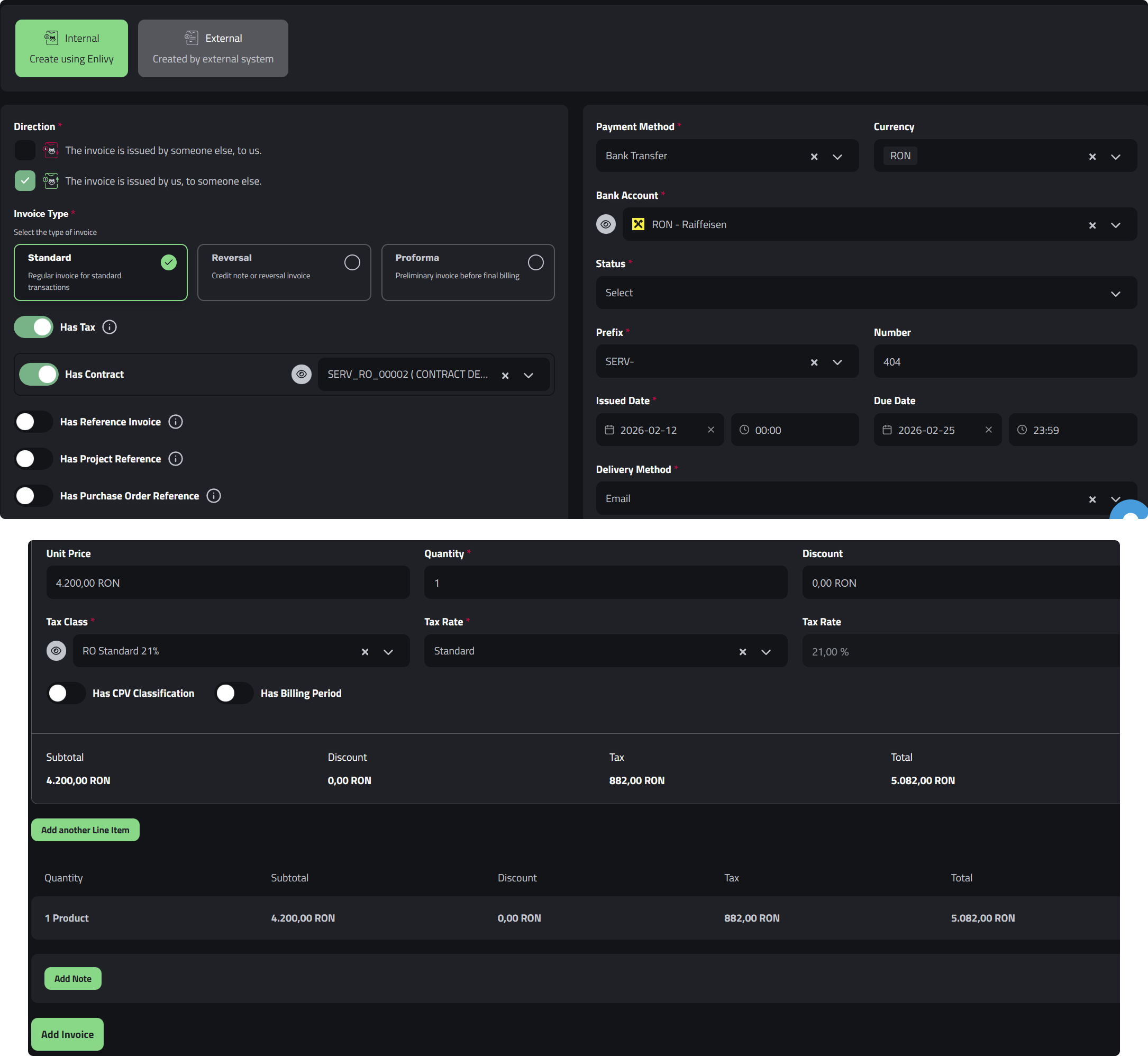
You enter the Invoices section in Enlivy and click Add Invoice. Select Internal to use the platform’s integrated system. The first step is to choose the Outbound direction (invoice issued to a client) and specify whether the invoice includes VAT.
Then you quickly fill in the essential details:
Payment and identification information:
- Payment method from dropdown (bank transfer, cash, card)
- Bank account where the money will be received
- Invoice prefix and number (you can use automatic or customized numbering)
- Issue date
- Due date
Parties involved:
- Sending user: Your company (invoice issuer)
- Receiving user: The client’s company receiving the invoice
Products or services invoiced: In the Line items section, you simply and quickly add products or services. Here it’s essential to verify:
- Correct description of each product/service
- Quantity and unit price
- Correct VAT percentage (19%, 9%, 5%, or other applicable special rates in Romania)
After verifying all information, you click Add Invoice and your invoice is created in the system.
Automatic Sending to ANAF - One Single Click
Now comes the part that will amaze you with its simplicity. The newly created invoice appears in the Enlivy dashboard, where you have the Push to ANAF button available.
One single click and the system does all the magic behind the scenes:
- Automatically generates the XML format according to ANAF requirements
- Validates all mandatory fields for eFactura
- Sends the invoice to the eFactura system
- Provides confirmation that the process completed successfully
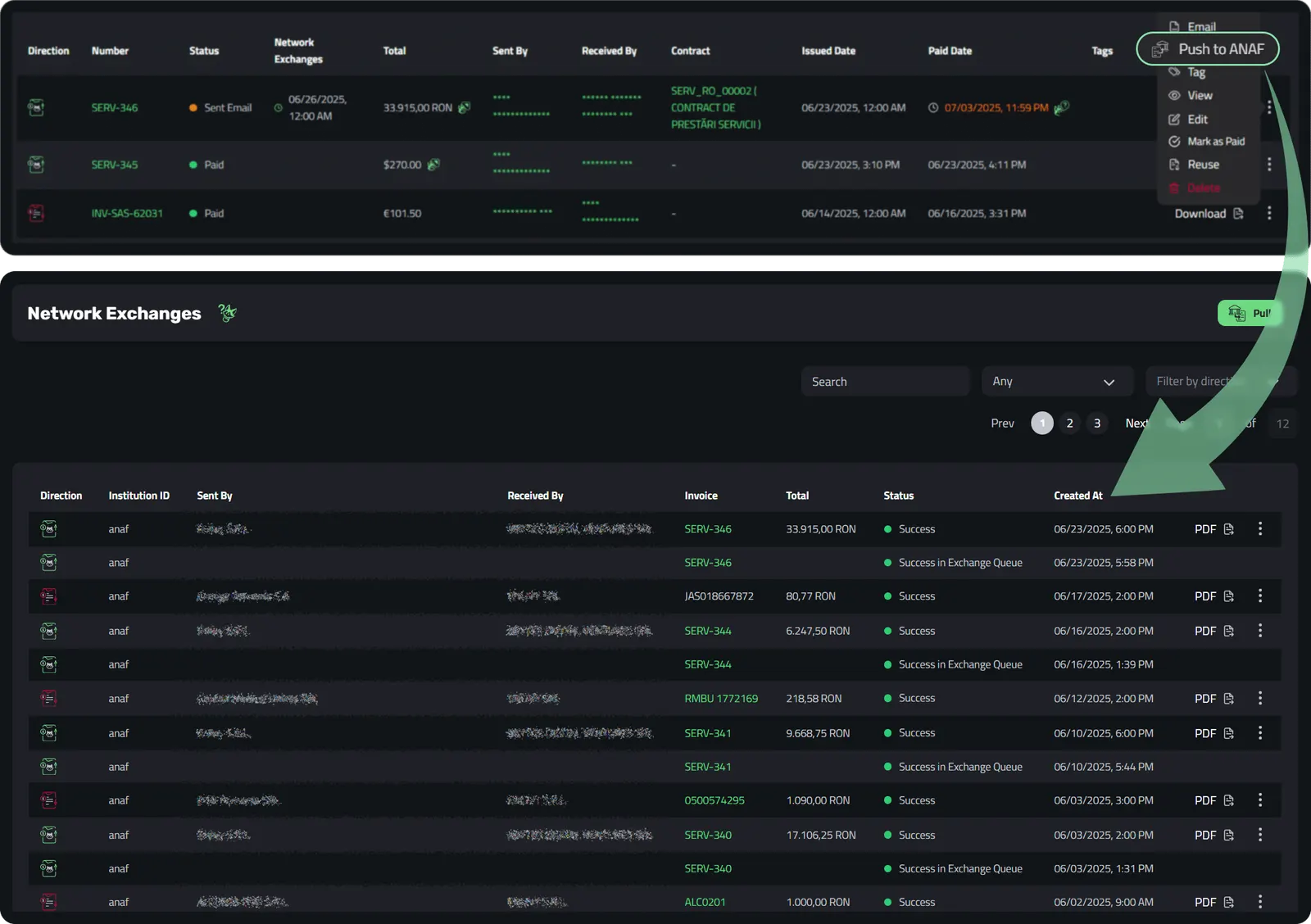
Your client immediately sees the invoice in their SPV (Private Virtual Space) in eFactura. No more emails with attached PDFs, phone calls for confirmation, or questions about invoice receipt. Everything is instant and transparent.
Learn more about how this works in Enlivy’s Network Exchanges feature.
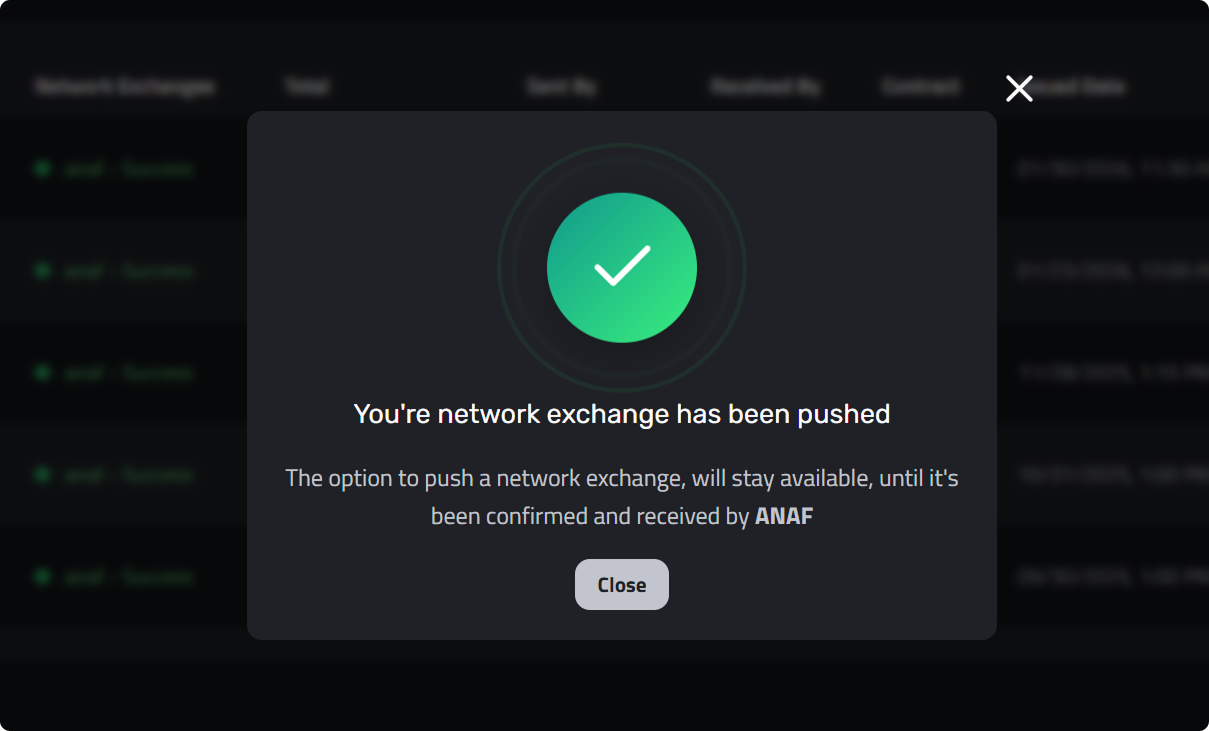
Complete Automation for Maximum Efficiency
For companies that issue many invoices - perhaps dozens or even hundreds per month - Enlivy offers an even more powerful functionality: automatic sending to ANAF.
You activate this option once in settings and then the process becomes completely automated. You create the invoice in Enlivy and it instantly reaches its destination in the eFactura system, without any additional steps on your part.
Imagine this: instead of spending hours every month logging into the ANAF portal, verifying and sending each invoice individually through eFactura, you just create them in Enlivy and they automatically circulate to their destination. Huge time savings and zero technological stress.
This Network Exchanges functionality completely transforms how you interact with eFactura, entirely eliminating the complicated intermediary of the government portal.
How to Receive Invoices from eFactura Automatically with Enlivy
nlivy’s integration with eFactura doesn’t work in just one direction. Receiving invoices from suppliers becomes just as simple as issuing them.
Initial Connection with eFactura - One Simple Step
To benefit from automatic invoice reception from eFactura, you need to connect your Enlivy account with the eFactura system once. This process is quick and done directly from the platform settings. Once the connection with ANAF is established, everything becomes automatic.
The Reception Process from eFactura - Everything Automated
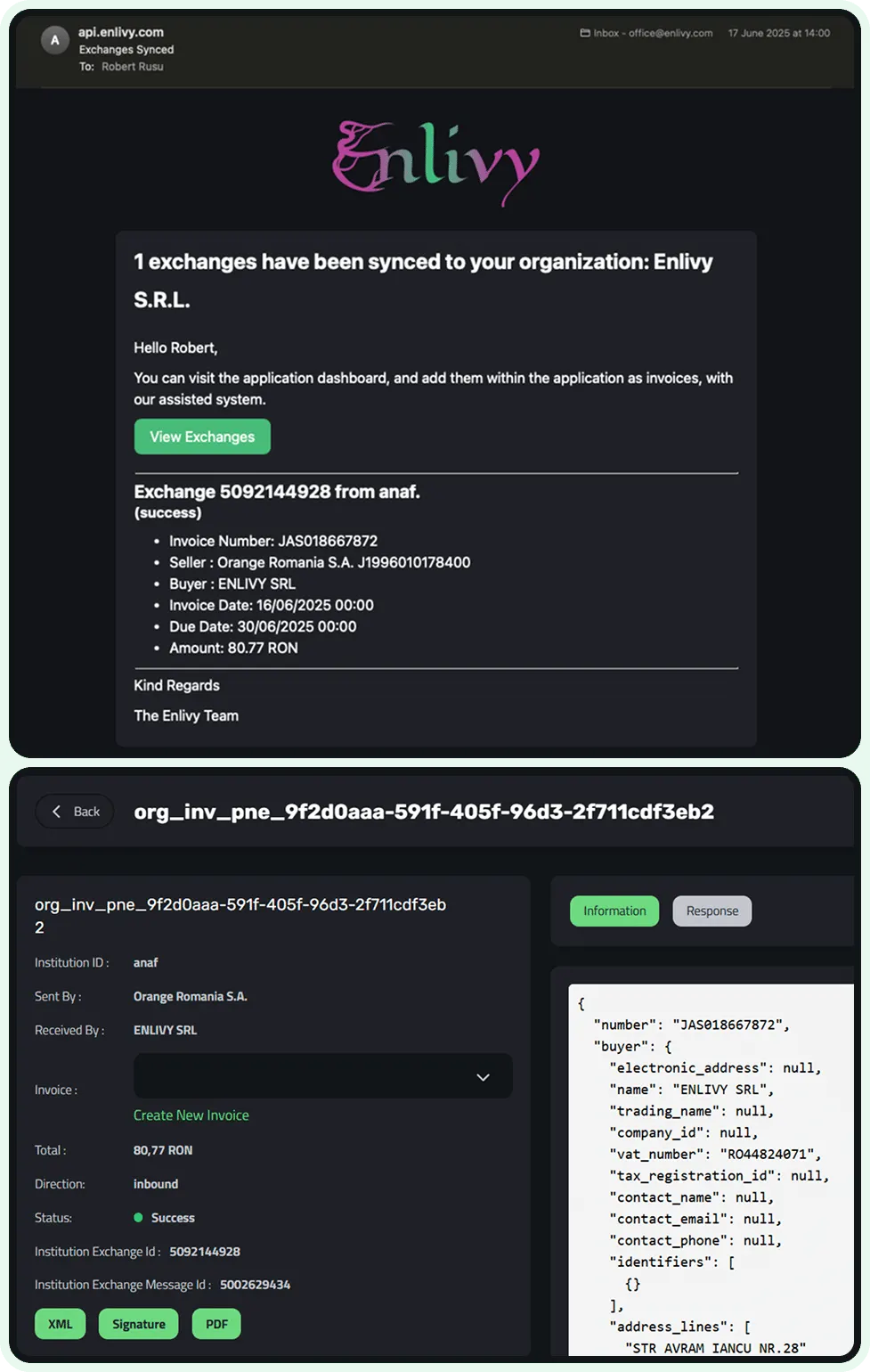
Imagine this scenario: a supplier sends you an invoice through eFactura. Instead of logging into the ANAF portal, searching for the invoice in SPV, downloading it in XML format, opening it, verifying the data, and then manually entering it into your accounting system, the following happens in Enlivy:
- Instant notification: In the Enlivy dashboard, the notification “We have a new network exchange” automatically appears. The system has detected that you’ve received a new invoice from eFactura.
- Data pre-population from eFactura: You click on the notification and enter directly into the registration process. The wonder is that most data is already pre-filled from information received from ANAF:
- Invoice issuer (your supplier)
- Recipient (your company)
- Invoiced amounts
- Applied VAT percentage
- Issue date from eFactura
- Verification and confirmation: You just quickly verify that everything is correct, optionally fill in the date you paid the invoice (or you’ll complete it later when you make the payment), and confirm.
- Complete integration in Enlivy: The invoice instantly becomes part of your financial system in Enlivy, alongside all other documents. You can see it in reports, associate it with payments, export it for your accountant - everything from one place.
For detailed step-by-step instructions on this process, check out the guide on adding an invoice from the eFactura system.
No more downloading complicated XMLs from eFactura, no more manually entering data that can be wrong, no more juggling between different platforms. Everything flows naturally and quickly through Network Exchanges.
Beneficiile Integrării Enlivy cu eFactura ANAF
La prima vedere, ar putea părea că vorbim doar despre câteva minute economisite aici și acolo. Dar efectul cumulativ al integrării Enlivy cu eFactura ANAF este dramatic, mai ales pentru companii active.
Benefits of Enlivy’s eFactura Integration
Let’s do a simple calculation about how much time you save by giving up the classic ANAF portal.
If you issue 50 invoices per month and each invoice takes you an average of 5 minutes to send manually through the eFactura portal (login, form completion, verification, sending), that means 250 minutes - over 4 hours - just for sending invoices. With Enlivy automation, this time is reduced to almost zero.
The same applies to invoices received from eFactura: if you receive 30 invoices monthly and each takes 7-8 minutes to process (download from eFactura, verification, entry into your own system), you’re at another 3-4 hours lost. Enlivy transforms them into a few clicks.
Eliminating Human Errors from eFactura
hen you manually enter the same data in two different systems - once in Enlivy and once in the eFactura portal - there’s always the risk of errors: a wrong digit, an incorrect VAT percentage, an incorrectly entered date. These mistakes can lead to discrepancies in accounting, reconciliation problems, and even fiscal complications with ANAF.
With automatic Enlivy-ANAF synchronization, data flows directly and correctly between systems. You enter information once, in Enlivy, and it arrives exactly as it should in eFactura. Zero manual transcriptions means zero transcription errors.
Complete Visibility Through Network Exchanges
Network Exchanges in Enlivy offers you something the eFactura portal cannot: a clear and complete overview of all your invoice exchanges.
In the centralized Enlivy dashboard, you instantly see:
- All invoices issued to eFactura and their status (sent, seen by client, paid)
- All invoices received from eFactura from suppliers and their state (received, awaiting payment, paid)
- Complete history of financial communication with each partner
- Useful reports and statistics for analysis and fiscal planning
No more digging through the complicated ANAF SPV menus or juggling between multiple windows. Everything is transparent and at hand in Enlivy.
Explore all the capabilities of this feature at Enlivy’s Network Exchanges page.
Guaranteed Compliance with ANAF Requirements
Another major advantage of Enlivy is that you don’t have to worry whether you’re meeting the technical requirements of eFactura. The platform automatically generates the correct XML format for ANAF, validates all mandatory fields, and ensures that each invoice complies with current legislation.
Who Should Use Enlivy’s eFactura ANAF Integration
Companies with High Invoice Volume in eFactura
If you issue or receive dozens or hundreds of invoices monthly through eFactura, the benefit of Enlivy is obvious and immediate. Automation saves hours of repetitive work, allowing you to focus on activities that truly matter for your business, not fighting with the ANAF portal.
Freelancers and Individual Entrepreneurs Using eFactura
Even if you don’t have a huge volume of invoices in eFactura, simplicity matters enormously. Instead of wasting time learning the ANAF interface and stressing about the technical aspects of eFactura, you focus on what you do best - your services or products. Enlivy completely eliminates the technical barrier.
Growing Companies
If your business is expanding and invoice volume is constantly growing, you need a scalable solution. Enlivy grows with you - whether you have 10 or 1,000 invoices monthly in eFactura, the process remains equally simple.
International Companies Operating in Romania
For foreign companies doing business in Romania, navigating the Romanian eFactura system can be particularly challenging. Enlivy provides an English interface while maintaining full compliance with ANAF requirements, making it easier for international teams to manage Romanian invoicing.
Companii în Creștere
Dacă afacerea ta este în expansiune și volumul de facturi crește constant, ai nevoie de o soluție scalabilă. Enlivy crește odată cu tine - fie că ai 10 sau 1000 de facturi lunar în eFactura, procesul rămâne la fel de simplu.
Getting Started with Enlivy’s eFactura Integration
eFactura doesn’t have to be complicated, time-consuming, or stressful. The system was created to digitalize and streamline fiscal communication, but to truly achieve this goal, you need the right tools.
With Enlivy’s integration, you send invoices to eFactura in one click, receive them automatically, and keep everything organized in a single dashboard. No technological stress, no time waste, no manual entry errors, no juggling between multiple platforms.