The Pipeline That Doesn't Stop at "Won."
rack every opportunity from first contact to paid invoice, with a complete activity history, automatic status-driven emails, and client collaboration built in.

Prospects: From Scattered Leads to a Governed Pipeline
Most businesses track sales in a spreadsheet, a separate CRM, or nothing at all; and every option has the same problem: the deal lives in one place, and the invoice lives somewhere else. Enlivy Prospects is a fully customizable sales pipeline built inside the same platform that quotes, contracts, and bills your customers.
-
What is a Prospect?
A Prospect is a single potential opportunity your team is tracking; a person or company, their contact details, where they came from, who owns the deal, how much it might be worth, and what status it’s in right now. It’s everything you know about an opportunity, in one place.
-
What is the Prospects pipeline?
A Report Schema is the backbone of a report—it defines the fields, questions, and structure. Think of it as a blueprint for reports. Once created, users assigned to it will see the report and complete it as required.
-
How it connects to billing
A prospect can become a proposal, then a contract, then a recurring billing schedule. All without leaving Enlivy, and without re-typing anything. Every other CRM stops at “Won.” Enlivy keeps going, all the way to collected revenue.
Your Pipeline, Your Rules – Enforced.
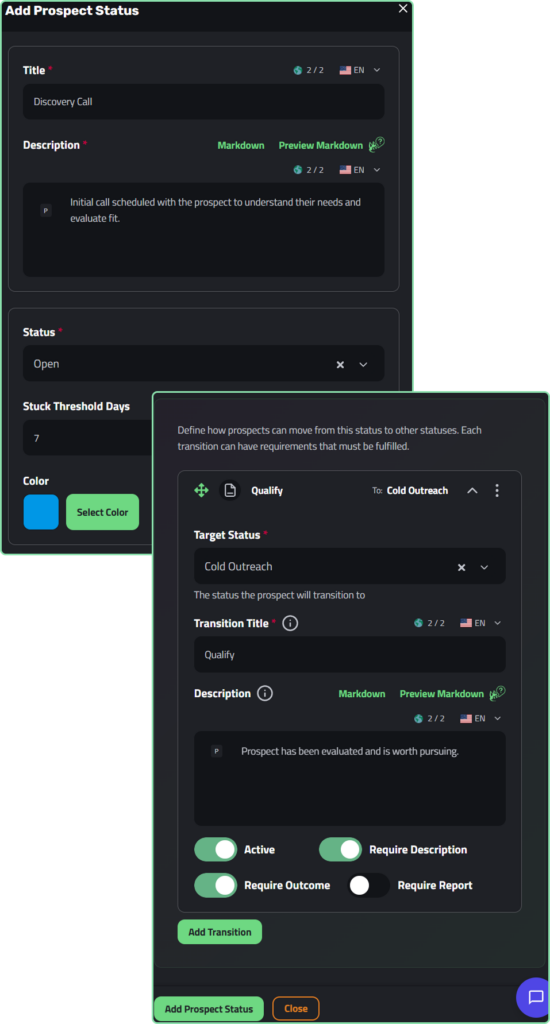
Custom statuses & status paths
Design your own stage names, colors, and order.
Define exactly which moves are allowed between stages, and what must happen before each move is accepted.
The process is encoded in the tool, not left to discipline.
-
Custom stage names
“Discovery Call,” “Proposal Sent,” “Negotiating.” Whatever your business calls it. Every stage maps to a universal type (Open, Qualified, Won, Lost) so reporting stays consistent.
-
Required notes
force the rep to document what happened before a stage can change.
-
Required outcome
a structured result field, standardized across the team.
-
Required form
link a qualification scorecard or discovery questionnaire. The prospect cannot advance until it’s filled in. “Qualified” means actually qualified — with the evidence attached.
-
Milestone timestamps
qualified_at, won_at, lost_at recorded automatically. The raw material for time-to-win and win rate analysis.
Open Any Prospect. Read Its Whole Story.
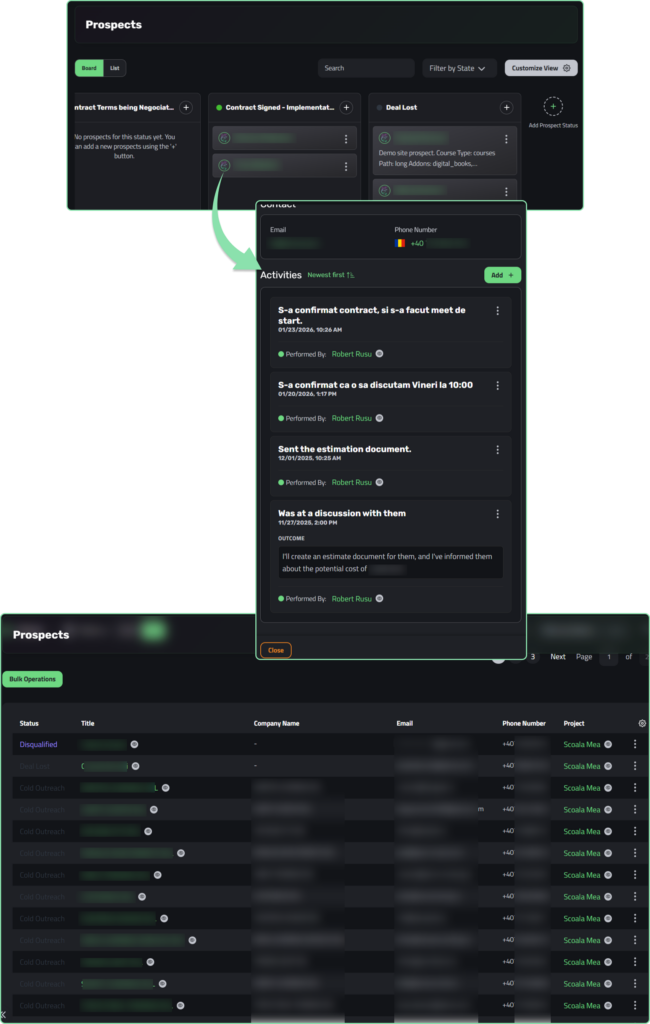
Activity Timeline
Every status change, every logged call, every email the system sentȘ written to the prospect’s timeline in order, forever.
When a deal changes hands or someone leaves the team, nothing is lost.
-
Automatic entries on every advance
each stage change writes a timeline entry with who did it, when, and the description or form they completed at the time.
-
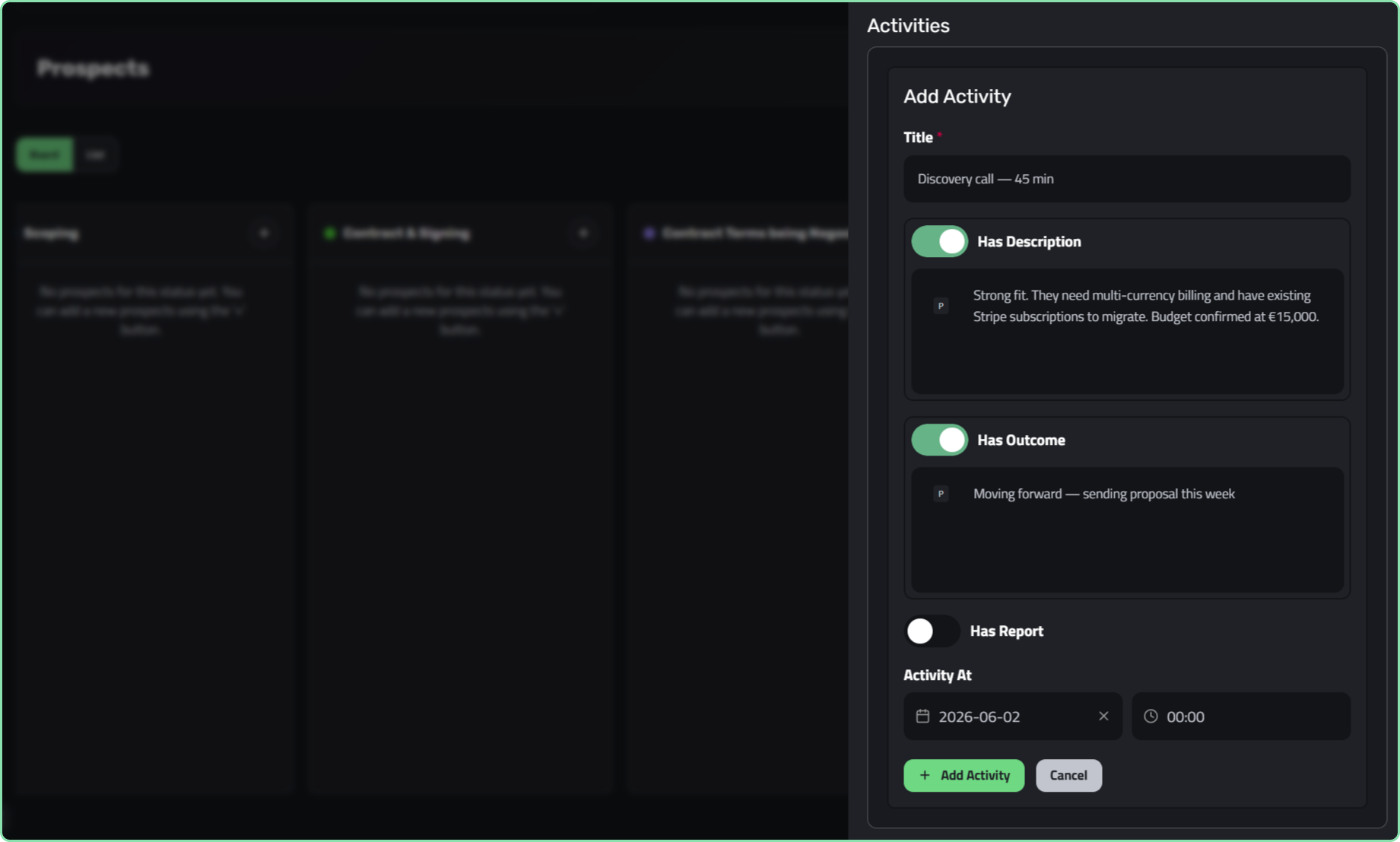
Manual activity logging
log calls, meetings, and notes with a title, description, outcome, and the actual date it happened (backdate freely).
-
Email sends logged automatically
when the system sends a status email, it writes that to the timeline too. The prospect’s full communication history is always complete.
-
Real-time
every activity broadcasts instantly to every open screen. The whole team always sees the same picture.
How Prospects Work in Enlivy
From capturing a lead to closing the deal — here’s how the whole flow runs, step by step.
-
1
A Prospect Enters the Pipeline
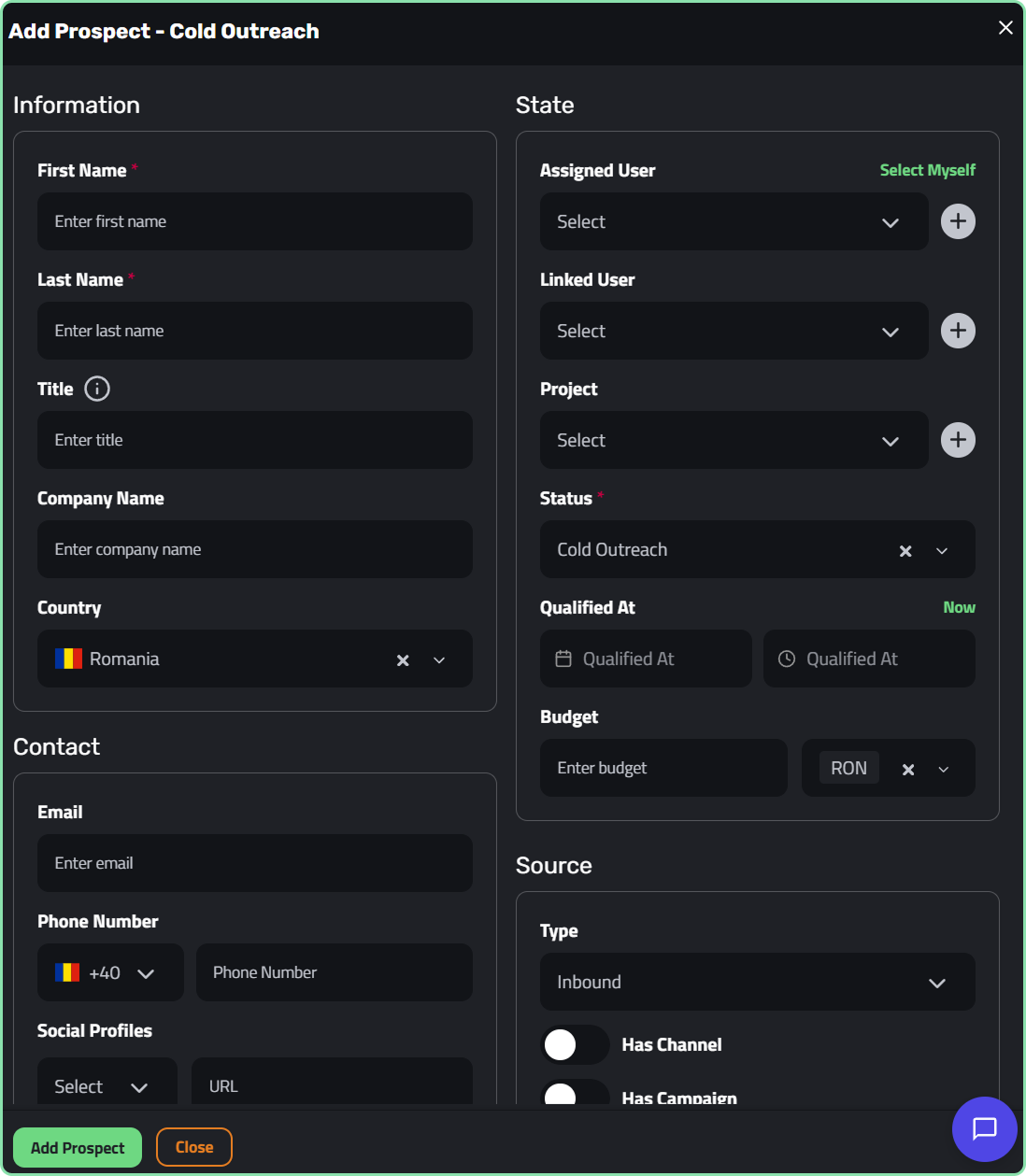
Prospects arrive in three ways. Your team types one in manually after a conversation, referral, or event.
You bulk-import your existing pipeline from a CSV, with column mapping, duplicate merging, and phone normalization.
Or a visitor configures a package on your public catalog and submits. Enlivy creates the prospect automatically,
with no one on the team doing anything.- Manual creation: team member adds a new lead in seconds
- CSV bulk import: migrate your entire existing pipeline
- Catalog self-request: inbound leads captured automatically
-
2
Your Team Works the Deal
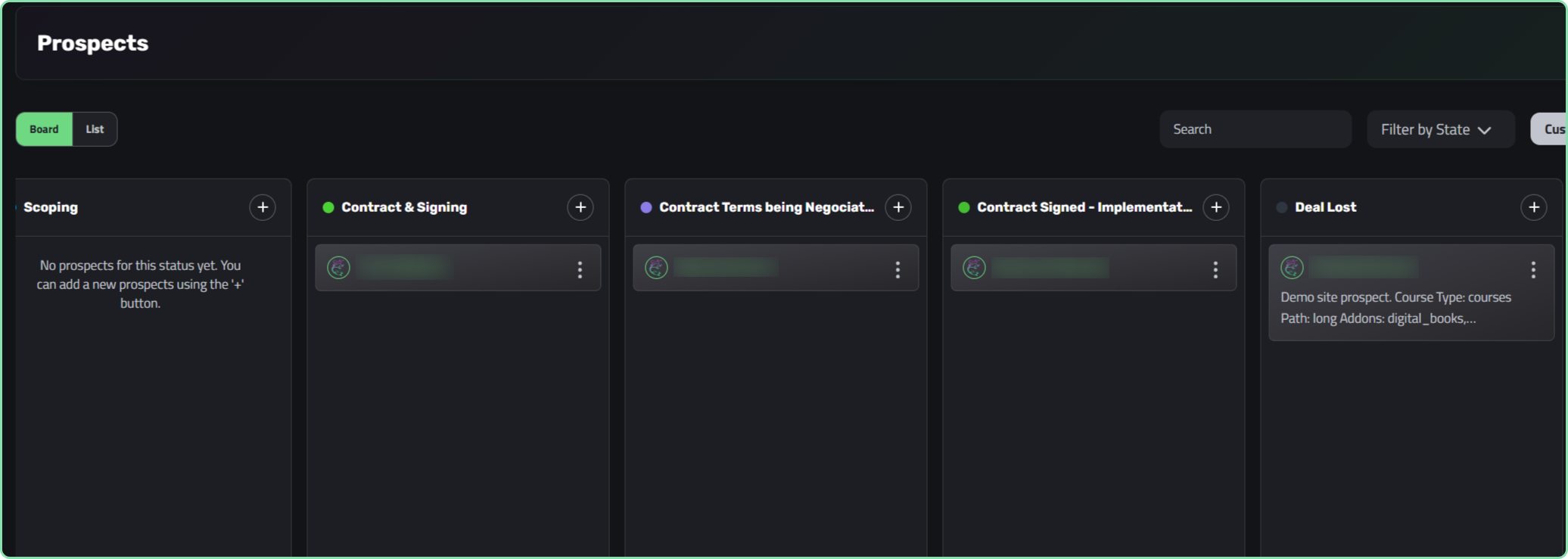
On the Kanban board, prospects are cards and statuses are columns. Moving a prospect to the next stage is a deliberate action:
the system checks that the path is allowed and that any required notes, outcomes, or forms are provided.
No silent stage jumps. No missing context. Every move is dated, attributed, and written to the timeline.- Kanban board: visual pipeline, drag-and-drop familiar
- Governed advance: each stage change enforces your rules
- Fast search and filtering: find any deal in a keystroke
-
3
Status Changes Trigger Automatic Emails
Assign a prospect to a Project and configure a status-entry email per stage. The moment a prospect enters that stage,
the email goes out: in the prospect’s language, with your branding, with action buttons that link wherever you need.
No one hits Send. Every send is logged to the timeline. A 7-day de-duplication window means a prospect bouncing between
statuses will never be spammed.- “New”: auto-email: “Thanks for your interest, here’s what happens next.”
- “Proposal Ready”: auto-email with a “View your proposal” button
- “Won”: auto-email: “Welcome aboard, here’s your onboarding link.”
-
4
Clients & Partners See Exactly What You Choose
Assign a prospect to a Project and invite external users: clients, referral partners, contractors.
For each person, you grant specific permissions: can they add prospects, view only their own, or see everyone’s?
And each grant can apply globally or only at specific statuses.
A partner can add leads and see their own. A client can see Won deals only.
A contractor can view and edit in Discovery, then read-only once it reaches Proposal Sent.- Per-user, per-status access: finer than any “share / don’t share” toggle
- Portal access secured by OTP or magic link email
- External users see only what their grants allow: enforced at the data layer
Turn Your Pricing Page Into a Lead-Capturing Machine.
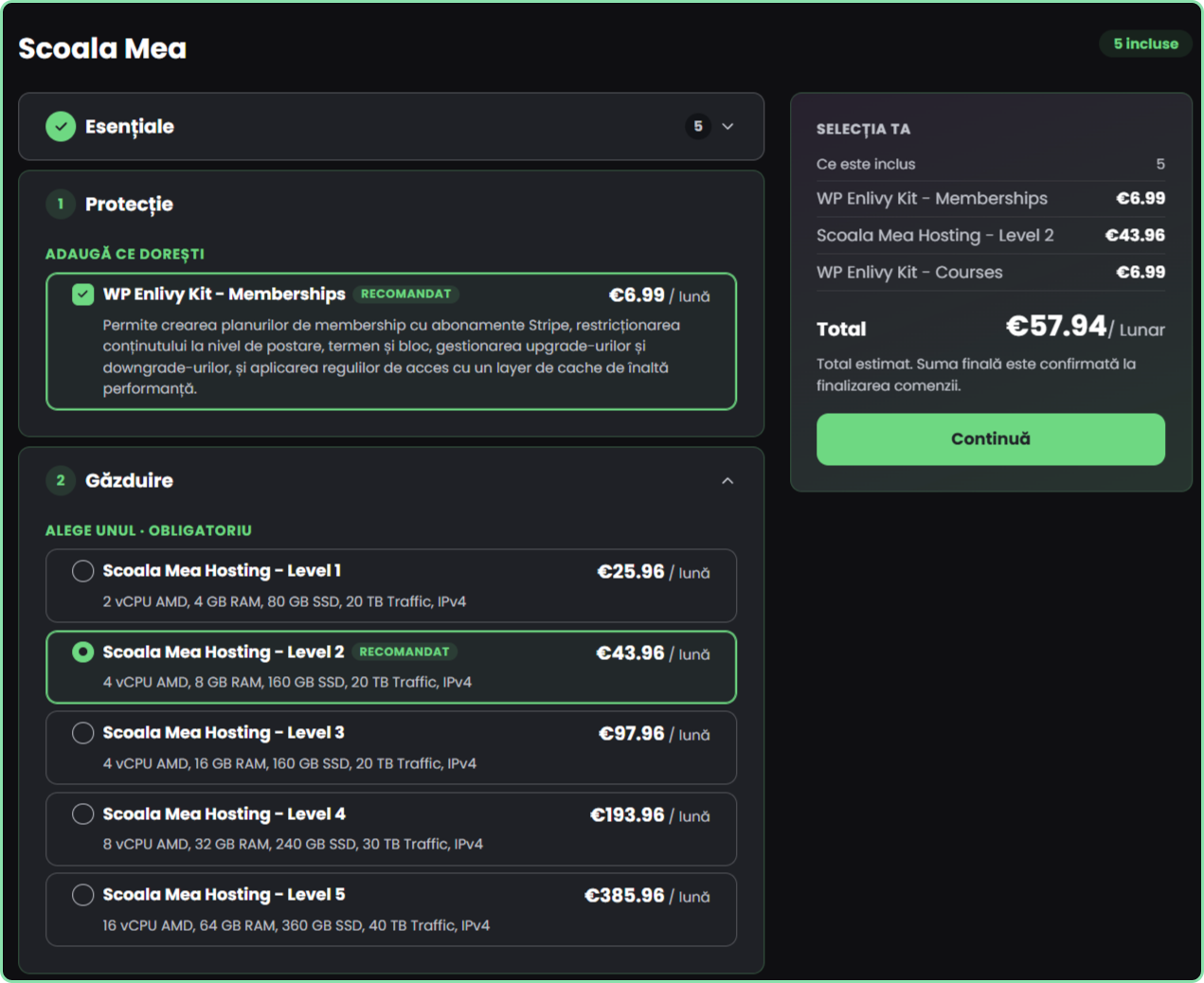
Publish a public, embeddable catalog of your packages. A visitor configures what they want and submits a request.
Enlivy automatically creates a tracked prospect and a ready-to-send draft proposal — with no one on the team lifting a finger.
-
Embeds on any website
Place the catalog directly on your pricing page, a landing page, or a partner’s site. Visitors see your packages in context — no redirect, no separate tool, no friction between interest and request.
-
Visitor configures their plan
Picks a package, fills in name, company, and email, and submits. Low enough friction that interested visitors actually complete it instead of dropping off.
-
Enlivy creates two things automatically
An inbound prospect tagged with the source channel and campaign, and a parked draft proposal built from the visitor’s selection.
-
Sales reviews and sends in one click
The proposal is already built from what the visitor configured. Review, adjust if needed, and send. No starting from scratch, no re-entering data.
-
Marketing finally sees conversion
Every inbound prospect carries its campaign tag; connect a campaign to a won deal inside the same tool that invoiced it.
-
Non-blocking capture
Even if the backend hits an issue, the submission is never lost. A lead that showed intent should never disappear because of a system error.
How Enlivy Prospects Keeps Your Team Aligned and Accountable
A pipeline that works even when the team is busy
Prospects is designed to eliminate the gaps that let deals slip, scattered notes, undocumented stage changes, leads that fall through the cracks,
and clients who have no window into where things stand.
-
Your process, enforced
Status paths require notes, outcomes, or completed forms before a stage can change. “Qualified” means actually qualified — with the evidence. Win/loss analysis is trustworthy because the reasons are always captured.
-
Automatic follow-through
Status emails go out the moment a stage is reached — no one has to remember. Inbound leads from the catalog arrive with a draft proposal already built. The pipeline keeps working without the team watching it.
-
A complete, unbroken history
Every move and every interaction is written to the activity timeline, in order, with who did it and when. Deals can be handed off safely. Nothing is lost when someone changes role or leaves.
-
Attribution from the first click
Every inbound prospect carries its source channel and campaign. Every Won is dated. Finally see which campaigns produce won deals, inside the same tool that invoiced them; with no attribution guesswork.
Clarity, Accountability, and Revenue
All in One Place.
With Enlivy Prospects, your pipeline isn’t just a list of deals:
it’s a governed, audited, connected system that runs from first contact all the way to paid invoice.
-
Know exactly where every deal is and who’s responsible
-
Enforce your sales process without relying on discipline
-
Let clients and partners into exactly the deals and stages you choose
-
Capture inbound leads automatically from your pricing page
-
Follow every deal through to proposal, contract, and billing — one system
-
Understand which campaigns produce revenue, not just traffic
Ready to Run a Real Sales Pipeline?
Stop chasing leads in spreadsheets and emails. With Enlivy Prospects, every deal is tracked, governed, and connected — all the way to the invoice.