Streamlined Contract Administration
Create, manage, and store contracts with ease. Ensure compliance and timely renewals with automated alerts and an organized repository.

Contract Chaos Costing You Time?
The email–print–scan–rescan loop is still how most businesses handle contracts. It introduces delays, version confusion, and no reliable way to verify who actually signed.
-
Lost in Email Chains
Searching through endless emails to find that one contract version, never knowing which is the final signed copy.
-
Signature Bottlenecks
Waiting days or weeks to track down who needs to sign what, slowing down critical business deals.
-
Missing Renewal Dates
Contracts expire without warning because renewal dates are tracked in scattered spreadsheets or not at all.
-
No Clear Audit Trail
When questions arise, there’s no clear way to track contract history, parties, or amendments.
From Dashboard to Done in Clicks

Two ways to manage contracts
Whether you’re building contracts from scratch or managing documents from external sources, Enlivy gives you complete flexibility and control.

Build from scratch
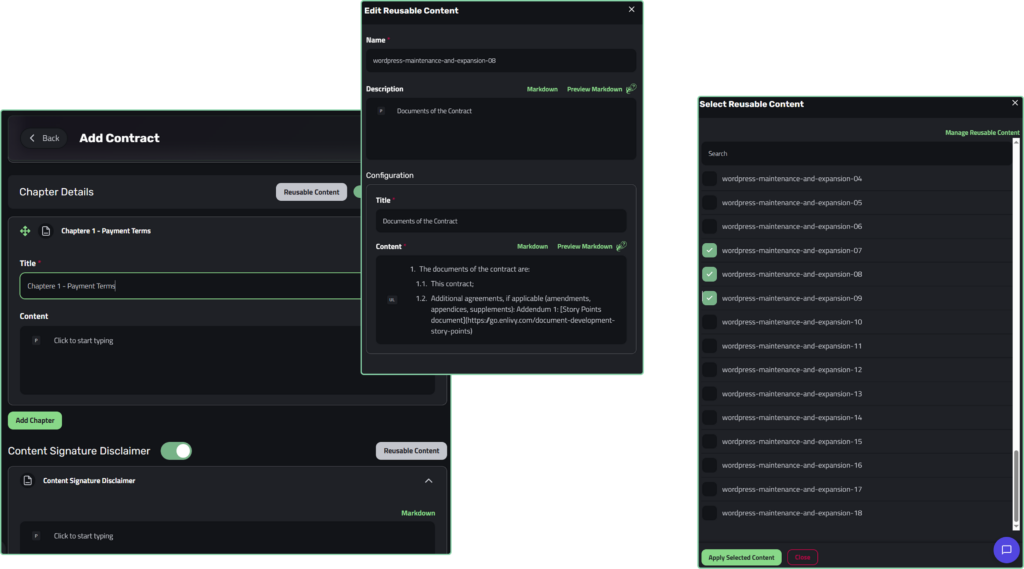
Write professional contracts directly in the platform using modular chapters, a Markdown editor, and reusable templates.
-
Choose from pre-designed templates for quick setup
-
Add multiple chapters with built-in content editor
-
Automatic contract numbering with custom prefixes
-
Set signature requirements for all parties
-
Track contract status from draft to fully signed
-
Add introduction, chapters, and signature disclaimers
-
Generate professional PDFs automatically
Import existing documents
Bring contracts created outside Enlivy into the system for centralized tracking, signing, and storage.
-
Upload PDFs or documents from any source
-
Set direction: sent by you or received from others
-
Link amendments and supplements to parent contracts
-
Assign sender and receiver users from your team or 3rd party
-
Track signature status and completion
-
Store all contract metadata in one place
-
Search and retrieve documents instantly
Build once, reuse everywhere
Most contracts share structural patterns: payment terms, confidentiality clauses, IP rights. Create each section once and assemble new contracts in minutes, not hours.
Signed in hours, not days
The signature system is built around a simple principle: maximum security through identity verification, maximum speed through automation. Not a tradeoff, both.
Configure signing rules
Before sending, choose who needs to sign and what identity verification level is required for each signer: email verification, phone (SMS), or both combined. Pick the level based on the contract’s sensitivity.
Email Verification
A unique 6-digit code is sent to the signer’s registered email. Expires in 10 minutes. Good for standard and internal agreements.
Phone Verification
A 6-digit code is sent via SMS to the signer’s registered phone number. Adds a physical device factor for higher-security requirements.
Combined Verification
Signer must verify via email first, then via phone. Both must pass before the contract is accessible. Use for high-value or legally sensitive agreements.
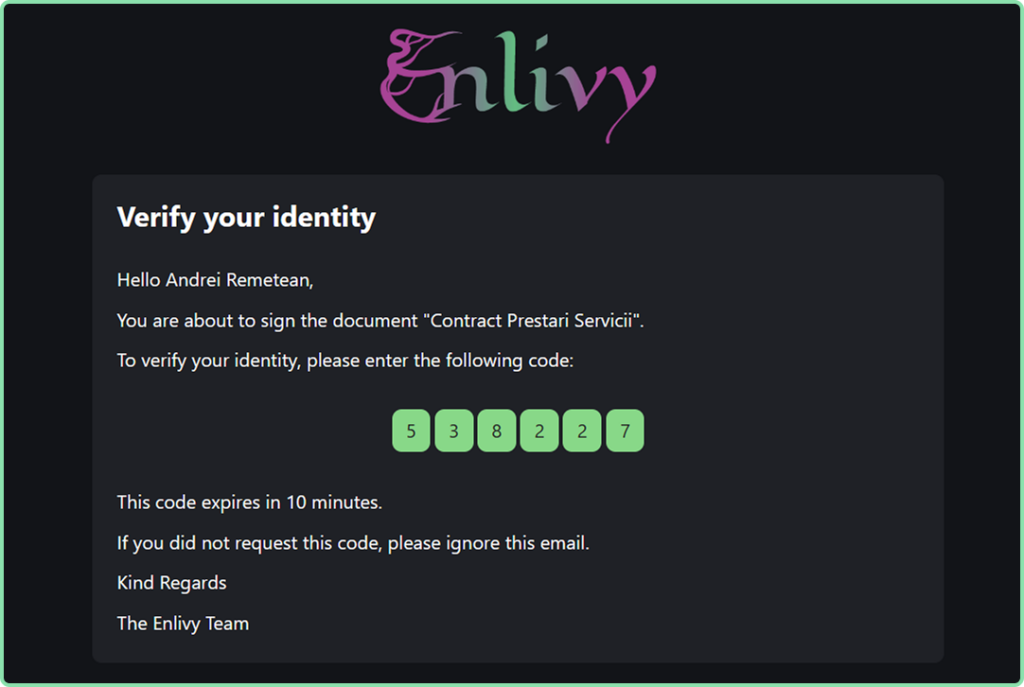
Signers receive their link
Each signer gets a personalized email with an individual signing link. No Enlivy account needed. No software to install. Signers click, verify their identity using the configured method, and proceed.
Read, then sign
After verifying identity, the signer reads the full contract. A reading progress bar is displayed at the bottom of the screen; the Sign button only activates once the contract has been fully read. The signer then draws their signature and checks the box: “I understand this is a legally binding agreement.” Only when both conditions are met does Sign Contract become active.
Signed copy delivered automatically
Once signed, the signer immediately receives an email with the signed document. Once all parties have signed, everyone receives the final version with all signatures included. The contract status and final document are automatically updated in Enlivy, no manual filing required.
Everything You Need to Stay Organized
Stay on top of every contract, signature, and renewal with ease.
-
Centralized Dashboard
View all contracts in one table with filtering by direction, status, category, dates, and parties. Never lose track of important agreements.
-
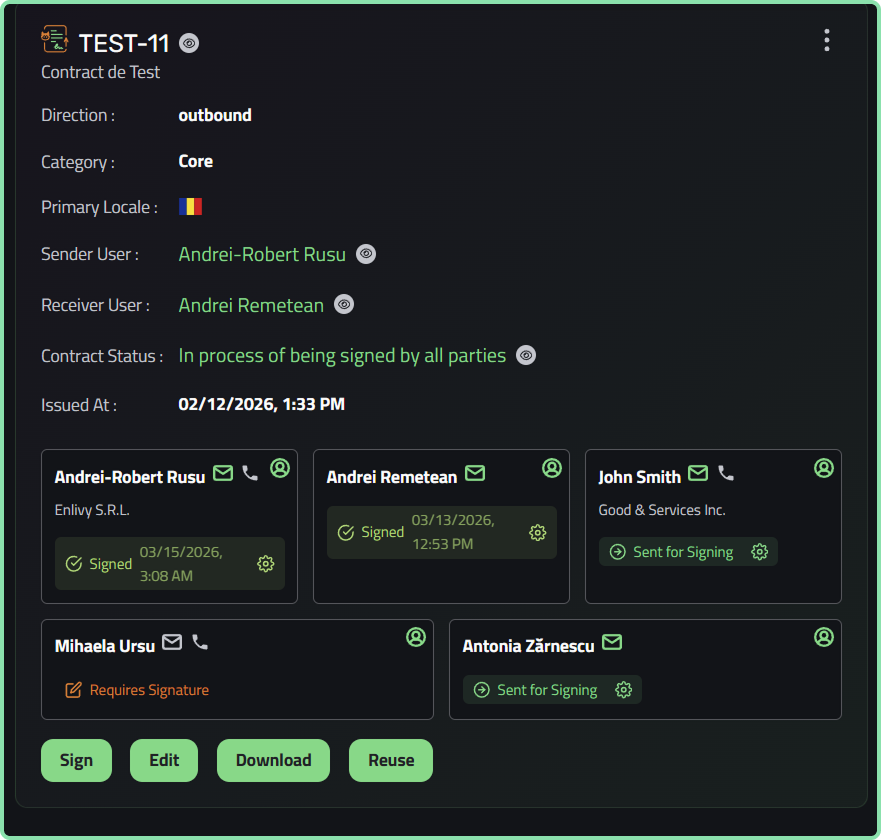
Signature Tracking
Mark which parties need to sign, track signature status, and see at a glance which contracts are awaiting signatures.
-
Contract Relationships
Link amendments, supplements, and addenda to parent contracts. Maintain clear chains of related documents for complete context.
-
Important Dates
Track issue dates, end dates, renewal dates, and signing dates. Never miss a critical deadline or renewal opportunity.
-
Party Management
Automatically populate party details from user profiles. Ensure accurate information appears on every contract.
-
Smart Organization
Categorize contracts as core, amendments, supplements, or addenda. Download, reuse, edit, or delete with simple actions.
Get Started in Minutes
Everything you need to organize contracts, all in one quick flow.
-
1
Access Contracts Dashboard
Navigate to Contracts from your left menu. You’ll see all existing contracts in a clean, organized table view.

-
2
Choose Your Method
Click “Add Contract +” and select either Create Using Enlivy for new contracts, or Upload External for documents created outside the platform.

-
3
Fill in Details
Enter contract information, select parties, set dates, and add content using our intuitive tabs: Information, Parties, General, Content Introduction, and Chapter Details.

-
4
Track and Manage
Once added, your contract appears in the dashboard. Monitor signature status, track deadlines, edit details, or reuse as templates for future contracts.

Stop Juggling Tools. Use One System.
| Feature | Enlivy Contracts | Traditional Methods |
| Contract Creation | ✔️ Built-in editor with templates | ❌ Separate word processor needed |
| Document Storage | ✔️ Centralized dashboard with search | ❌ Scattered across email and drives |
| Signature Tracking | ✔️ Automatic status updates per party | ❌ Manual follow-ups via email |
| Version Control | ✔️ Clear parent-child relationships | ❌ File names like “final_v3_FINAL” |
| Renewal Reminders | ✔️ Built-in date tracking | ❌ Calendar entries or nothing |
| Party Information | ✔️ Auto-populated from user profiles | ❌ Manually typed each time |
| Search & Filter | ✔️ Filter by status, date, party, category | ❌ Search file names and hope |
| Audit Trail | ✔️ Complete history in one place | ❌ Pieced together from emails |
Work Seamlessly With Your Enlivy Workspace
Contracts doesn’t exist in isolation. It connects with other Enlivy features to create a complete business management system.
-
Users
Assign contracts to team members as senders or receivers. User profiles automatically populate party details, ensuring accurate information on every contract.
-
Playbooks
Create standardized contract workflows and procedures. Define your contract approval process, required fields, and review steps for consistency.
-
Invoices
Link contracts to invoices for complete financial tracking. Reference contract terms when billing clients and maintain clear payment histories.
-
Files
Store contract documents in Enlivy Files first, then link them when uploading external contracts. All your documents stay organized in one central repository.
Ready to Take Control of Your Contracts?
Join teams who’ve simplified their contract management with Enlivy.